

MCP Server
Prepare for a meeting
Get a brief on the person you're about to meet from your Dex notes, reminders, calendar and recent emails, through your AI assistant.
What you need
- The Dex Professional plan, with Dex connected to your assistant. See MCP Server for setup.
- For the calendar and inbox steps: a Google or Microsoft account connected in Dex under Settings → Sync & Import/Export.
Steps
Ask who you are meeting
Dex reads every connected calendar and returns the events with their attendees.
Who am I meeting tomorrow?
Ask for a brief on one person
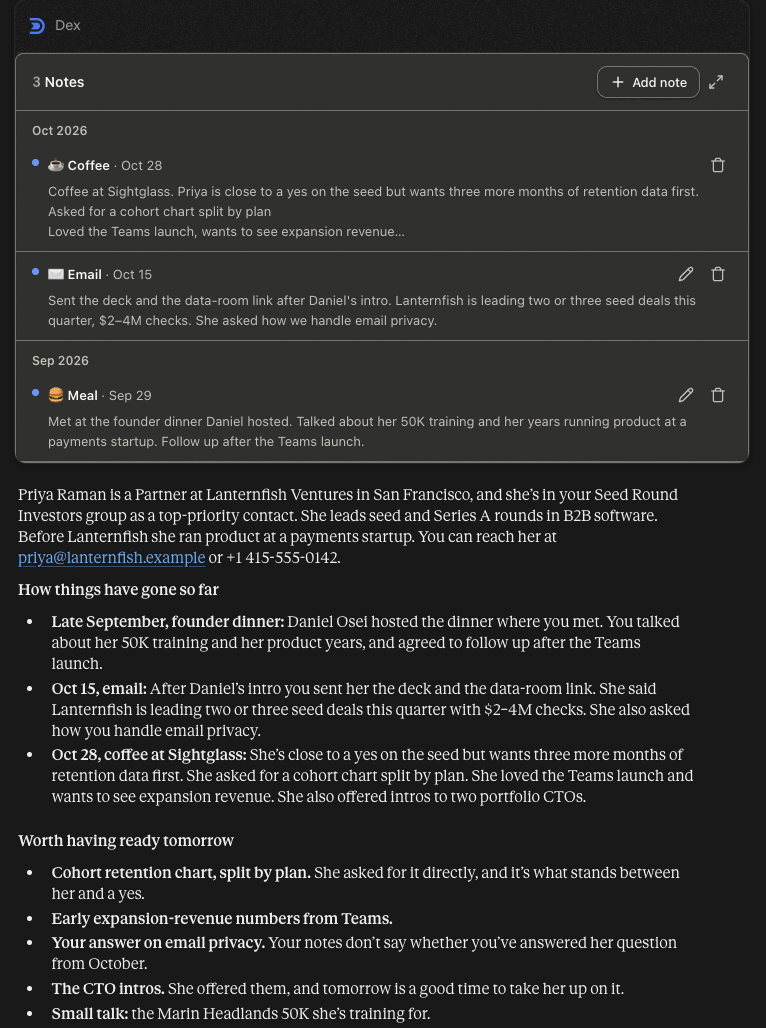
The assistant opens their contact, lists your notes with them and writes a brief from those notes.
I'm meeting Priya Raman tomorrow. Pull up her contact and recent notes so I'm ready.
Check what is still open between you
Do I have any open reminders for Priya, and what was our last email thread about?
Save your prep on their timeline
The note is there for you after the meeting.
Add a note on Priya: goals for tomorrow are the Q4 retention numbers and the cohort chart.
What you'll see
In Claude and ChatGPT, Dex answers with a contact card, your notes grouped by month and the written brief. Other MCP clients show the same information as text. The saved note comes back as a confirmation card with a link to it in Dex.
Good to know
- Email results are metadata only: sender, participants, subject, snippet, date and a link to the message. Full message bodies are never returned.
- Without a date range, email search covers roughly the last six months.
- The assistant can only use what is in Dex and your connected accounts, so a contact with no notes gets a thin brief.
- In ChatGPT, type @Dex before your request.
- Prefer an email? Pre-Meeting Brief emails arrive about 10 minutes before meetings with two to four attendees.
Tools used: dex_list_calendar_events, dex_search_contacts, dex_get_contact, dex_list_notes, dex_list_reminders, dex_search_emails, dex_create_note