

Pre Meeting Brief Emails
Overview
A Pre‑Meeting Brief is an email from Dex sent shortly before an upcoming meeting. It's designed to reduce last‑minute scrambling by putting key details and relevant history in one place. The brief improves as Dex learns your working context—when you add notes, keep your contacts up to date, and connect your calendar, Dex has more relevant history to surface right before a meeting.
What you'll see in the email
Each Pre‑Meeting Brief email may include:
- Meeting details
- Meeting title
- Date/time
- Attendee count and attendee list
- Join link (when available)
- Link to open the event in Google Calendar
- Per‑attendee context (when available)
- Name and job title
- Links to Dex and LinkedIn
- Recent interactions (last ~30 days, when available)
- Recent email subjects
- Past meetings
- Dex notes you've saved
Dex includes what it can find; sections may be omitted if there isn't enough data. You'll get the most value when your contacts have accurate emails and you capture notes after conversations.
When Dex sends a Pre‑Meeting Brief
Dex sends the email about 10 minutes before an upcoming meeting—if the meeting and your account meet the requirements below.
Requirements (to receive Pre‑Meeting Brief emails)
To receive Pre‑Meeting Brief emails, you typically need:
- Google Account connected to Dex
- Calendar sync enabled
- Email notifications for Pre‑Meeting Brief turned on in Dex
- Save a few Dex notes after meetings or key emails
- A meeting with more than one attendee
- A small meeting size (Dex only supports meetings with up to 4 attendees total, including you)
- Attendees that Dex can match to your contacts (based on attendee email addresses)
Supported meeting details & join links
Dex attempts to include a join link when it can detect one from the calendar event (for example via conference data or common video meeting links). If Dex can't reliably detect a join link, the brief may include only the calendar event link.
For in‑person meetings, Dex may include the meeting location when it's useful.
How to enable or disable Pre‑Meeting Brief emails
You can control this in your notification settings.
Web app
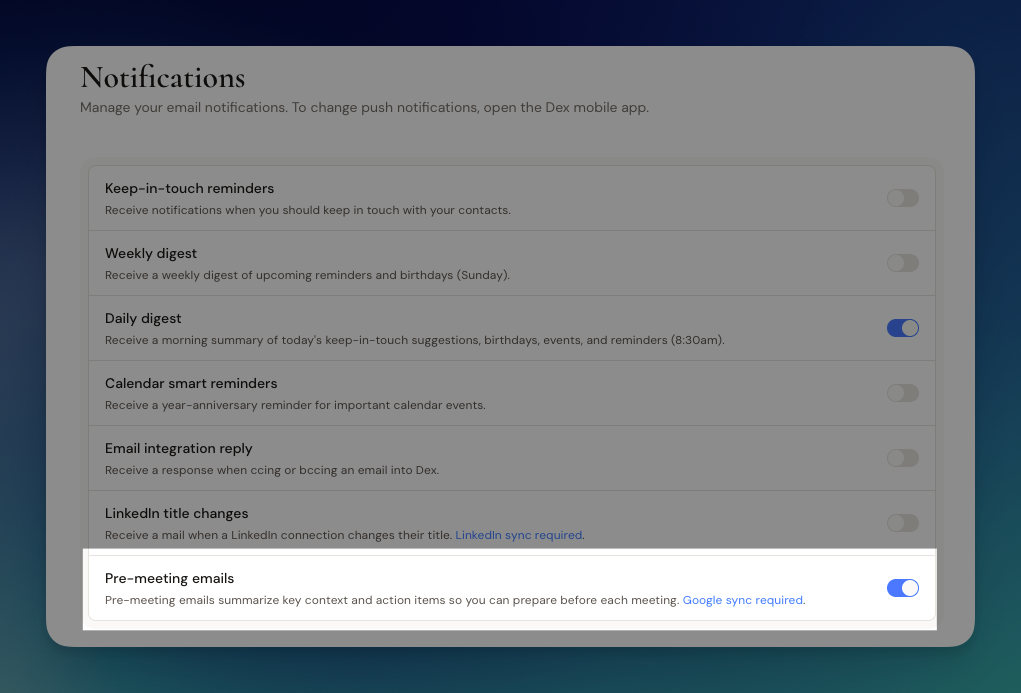
- Navigate to https://getdex.com/appv3/settings/notifications
- Turn on "Pre-Meeting Emails" setting.
Mobile app
- Open settings → click Notifications
- Turn on Pre-Meeting Brief setting.
If you don't see the option yet, it may be rolling out or gated by availability on your account.
Privacy and data handling
Pre‑Meeting Brief emails are sent only to you (your Dex account email address). Dex does not send your brief to meeting attendees.
To generate the brief, Dex may use:
- Your connected calendar event details
- Your recent interaction history associated with attendees (for example email metadata and your Dex notes)
Some parts of the brief may be generated suggestions based on available history. Always review and validate before acting.
Troubleshooting
If you're not receiving Pre‑Meeting Brief emails, check:
- Notification setting: Pre‑Meeting Brief email is enabled
- Calendar connection: Google Calendar is connected and calendar sync is enabled
- Timing: The meeting starts within ~10 minutes (briefs are generated close to start time)
- Meeting type: The meeting has 2–4 attendees total (including you)
- Attendee matching: Attendees have email addresses and those emails exist on contacts in Dex
- Delivery: Check spam/promotions folders and email rules
FAQ
Feedback & support
If something looks wrong (missing join link, wrong attendee context, irrelevant notes), share:
- The meeting title + approximate start time
- Which section was incorrect or missing
This helps Dex improve accuracy and coverage.
Need help?
If you run into any issues or have questions, we're here to help. Reach out to us anytime at [email protected]****.
Exporting your Contacts, Notes, and Network Updates
Exporting lives under Settings → Workflow → Import / Export, on the Export tab. There is no separate Export page in the sidebar.
Organize your Contacts
Dex has a lot of various tools to assist you in organizing your contacts efficiently. Click on each tab to find out more about the different features!