

Log a conversation
What you need
- The Dex Professional plan, with Dex connected to your assistant. See MCP Server for setup.
Steps
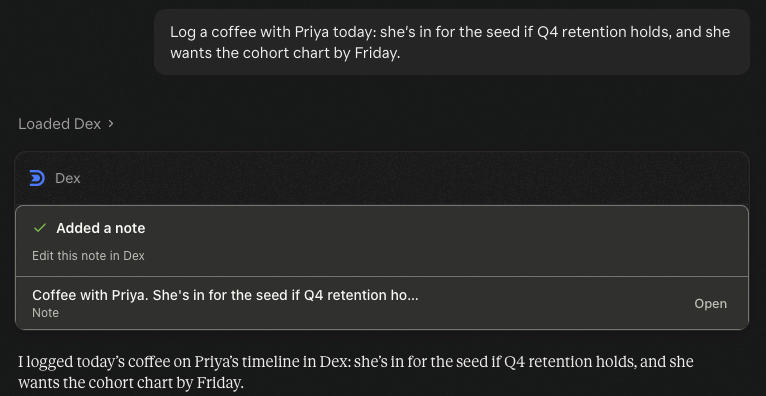
Log the conversation in plain words
Dex picks the note type that fits, such as Meeting, Call, Coffee or Note.
Log a coffee with Priya today: she's in for the seed if Q4 retention holds, and she wants the cohort chart by Friday.
Set the follow-up in the same chat
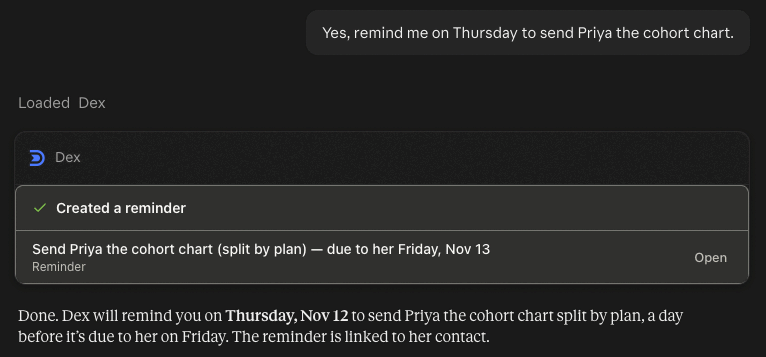
Remind me on Thursday to send Priya the cohort chart.
Met someone new? Create the contact and the note together
Add Jane Doe, VP Engineering at Acme Corp, and log that we met at the Health 2.0 meetup today.
Log one meeting on several people
The same note appears on each person's timeline.
Log a meeting today with Priya Raman and Marcus Thornbury: we agreed to share the Q4 numbers next week.
Mark their keep-in-touch done
If the person has a keep-in-touch cadence, mark it done so the next reminder is counted from today.
I just caught up with Priya. Mark her keep-in-touch as done.
What you'll see
Every change comes back as a confirmation card, such as "Added a note" or "Created a reminder", with the text and a link to open it in Dex.
Good to know
- A note is dated now unless you say otherwise. Say "yesterday" or give the date to backdate it.
- Reminders can repeat: weekly, biweekly, monthly, quarterly, biannually or yearly.
- In a Dex for Teams workspace, notes are shared with every member unless you ask for a private note.
- Chats on WhatsApp, iMessage, LinkedIn and Instagram can log themselves. See Conversation Memory.
Tools used: dex_search_contacts, dex_list_note_types, dex_create_note, dex_create_reminder, dex_create_contact, dex_complete_keep_in_touch
Prepare for a meeting
Get a brief on the person you're about to meet from your Dex notes, reminders, calendar and recent emails, through your AI assistant.
Find who to reconnect with
Ask your AI assistant who is due, who has gone quiet and who is waiting on you, answered from your Dex contacts and keep-in-touch settings.