

MCP Server
The Dex MCP Server lets you manage your personal CRM directly from any AI client that supports the Model Context Protocol. Search contacts, log interactions, set reminders, organize your network, and work with your connected calendar and email — all through natural conversation with your AI assistant.
Works with Claude Code, Claude Desktop, Claude.ai, Cursor, VS Code (Copilot), Gemini CLI, Zed, Codex, Goose, OpenCode, and any other MCP-capable client.
Automatic install
If you have Node.js installed, this single command auto-detects every supported AI client on your machine and configures it:
npx -y add-mcp "https://mcp.getdex.com/mcp" -y
Restart your client(s) afterwards. You'll be prompted to authenticate via browser on first use.
Manual setup
Pick your client below. The MCP server URL is https://mcp.getdex.com/mcp and the transport is Streamable HTTP (not SSE).
If your client uses a generic JSON config file, this is the snippet to drop in:
{
  "mcpServers": {
    "dex": {
      "type": "http",
      "url": "https://mcp.getdex.com/mcp"
    }
  }
}
Run:
claude mcp add --transport http dex https://mcp.getdex.com/mcp
Then run /mcp inside Claude Code to authenticate.
Make sure to use --transport http — the Dex MCP server uses Streamable HTTP, not SSE. Adding it as sse will cause tool calls to hang with 404s on the notification stream.
In Claude.ai (web) or Claude Desktop, add Dex as a custom connector — no JSON editing needed:
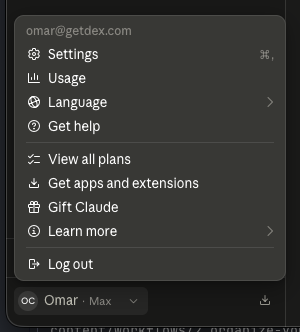
- Click your name in the bottom-left corner and choose Settings.
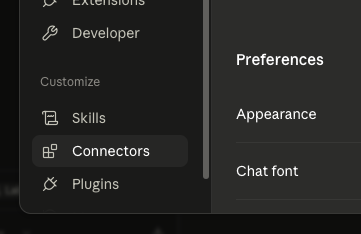
- In the sidebar, under Customize, select Connectors.
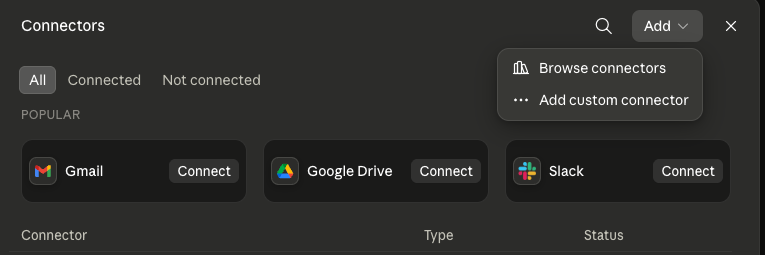
- Click Add in the top right, then Add custom connector.
- Enter Dex as the name and paste
https://mcp.getdex.com/mcpas the URL.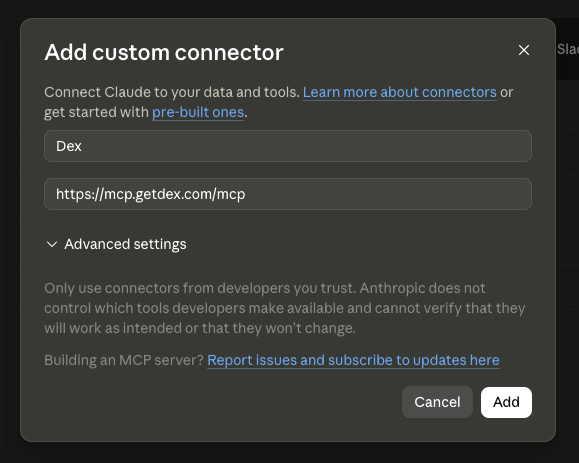
- Click Add and authenticate with your Dex credentials when prompted.
.cursor/mcp.json in your project root (or ~/.cursor/mcp.json for global configuration) and add the JSON snippet above. Cursor will pick it up on the next restart..vscode/mcp.json in your project root with the JSON snippet above, or configure the MCP server through VS Code settings.The fastest path is the published app: Dex ChatGPT App.
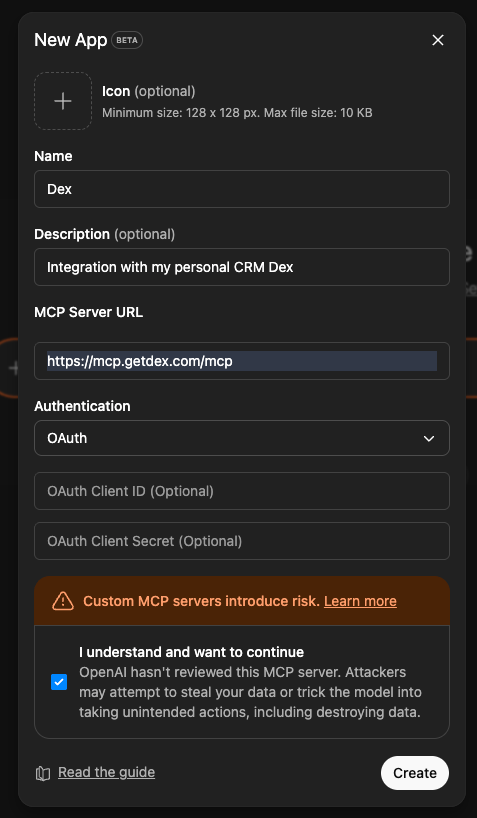
To wire it up manually:
- Open ChatGPT and go to Settings > Apps > Advanced Settings and enable developer mode.
- In the Apps section, click Create App.
- Set Name to
Dex, pastehttps://mcp.getdex.com/mcpas the MCP Server URL, keep Authentication set to OAuth. - Click Create, then authenticate with your Dex credentials when prompted.
Any MCP-capable client should accept the JSON snippet above (or its equivalent UI form). Use https://mcp.getdex.com/mcp as the server URL and Streamable HTTP as the transport.
If the client implements MCP OAuth, it opens a browser window for sign-in on first use. Some hosts only accept a URL plus a static header and never do — see Hosts without browser sign-in.
Available Tools
Once connected, your AI assistant gains access to the following tools for managing your Dex CRM:
Contacts
| Tool | Description |
|---|---|
dex_search_contacts | Search contacts by name, email, company, or any keyword |
dex_filter_contacts | Filter with the same structured conditions as Dex views |
dex_list_contacts | Paginate through contacts with lightweight summaries |
dex_get_contact | Get full contact details, optionally including notes/timeline |
dex_create_contact | Create one or more contacts (supports batch / CSV imports) |
dex_update_contact | Update contact fields, emails, and phone numbers |
dex_complete_keep_in_touch | Mark a keep-in-touch as done, or snooze it |
dex_archive_contacts | Archive or unarchive contacts — reversible, unlike deleting |
dex_delete_contacts | Bulk delete contacts (irreversible) |
dex_merge_contacts | Merge duplicate contacts into one |
dex_search_contacts handles keyword and geographic lookups ("who do I know in Berlin?"), while dex_filter_contacts answers structured questions ("contacts tagged investor at Google I talked to this year") using the same filters as Dex views — tags, groups, company, job title, LinkedIn, location, interaction dates, and custom fields. All conditions combine with AND.Notes & Timeline
| Tool | Description |
|---|---|
dex_list_notes | List notes across timelines, optionally filtered by contact |
dex_get_note | Get a single note by ID |
dex_list_note_types | List available note types (Meeting, Call, Coffee, Note, …) |
dex_create_note | Log a meeting, call, or interaction on a contact's timeline |
dex_update_note | Update an existing note |
dex_delete_note | Delete a note |
Reminders
| Tool | Description |
|---|---|
dex_list_reminders | List reminders and tasks, optionally by contact |
dex_get_reminder | Get a single reminder by ID |
dex_create_reminder | Create a follow-up reminder, optionally recurring |
dex_update_reminder | Update an existing reminder |
dex_delete_reminder | Delete a reminder |
Tags
| Tool | Description |
|---|---|
dex_list_tags | List all tags |
dex_get_tag | Get a single tag by ID |
dex_create_tag | Create a new tag |
dex_update_tag | Rename a tag |
dex_delete_tag | Delete a tag |
dex_add_tags_to_contacts | Apply tags to one or more contacts |
dex_remove_tags_from_contacts | Remove tags from contacts |
Groups
| Tool | Description |
|---|---|
dex_list_groups | List all contact groups |
dex_get_group | Get a single group by ID |
dex_create_group | Create a new group |
dex_update_group | Update a group |
dex_delete_group | Delete a group |
dex_list_group_contacts | Paginate contacts within a group |
dex_add_contacts_to_group | Add contacts to a group |
dex_remove_contacts_from_group | Remove contacts from a group |
Custom Fields
| Tool | Description |
|---|---|
dex_list_custom_fields | List all custom field definitions |
dex_create_custom_field | Define a new custom field |
dex_update_custom_field | Update a custom field definition |
dex_delete_custom_field | Delete a custom field definition |
dex_set_custom_field_values | Batch-update custom field values on contacts |
Calendar
| Tool | Description |
|---|---|
dex_list_calendar_events | List events across all connected calendars, with optional keyword search |
dex_get_calendar_event | Get one event with attendees, conferencing links, and recurrence |
dex_create_calendar_event | Create a timed or all-day event and invite attendees |
dex_update_calendar_event | Reschedule or edit an event |
dex_delete_calendar_event | Delete an event — cancels the meeting for attendees if you organize it |
Reads span every connected calendar. Writes target a single account: your primary one unless you name another.
| Tool | Description |
|---|---|
dex_search_emails | Search across all connected mailboxes by keyword, sender, or date |
Results are message metadata only — sender, participants, subject, snippet, date, and a link to open the message with your provider. Full message bodies are never returned. Without a date range, the search covers roughly the last six months.
What You Can Do
Here are some examples of what you can ask your AI assistant once connected:
Find Contacts
Log Interactions
Set Reminders
Prep for Meetings
Organize Network
Clean Up Duplicates
Manage Your Calendar
Search Your Inbox
For longer, multi-step jobs, the Dex skills library has ready-to-paste prompts for keeping in touch, importing contacts, meeting prep, research, cleanup and outreach. Copy one, fill in the bracketed details, and paste it into your connected assistant.
Authentication
The MCP server supports two authentication methods.
Browser OAuth (Default)
This is the path for clients that implement the MCP OAuth spec — Claude, ChatGPT, Cursor, VS Code, Windsurf and similar. On first connection, your AI client opens a browser window for you to log into your Dex account. The consent screen names the client that's connecting and whether it's requesting read or write access, and you approve or deny it explicitly. Credentials are cached for subsequent sessions.
API Key (Headless / CI)
For environments without a browser, use an API key:
Generate an API key
Go to Settings > Dex API & MCP and create a key. It starts with dex_.
Send the key as an Authorization header
The MCP server reads the key from the request's Authorization header:
Authorization: Bearer dex_your_key_here
In a client that uses a JSON config file, add it alongside the server URL:
{
  "mcpServers": {
    "dex": {
      "type": "http",
      "url": "https://mcp.getdex.com/mcp",
      "headers": {
        "Authorization": "Bearer dex_your_key_here"
      }
    }
  }
}
Clients name this field differently, so check your client's docs for how it passes custom headers.
DEX_API_KEY as an environment variable does nothing for the MCP server. Nothing in the MCP connection reads it. The key has to travel in the Authorization header on the request.Hosts without browser sign-in
Some hosts configure an MCP server with nothing but a URL and a static Authorization header. Grok Bot's custom connector and xAI's remote-MCP tool are the common examples. They never follow the server's authentication challenge, so they never request a sign-in URL — no browser window appears, and the connector may report authentication_required with no link to click. That is a limit of the host, not your Dex account, and re-adding the connector will not change it.
| Surface | Browser sign-in? | Use |
|---|---|---|
| grok.com web custom connectors | Yes | Paste the MCP URL, sign in when prompted |
| Grok Bot | No | Dex Skill + CLI + device code (below) |
| Grok Build (CLI) | No | API key in the Authorization header |
| xAI API remote-MCP tool | No | API key in the tool's authorization field |
Grok Bot has its own sandbox, so it can install the Dex CLI and complete a device-code sign-in for you. Ask it:
Install this skill and authenticate using the remote machine code: https://github.com/getdex/agent-skills
It installs the CLI, requests a short code, and shows you the code plus a link. You approve it in your own browser, and Grok is connected — no key pasted into chat. See Dex Skill for the full flow.
The connector may keep showing as "unauthenticated" even when the key works, because that badge tracks a sign-in that never happened. The badge alone is cosmetic — but a 401 or 403 on an actual tool call is a real rejection, not a display quirk.
Data Model
The MCP server gives your AI assistant access to the full Dex contact graph:
Contact
├── Basic Info        — name, email, phone, company, job title, birthday
├── Social Profiles   — LinkedIn, Twitter/X, website
├── Description       — rich text notes about the person
├── Tags              — flat labels (e.g. "Investor", "College Friend")
├── Groups            — collections with emoji (e.g. "🏢 Acme Team")
├── Custom Fields     — user-defined (text, dropdown, date)
├── Notes / Timeline  — meetings, calls, coffees, general notes
├── Reminders         — follow-ups with optional recurrence
├── Keep in Touch     — cadence for staying in contact
└── Status            — starred, archived
Calendar events and emails are not stored in Dex. Those tools read live from the Google or Microsoft accounts you've connected under Settings → Sync & Integrations, so they only work once at least one account is linked.
Response Limits
Responses are capped at 25,000 characters. Use pagination with smaller page sizes for large result sets.
Troubleshooting
https://mcp.getdex.com/mcpThis usually means the server was added with the wrong transport. The Dex MCP server uses Streamable HTTP, not SSE. Remove and re-add it:
claude mcp remove dex
claude mcp add --transport http dex https://mcp.getdex.com/mcp
Run claude mcp list to confirm the entry shows http (not sse).
First check whether your client supports MCP sign-in at all. Hosts that only accept a server URL plus a static header — Grok Bot's custom connector and xAI's remote-MCP tool among them — never open a browser and will report authentication_required with no link. Re-adding the connector won't help.
On Grok Bot, use the Dex Skill instead: it installs on Grok's own machine and signs you in with a short code. On hosts with no shell, use an API key in the Authorization header. See Hosts without browser sign-in.
If your client does support sign-in and the window still doesn't open, confirm the transport is Streamable HTTP and the URL is exactly https://mcp.getdex.com/mcp.
limit parameter. Responses exceeding 25,000 characters are automatically truncated.