Relationship Intelligence CRM vs Traditional CRM: What’s the Difference?
A traditional CRM is a database of deals that people update by hand. A relationship intelligence CRM captures email, calendar, and LinkedIn activity automatically and shows who on your team knows whom. Pipeline-driven sales teams need the first; relationship-driven teams need the second.


Most CRMs fail for the same boring reason: nobody updates them. A rep closes a call, means to log it, gets pulled into the next one, and the record stays empty. Six months later the CRM says nobody at your company has ever spoken to a client you've had for three years.
The relationship-first kind of CRM takes a different approach. Instead of waiting for people to type, it reads the activity that already happens in email, calendar, and LinkedIn, and builds the picture itself. This post explains how the two kinds of CRM differ, which one fits your team, and when it makes sense to run both.
Fast facts:
A traditional CRM is organized around deals and depends on manual data entry. A relationship intelligence CRM is organized around people and captures data automatically.
The key question it answers is "who on our team knows this person, and how well?"
Sales teams with stages and forecasts still need a traditional CRM. Teams whose work runs on introductions, hiring, fundraising, or partnerships often don't.
Many teams run both: a pipeline tool for deals and a relationship tool for the network.
What is a traditional CRM?
A traditional CRM (customer relationship management system) is a database for tracking customers and deals. Salesforce, HubSpot, Pipedrive, and Zoho are the familiar names. The core objects are contacts, companies, and deals, and the core view is a pipeline: lead, qualified, proposal, closed.
It's built for managers as much as for reps. Forecasts, conversion rates, and activity reports all depend on people entering accurate data. That's the weak point. The more a CRM depends on manual entry, the more its data drifts from what actually happened.
What is a relationship intelligence CRM?
A relationship intelligence CRM is a CRM built on automatic data capture and connection mapping. It connects to each person's email, calendar, and often LinkedIn, logs interactions without anyone typing, matches people across sources, and shows how strong each relationship is.
The core view isn't a pipeline. It's a person: every interaction anyone on your team has had with them, who knows them best, and when someone last reached out. If you want the full background on the concept, start with our explainer on what relationship intelligence is.
7 differences side by side
| Traditional CRM | Relationship intelligence CRM |
|---|---|---|
Organized around | Deals and pipeline stages | People and connections |
How data gets in | Mostly typed in by users | Captured from email, calendar, LinkedIn |
Main question | Where is this deal? | Who knows this person, and how well? |
Key metric | Pipeline value, win rate | Relationship strength, recency |
Built for | Sales teams and managers | Anyone whose work runs on relationships |
Team view | Record owner per account | Everyone's connections to a contact |
Typical small-team cost | Free to about $100 per seat per month | About $20 to $80 per seat per month; dealmaking tools cost more |
1. Data entry
This is the biggest difference. A traditional CRM is only as good as what people type into it. The relationship-first kind fills itself from activity that's already happening, so the record stays current even when nobody remembers to update it.
2. Who knows whom
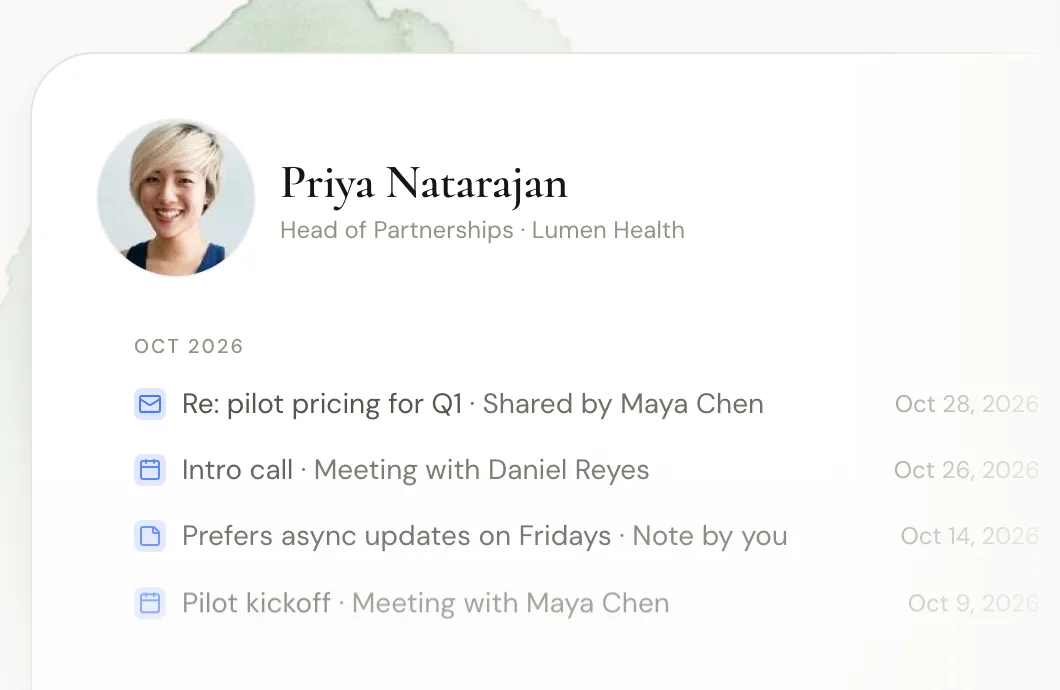
A traditional CRM usually assigns each account to one owner. If someone else on the team knows the buyer's boss from a previous job, the CRM has no idea. A relationship-first CRM merges every teammate's connections, so a search for a company shows every path in.
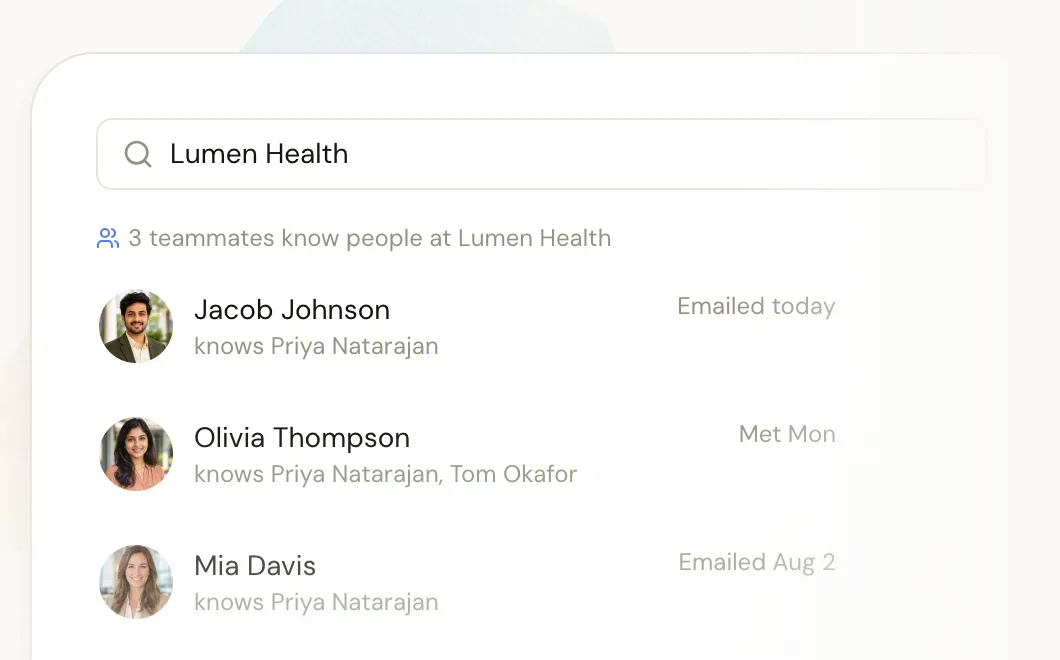
3. What it measures
Traditional CRMs measure deals: value, stage, probability. Relationship-first tools measure relationships: how often you talk, how recently, and whether it goes both ways. That's useful for spotting a key relationship that's going cold before it's too late.
4. Warm introductions
The output of this kind of CRM is often a warm introduction. Research supports why that matters. A 2022 study of 20 million LinkedIn users, published in Science, found that moderately weak ties (people you know, but not well) drove the most job mobility. Those are exactly the connections a traditional CRM never records.
5. Who uses it
Traditional CRMs are sales software. Relationship-first CRMs work for anyone who manages a network: investors, recruiters, founders raising money, agencies, foundations, and business development teams.
6. Privacy
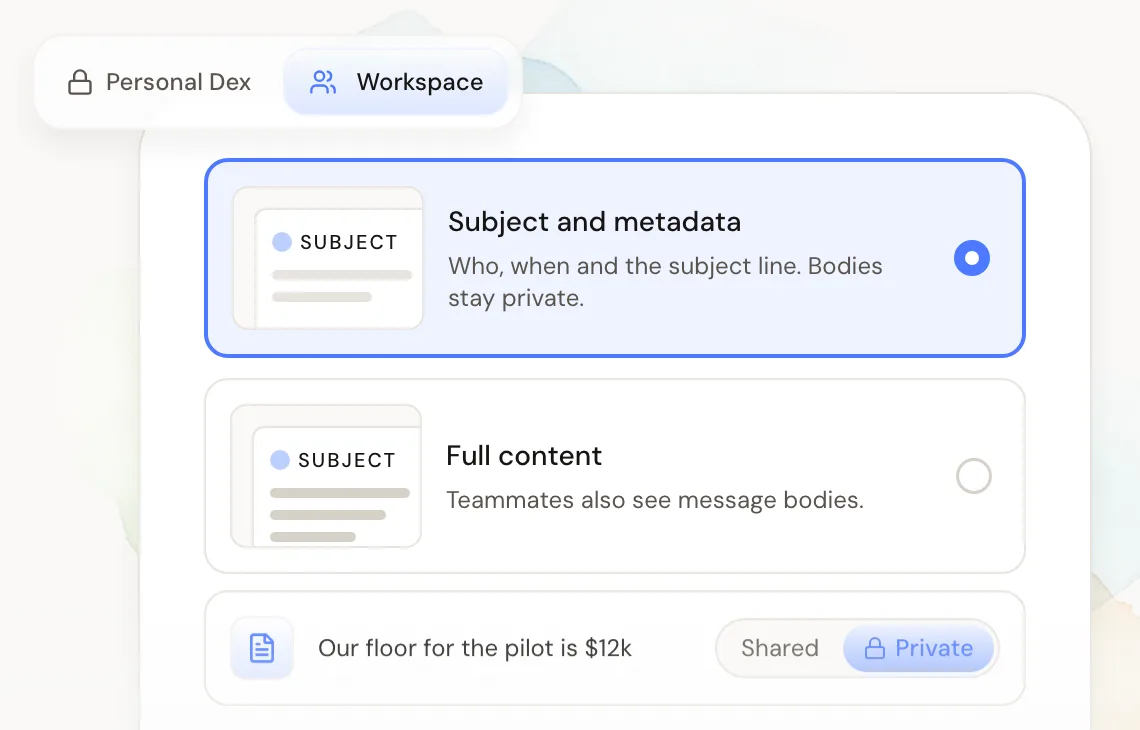
Because relationship intelligence reads inboxes, privacy matters more. The better tools let each person choose what the team sees. In Dex for Teams, each member picks whether the shared workspace sees only email subject lines and metadata, or full content, and notes can stay private.
7. Setup
A traditional CRM needs fields, stages, and rules before it's useful. A relationship-first tool is useful the day people connect their accounts, because the history is already in their email.
Which one does your team need?
Use this test. Count how many of these describe your team.
You need a traditional CRM if... | You need a relationship intelligence CRM if... |
|---|---|
You sell to many leads you haven't met | Most of your wins come through people you or a teammate know |
You forecast revenue by pipeline stage | You ask "does anyone know someone at...?" every week |
A manager reviews activity reports | Relationships go cold when someone leaves or gets busy |
You run sequences and outbound campaigns | You raise money, hire, or build partnerships through intros |
If you mostly ticked the left column, stay with a traditional CRM, and consider tools that add relationship features on top. If you ticked the right, a relationship-first CRM will do more for you than a pipeline ever will. Our roundup of relationship intelligence platforms for small teams compares the options.
Can you run both?
Yes, and many teams do. A sales team might keep HubSpot or Pipedrive for deals while partners and leadership use a relationship tool to find intros into target accounts. Dex's own Teams FAQ says teams that still need deal stages can run both, and the Team plan includes CRM integrations.
The risk of running both is duplicate data and two places to check. Keep a clear rule: deals live in the sales CRM, and people and relationships live in the relationship tool.
Signs your traditional CRM isn't working
A traditional CRM can be the right tool and still fail a team that doesn't fit it. These are the patterns we hear most from small teams before they switch.
Half the records are empty. People log the deals that matter to their quota and skip everything else. Investor updates, partner calls, and coffee meetings never make it in.
Nobody trusts the "last contacted" date. If the CRM says you haven't spoken to a client in eight months and you had lunch with them last week, people stop checking it.
Intros still happen on Slack. If "does anyone know someone at...?" is still a weekly message, the CRM isn't answering the question your team actually asks.
Relationships leave with people. When a teammate moves on, their history with key contacts goes with them, because it lived in their inbox and not the CRM.
You pay for features you don't use. Forecasting, territories, and sequences cost money. A team that doesn't sell through a pipeline is paying for someone else's workflow.
If three or more of those sound familiar, the issue probably isn't discipline. It's that a deal database is the wrong shape for your work.
How to switch without losing history
Moving to a relationship-first tool is easier than most CRM migrations, because most of the history is already in your email and calendar.
Start with two or three people. Have them connect email, calendar, and LinkedIn, and check that the shared view matches what they know to be true.
Import what isn't in email. Export contacts and notes from your old CRM as a CSV and bring them in, so typed notes from past calls aren't lost.
Agree on privacy settings up front. Decide as a team whether the shared view shows subject lines only or full content. People connect their accounts faster when they know the answer.
Pick owners for key relationships. Assign one person to each important contact and set a reminder cadence, so nobody assumes someone else has it.
Decide what stays in the old system. If you still forecast deals, keep the pipeline where it is and stop duplicating contact work there.
Most small teams get a usable shared view within a day, because the software backfills months of activity as soon as accounts connect. That speed is a big part of why a relationship intelligence platform works well as a CRM for small teams that never had time to keep a traditional one up to date.
Where Dex fits
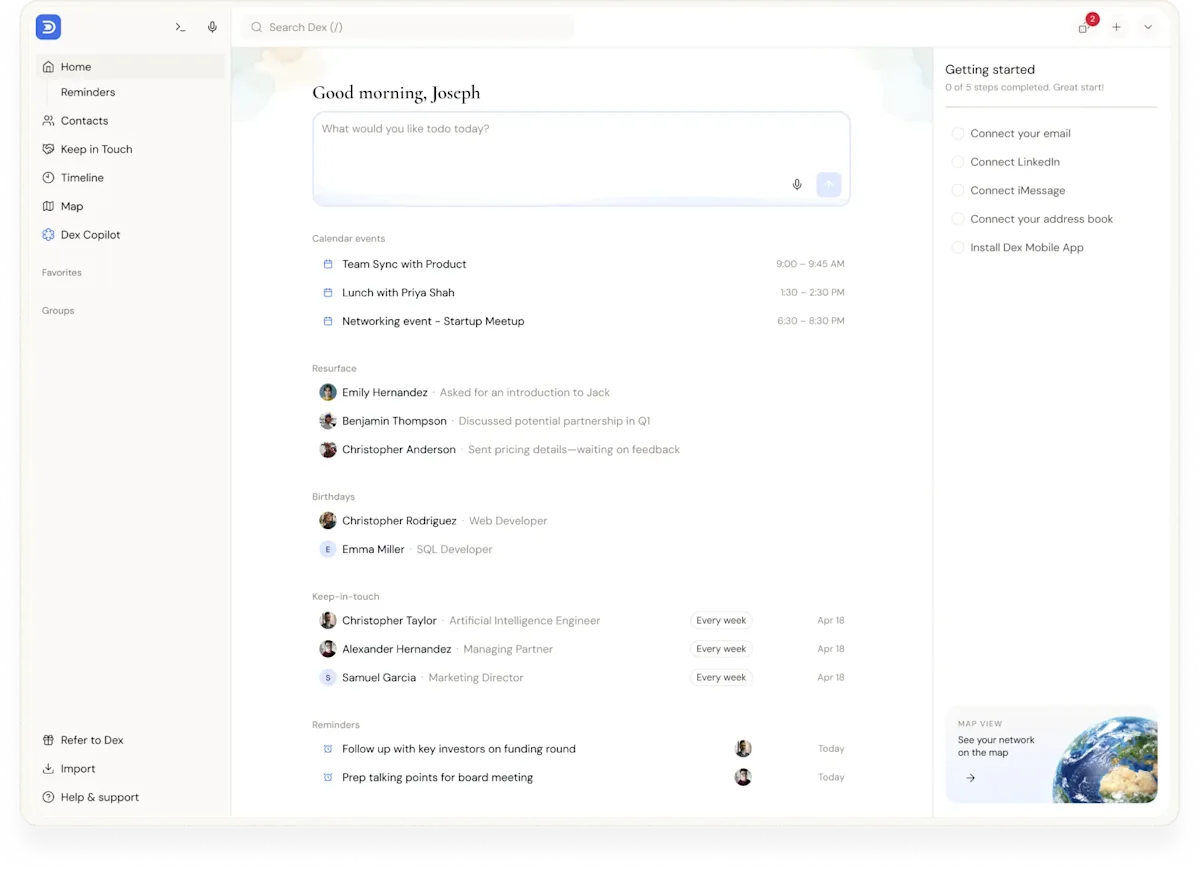
Dex is a relationship intelligence CRM built for individuals and small teams. Each person keeps a private Dex that syncs email, calendar, LinkedIn, and messaging apps, with keep-in-touch reminders so important relationships don't fade. Dex for Teams adds a shared workspace on top, with who-knows-whom search, one shared timeline per contact, and per-person privacy controls. Teams can also query the shared network from AI assistants through the Dex MCP server.
Dex for Teams costs $40 per user per month. It doesn't do pipelines, forecasts, or sequences. If those are central to your work, pair it with a sales CRM or pick a tool like folk or Attio that does both. Our list of the best relationship intelligence software covers those options.
Who this isn't for
If your team runs a high-volume sales motion with SDRs, sequences, and quota, a relationship-focused tool won't replace your sales stack. It can add to it, but your system of record should stay a traditional CRM. And if you're a solo professional, you may just need a personal CRM rather than a team tool.
FAQ
What is a relationship intelligence CRM?
A CRM that captures interactions automatically from email, calendar, and LinkedIn, and maps who on your team knows whom and how well. It's organized around people instead of deals.
How is it different from a traditional CRM?
A traditional CRM tracks deals in a pipeline and depends on people typing in data. A relationship-first CRM fills itself from activity and focuses on connections and warm introductions.
Is HubSpot a relationship intelligence CRM?
HubSpot is a traditional, pipeline-first CRM that logs email and meetings, but it isn't built around mapping who on your team knows whom. Some teams add a relationship intelligence tool alongside it.
Do I need both kinds of CRM?
Only if you have both jobs. Sales teams that forecast pipeline need a traditional CRM. Teams that win through relationships may only need the relationship-first kind. Mixed teams often run both.
Is a relationship intelligence CRM good for small teams?
Yes. Small teams often get the most out of one, because they don't have the time for manual CRM entry and each shared connection is a big share of their network.
What's the difference between a relationship CRM and a personal CRM?
A personal CRM manages one person's network. A team relationship CRM merges several people's networks and adds shared history and who-knows-whom search. Dex does both.
The bottom line
The difference between a relationship intelligence CRM and a traditional CRM comes down to what each is built around. Traditional CRMs track deals and need people to type. Relationship intelligence CRMs track people, capture data on their own, show who on your team knows whom, and surface the warm introductions a pipeline can't see. Sales teams with forecasts still need a traditional CRM. Teams that win through their network, such as investors, recruiters, founders, and agencies, usually get more from the relationship-first kind, and plenty run both.
Want to see the connections hiding in your team's inboxes? Start your free Dex trial and set up a workspace for your team.
Related guides