How to Get Warm Introductions Through Your Team (With Templates)
A warm introduction is when someone who knows both people connects them, so the first message arrives with trust attached. Here's how to get warm introductions through your team in five steps, with five templates for the ask, the forwardable note, the double opt-in check, the intro, and the thank-you.


A cold email to a busy executive usually gets nothing back. The same request, forwarded by someone they've worked with, often gets a reply the same day. Nothing about the request changed. Someone they trust vouched for it.
That's why warm introductions are worth the effort, and why most teams leave them on the table. Somebody on your team probably knows the person you want to reach. The hard part is finding that person, asking in a way that's easy to say yes to, and not burning the relationship in the process.
This guide covers how to get warm introductions through your team, step by step, with five templates you can copy for the ask, the forwardable note, and the intro itself.
Fast facts:
A warm introduction is when someone who knows both people connects them, so the first message arrives with trust already attached.
Research on hiring backs this up: referred candidates are more likely to be hired and tend to stay longer.
The best intros are double opt-in. The connector checks with the other person before making the introduction.
Make the ask easy with a short forwardable note your teammate can send as is.
Always close the loop. Tell your connector how it went, even when nothing came of it.
What is a warm introduction?
A warm introduction is a connection made by someone who knows both people. Instead of you writing to a stranger, a mutual contact writes to them on your behalf, explains who you are and why the two of you should talk, and hands off the conversation.
It's different from name-dropping ("Sam said I should reach out"), which puts all the work on you and none of the trust on Sam. In a real warm introduction, the connector puts their own name on the line.
The most respectful version is the double opt-in intro. The connector asks the other person first ("would you be open to meeting someone from my team?") and only connects you if they say yes. It takes an extra day, but nobody gets ambushed, and the person you meet has already agreed to talk.
Why warm introductions work
The reason is simple: trust moves through people. When someone you respect recommends a person, you give them the benefit of the doubt you'd never give a cold email.
There's good evidence for this from hiring, where referrals are tracked closely. A Federal Reserve Bank of New York study of one company's employee referral system found that referred candidates were more likely to be hired, started with a wage advantage, and stayed with the company longer. Field experiments by Harvard economist Amanda Pallais and a co-author found the same pattern in an online labor market: referred workers were more likely to be hired, all else equal.
The same logic applies to sales, fundraising, and partnerships. A warm introduction carries information the cold email can't: someone who knows both sides thinks this is worth a conversation.
How to get warm introductions through your team
Most teams that try this lose steam because every intro feels like a favor that has to be negotiated from scratch. These five steps make it routine.
1. Find the path
Before you ask anyone, find out who on your team actually knows the person or company. Search your team's shared contacts, LinkedIn, and email history, or check your map if you've built one. Our guide to mapping who knows who on your team walks through how to build one in an afternoon.
2. Pick the right connector
If more than one teammate knows the person, pick the one with the strongest and most recent relationship, not the most senior one. A colleague who worked with them last year beats a founder who met them once at a conference.
Check the context too. If the connector has an open deal, a tense history, or a favor already pending with that person, pick someone else or wait.
3. Make the ask easy
Send your teammate a short note that answers three things: who you want to meet, why now, and what you're asking for. Attach a forwardable email they can send without editing. The less work the connector has to do, the faster the intro happens.
4. Let the connector check first
Ask your teammate to check with the other person before making the introduction. This is the double opt-in step. If the answer is no or not now, you've lost nothing and the connector's relationship is intact.
5. Follow up fast and close the loop
When the intro lands, reply within a day and move your teammate to BCC so their inbox doesn't fill up. After the meeting, tell your connector how it went. People make more introductions for colleagues who report back.
Mistakes that burn warm introductions
Most intros fail for avoidable reasons, and a bad intro costs the connector a little goodwill each time.
The most common one is asking without context. "Can you intro me to Priya?" forces your teammate to figure out why and write the email themselves. Send the forwardable note every time.
The next is skipping the opt-in. Dropping two strangers into a thread can feel pushy to the person on the receiving end. One quick check first avoids that.
Going to the same person over and over is another. If one teammate makes all your introductions, spread the asks around or build your own connections. Our guide to team relationship management covers how to give every key relationship more than one owner.
The last is forgetting the thank-you. It takes one message, and it's the difference between a teammate who makes the next intro happily and one who quietly stops.
5 warm introduction templates
Edit the brackets and keep the length. Short notes get forwarded. Long ones get "I'll do it later."
Template 1: Asking a teammate for an intro
Hey [Teammate], I saw you know [Name] at [Company]. We're trying to get in front of their [team] about [topic], and I think a quick intro from you would land much better than a cold email.
Would you be comfortable checking if they're open to a 20-minute call? I've put a short note below you can forward as is. No pressure if the timing's wrong.
Template 2: The forwardable note
Subject: Intro to [Your name] at [Your company]?
Hi [Name], a colleague of mine, [Your name], is working on [one-line description]. They'd love 20 minutes to hear how your team handles [topic] and share what they've seen at [similar companies].
Would you be open to an intro? Totally fine if not.
Template 3: The double opt-in check (for your teammate)
Hi [Name], quick question before I connect you with anyone: would you be open to meeting [Your name] from my team? They're working on [topic] and I think a conversation could be useful for both of you. Happy to skip it if you're busy.
Template 4: The introduction
Subject: [Name] <> [Your name]
[Name], meet [Your name], who works with me at [Company] on [area]. [Your name], [Name] runs [team] at [their company] and knows [topic] better than anyone I know.
I'll let you two take it from here.
Template 5: Closing the loop
Hey [Teammate], thanks again for the intro to [Name]. We talked on [day]. [One sentence on how it went and what's next]. I really appreciate you vouching for me.
Where Dex for Teams fits
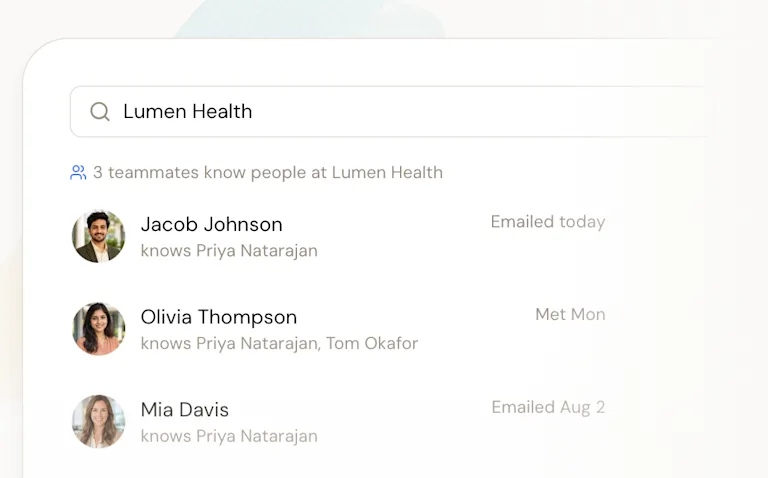
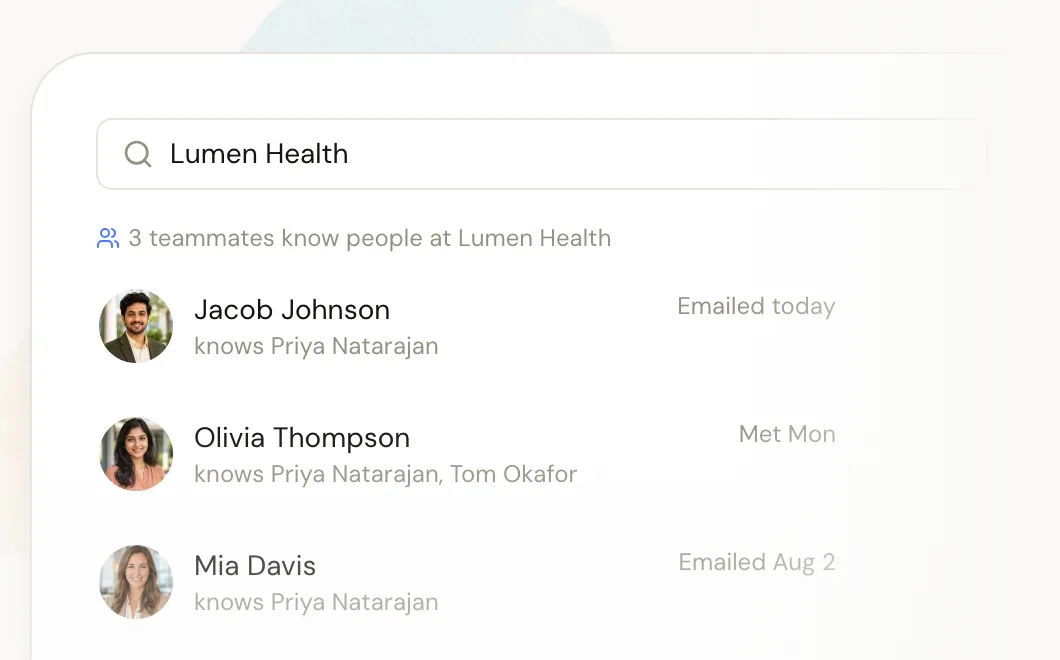
The hardest part of a warm introduction is usually step one: knowing who on your team has the connection. That's the part Dex for Teams is built for.
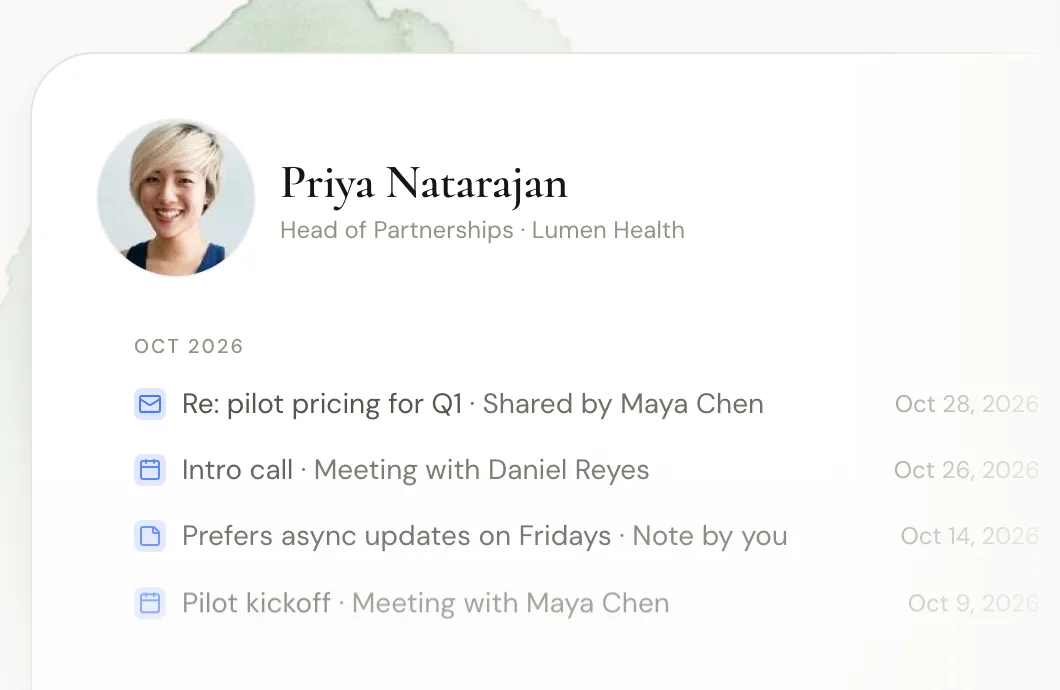
Each member connects their own accounts and chooses what the shared workspace sees. Search a person or company and Dex shows which teammates are connected, who spoke with them last, and the history so far. LinkedIn syncs for each member, and the shared network refreshes about every two days. Privacy is set per person, from subject lines and metadata only up to full content, and notes can stay private.
Dex finds the path, but it doesn't make the intro for you. You still ask your teammate in your own words, which is how it should be. If you want more on how these tools compare, see our roundup of relationship intelligence platforms for small teams.
There's a 14-day free trial with no card needed.
FAQ
What is a warm introduction?
A warm introduction is when a mutual contact connects two people who don't know each other yet, explaining why they should talk. It carries the connector's trust, so the first conversation starts warmer than a cold email.
How do you ask for a warm introduction?
Tell the connector who you want to meet, why now, and what you're asking for, and include a short forwardable email they can send without editing. Ask them to check with the other person first, and make it easy to say no.
What is a double opt-in introduction?
A double opt-in introduction is one where the connector asks both people before connecting them. It avoids surprising anyone and means both sides have agreed to the conversation before it starts.
Do warm introductions really work better than cold outreach?
Research on hiring suggests they do. A New York Fed study found referred candidates were more likely to be hired and stayed longer, and field experiments in an online labor market found referred workers were more likely to be hired.
How do you find warm introductions on a team?
Map which teammates know which outside people, using LinkedIn, email, calendar, and memory, or use a team tool that shows who knows whom from synced accounts. Then go through the teammate with the strongest, most recent connection.
The bottom line
Warm introductions work because trust moves through people. To get more of them through your team:
Find the path first, with a who-knows-who map or a shared tool.
Pick the teammate with the strongest, most recent connection.
Send a short forwardable note so the connector does almost nothing.
Use double opt-in, so nobody gets surprised.
Follow up within a day and always close the loop with a thank-you.
Copy the five templates above into a shared doc, and the next time someone on your team needs a door opened, the ask takes two minutes instead of twenty. Over a few months, those small asks add up to a habit: people check who knows who before they write a cold email, and your team's network starts doing real work.
Want to see which teammate knows the person you're trying to reach? Start your free Dex for Teams trial and find your team's warm paths today.
Related guides