Team Relationship Management: How to Keep Your Network From Walking Out the Door
Team relationship management means treating client and partner relationships as something the whole team holds: everyone can see who knows who, the history lives in one shared record, and every key relationship has a backup. Here are five habits to build it, plus a handoff checklist and email template for when someone leaves.


Your best account manager gives two weeks' notice. Her calendar is full of client lunches, her inbox holds four years of threads, and half your referral partners only have her cell number. On her last day, the laptop goes back to IT. The relationships don't go anywhere you can find them.
That's the problem team relationship management solves. Most companies treat relationships as something that belongs to individuals, then act surprised when those relationships leave with the individual. It happens more often than it feels like it should: US workers quit 3.4 million jobs in September 2026 alone, according to the Bureau of Labor Statistics.
This guide covers what team relationship management actually means, five habits that keep client relationships with the company instead of one inbox, and a handoff checklist (with an email template you can copy) for when someone does leave.
Fast facts:
Team relationship management means treating outside relationships as a shared asset: the team can see who knows who, the history lives in one place, and every key relationship has a backup.
Research on ad agencies and their clients found that when managers left, client relationships were more likely to end.
The biggest single fix is giving every important relationship a second person before anyone resigns.
When someone does leave, the notice period is the only window for warm handoffs. Use the first two days to plan them.
A sales CRM tracks deals. Team relationship management tracks people and connections, with or without a deal attached.
What is team relationship management?
Team relationship management is the practice of treating your company's professional relationships (clients, partners, investors, candidates, referral sources) as something the whole team holds, instead of something each person keeps in their own head and inbox.
In practice it comes down to three things:
The team can see who knows who, and how recently they talked.
The history of each relationship lives in one shared record, not in someone's sent folder.
Every important relationship has more than one person who could pick it up tomorrow.
It isn't the same as a sales CRM. A sales CRM tracks deals moving through stages. Team relationship management tracks people and the connections between them, whether or not there's a deal attached. A recruiter's best hiring manager contact, a foundation's longtime donor, a VC's favorite co-investor: none of those sit neatly in a pipeline, and all of them are worth protecting.
If you want the longer version of the idea, our guide to what relationship intelligence is covers how tools turn email and calendar data into a map of your team's network.
Why client relationships walk out the door
Turnover is normal. The damage depends on where your relationships live when it happens.
Relationships are personal by default. A client trusts a person, not a logo. Joseph Broschak's study of advertising agencies and their clients from 1986 to 1998, published in Administrative Science Quarterly, found that when managers left client firms, the agency relationships were more likely to dissolve. On the agency side, both exits and promotions were linked to more client relationships ending, depending on the manager's role.
Promotions count too. That second finding is easy to miss. You don't need a resignation to strand a relationship. Moving your best account lead into a management role can cool her old accounts just as fast if nobody else knows them.
The context lives in one inbox. Even when the person who stays is willing to take over, they usually start from zero. What did we promise last quarter? Who else at the client matters? Why did they almost leave in 2024? That history is in threads only one person can read.
Replacing the person is already expensive. Gallup estimates that replacing an employee costs one-half to two times their annual salary, and calls that conservative. That figure is about hiring and ramp-up. It doesn't count the client who quietly stops renewing because their contact is gone.
The good news is that most of this is preventable with habits, not headcount. Good team relationship management is mostly a handful of routines that keep relationships visible and shared before anyone gives notice.
5 ways to build team relationship management into your week
None of these need a big rollout. Pick the first two, run them for a month, then add the rest.
1. Map who knows who before you need it
Write down your 25 to 50 most important outside relationships. For each one, list every teammate with a real connection and roughly when they last talked.
Then look at the rows with only one name. Each of those relationships is one resignation away from going cold, and that list is your real risk register.
Doing this by hand once is eye-opening. Doing it every quarter by hand is not realistic, which is why tools that read email and calendar activity exist. Our checklist of team CRM features covers what to look for if you go that route.
2. Keep one shared history per relationship
When three people work the same client, each of them holds part of the story. Put it in one place: emails, meetings, and notes from everyone, in one timeline per person.
This does two jobs. Day to day, it stops duplicate check-ins and awkward "didn't you hear from my colleague?" moments. When someone leaves, it means the person taking over can read the last year of the relationship in ten minutes instead of guessing.
The bar is low. A shared record that's 80% complete beats a perfect one that lives in a single inbox.
3. Agree on privacy rules before anyone connects an inbox
This is the step teams skip, and it's why shared systems end up half empty. People won't share their email with a team tool if they don't know what colleagues can read.
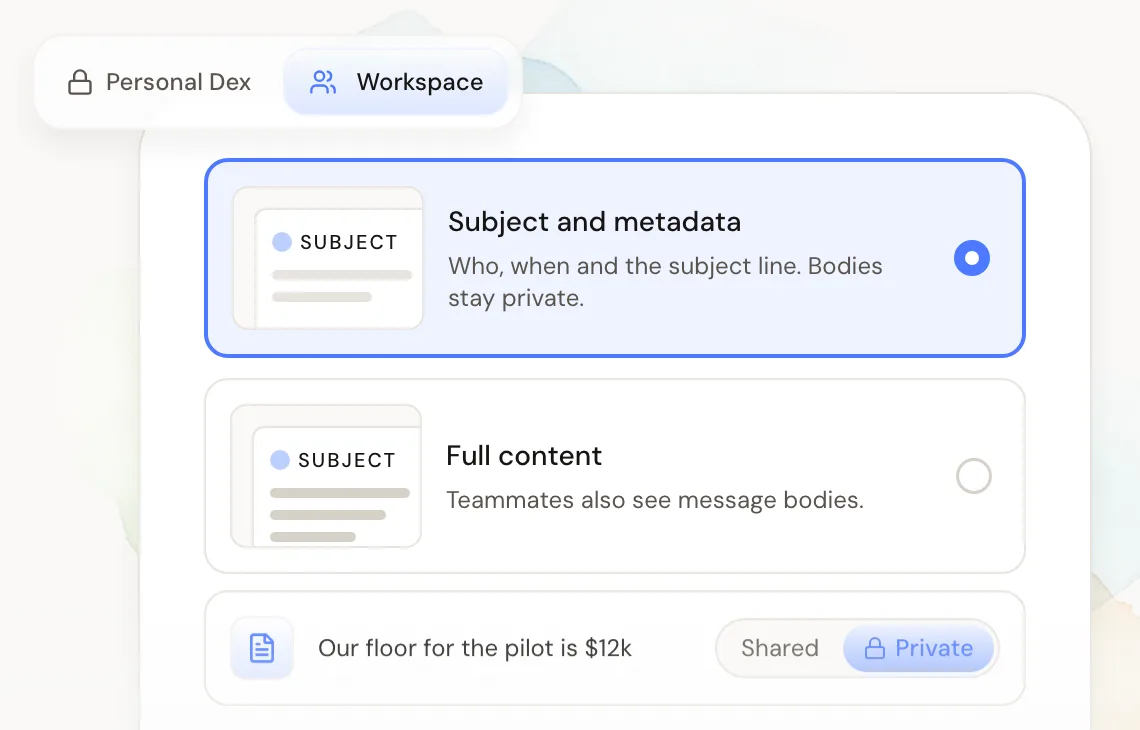
Settle it up front. A common split: the team sees who, when, and the subject line, while message bodies stay private unless someone chooses to share them. Personal contacts (family, friends, the dentist) stay out entirely. Write the rule down in one paragraph and share it with the team.
When people trust the rules, they connect their accounts. When they connect their accounts, your team relationship management actually has data to work with.
4. Give every key relationship a second person
This is the highest-leverage habit on the list. For each relationship on your map, name an owner and a backup.
The backup doesn't need to do much. They get cc'd on the occasional recap, join one call a quarter, and send a congratulations note when the client posts news. The goal is simple: if the owner leaves, the client already knows a second face and has a reason to reply to them.
Introduce the backup in a normal context, not as succession planning. "I've asked Priya to join our quarterly reviews, she's been running point on the reporting side" lands better than "in case I get hit by a bus."
5. Put follow-ups on a schedule, not on memory
Relationships rarely end with a fight. They end with a gap. Nobody checks in for eight months, and then the client has a new vendor and a new contact.
Set recurring reminders for your key relationships, every 30 or 90 days depending on how close they are, and give each one a named owner. A reminder that belongs to "the team" belongs to nobody. If you want ideas for what to actually say when the reminder fires, our list of habits that strengthen relationships is a good place to start.
How to hand off relationships when someone leaves
Even with all five habits in place, departures need a plan. The notice period matters more than anything else here, because it's the only window when the person leaving can still make warm introductions in their own voice.
Here's a checklist to run as soon as someone gives notice:
Pull their top relationships in the first two days. Sort by value to the business and by how recently they talked. Twenty is usually enough.
Assign a new owner to each. Start with the backup from habit 4. If there's no backup, pick the person who'll work with that client most.
Send handoff emails from the person leaving. A warm note from someone the client already trusts does more than a "your new point of contact" email from the company.
Book a joint call for the top ten. Twenty minutes with the departing owner, the new owner, and the client is the single best handoff you can do.
Get the context out of their head. Ask for a short note on each top relationship: open promises, sensitive history, who else matters at the client. Put it in the shared record.
Check what happens to their data. Don't assume a departing teammate's synced emails and notes stay behind. Find out how your tools handle a member leaving, and copy anything important into the shared record before their last day.
Follow up 30 days later. The new owner checks in once things have settled. This is where most handoffs quietly fail.
Here's a handoff email the departing person can adapt:
Subject: Introducing [New owner]
Hi [Name], some news I wanted you to hear from me directly: I'm leaving [Company] on [date].
[New owner] is taking over [what you work on together]. She's been on our last few calls, knows the background on [project], and I've walked her through everything we have open.
Could we find 20 minutes with the three of us before I go? [Day] or [day] would work on my side.
It's been a real pleasure working with you.
[Your name]
Keep it short and personal. The client should come away knowing two things: they heard it from you, and they're in good hands.
Where Dex for Teams fits
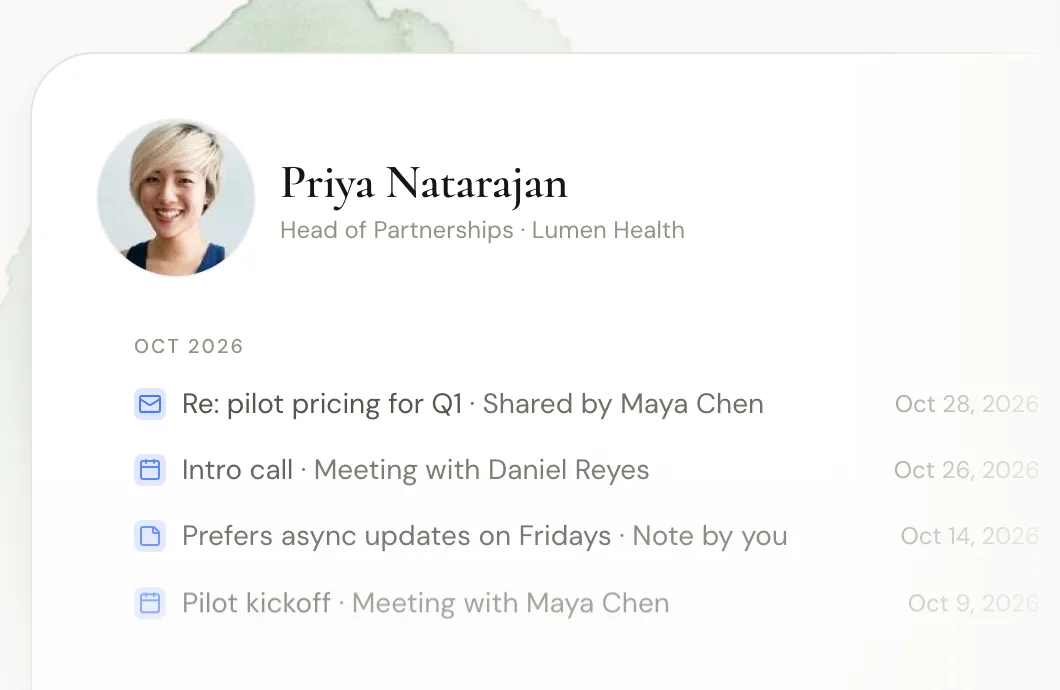
Dex started as a personal CRM, and Dex for Teams adds a shared workspace on top of it. Each person keeps their own private Dex. The workspace is a separate space, and each member chooses which accounts it sees and which contacts and groups go into it.
Here's how it maps to the habits above:
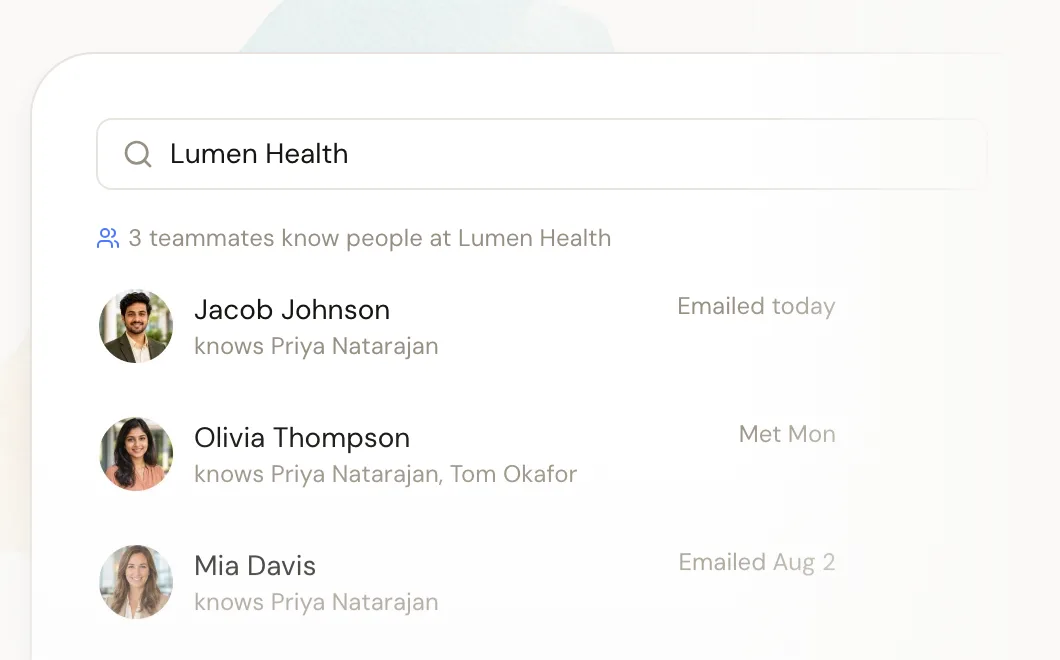
Who knows who: search a person or company to see which teammates know them, who spoke with them last, and the history so far.
Shared history: emails, meetings, and notes from everyone working a relationship show up in one timeline.
Privacy rules: each member picks what the workspace sees from their accounts, either subject lines and metadata or full content, and can change it at any time. Notes can be shared or kept private.
Scheduled follow-ups: team and personal reminders with recurring intervals, like every 30 or 90 days.
Roles: owner, admin, member, and viewer.
One honest note for the handoff checklist: because the workspace only holds what each member chooses to share, Dex for Teams supports these habits but doesn't replace the handoff itself. Run the checklist while the person is still on the team.
Dex doesn't do pipelines, forecasting, or email sequences. If your team needs those, run it next to a sales CRM, or read our comparison of relationship intelligence platforms for small teams to see other options. There's a 14-day free trial with no card needed.
FAQ
What is team relationship management?
Team relationship management is the practice of treating a company's outside relationships, like clients, partners, and referral sources, as shared rather than personal. The team can see who knows whom, the history lives in one shared record, and every important relationship has a backup person.
How is team relationship management different from a CRM?
A sales CRM tracks deals through pipeline stages. Team relationship management tracks people and the connections between them, whether or not there's a deal. Some teams use both: a sales CRM for deals and a relationship tool for people and introductions.
How do you keep client relationships when an employee leaves?
Start before anyone leaves by giving every key relationship a second person. When someone gives notice, list their top relationships in the first two days, assign new owners, have the departing person send warm handoff emails, and book joint calls for the most important clients.
Who should own a client relationship on a team?
One named owner, plus a backup who the client has met. Ownership should sit with the person who works with the client most, and the backup should join at least one call a quarter so the client knows them.
What tools help with team relationship management?
Look for tools that capture email and calendar activity on their own, show who on the team knows each contact, keep one shared timeline per relationship, and let each person control what colleagues can see. Relationship-first tools like Dex for Teams, folk, and Attio are built for this.
The bottom line
People leave, get promoted, and change roles. Your relationships don't have to go with them. Team relationship management comes down to a few habits you can start this week:
Map who knows who, and flag every relationship with only one name on it.
Keep one shared history per relationship so anyone can pick it up.
Agree on privacy rules first, so people actually connect their accounts.
Give every key relationship a second person the client has met.
Put follow-ups on a schedule with named owners, and run the handoff checklist the day someone gives notice.
Start with the map and the backups. Those two alone will tell you where your real risk is and cut most of it. Add a tool once the habits stick, because software can keep the map current but it can't make the introductions for you.
Want to see who on your team knows whom right now? Start your free Dex for Teams trial and set up a shared workspace in an afternoon.
Related guides