CRM for Teams: How to Pick One Without Overbuying
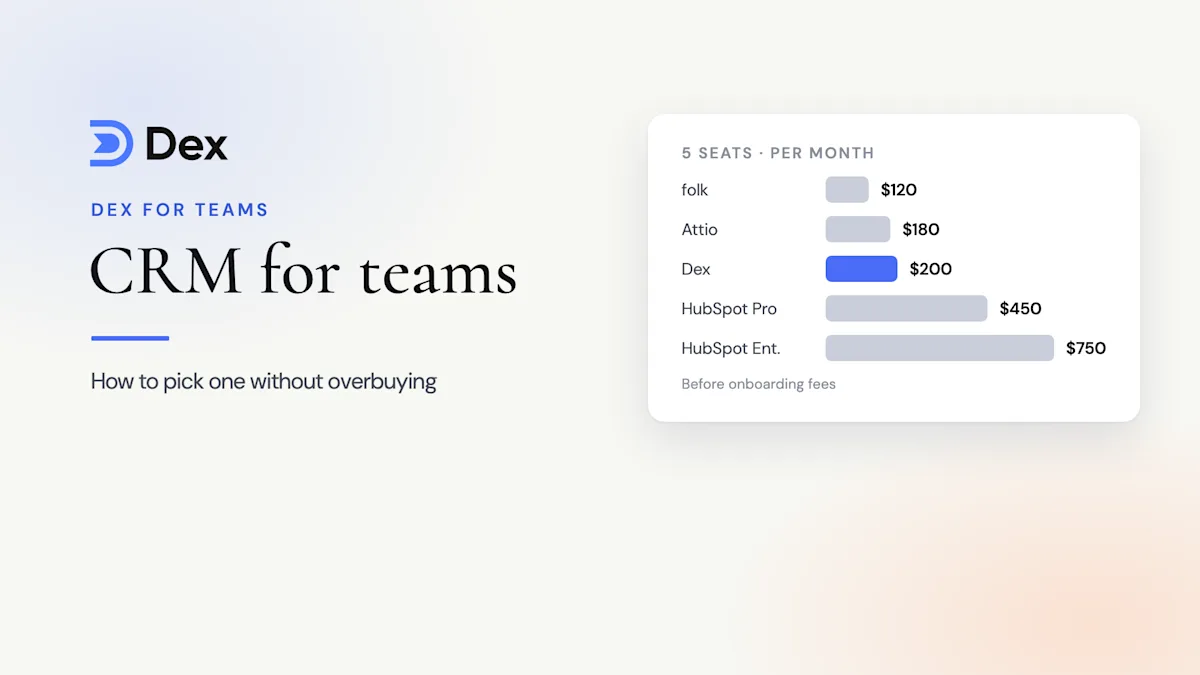
To pick a CRM for teams without overbuying, write down the one job it must do, list must-have requirements and features to skip, count only the seats that will use it daily, trial it with real accounts for two weeks, and check how easily you can export your data. For a 5-person team, CRM costs range from about $120 to over $750 a month.


Overbuying a CRM is easy. The demo shows forecasting dashboards, lead scoring, and twelve kinds of automation, and it all looks useful. Then the invoice arrives. HubSpot's Sales Hub pricing page lists Professional at $90 per seat per month on annual billing, plus a required one-time onboarding fee of $1,500. For a five-person team, that's $5,400 a year in seats and $1,500 before anyone logs in.
Six months later, most of those features sit untouched, two of the five seats belong to people who open the CRM once a month, and the team still asks on Slack who knows someone at a target account.
This guide is a buying process for a CRM for teams that keeps cost in line with what you'll use. It covers what a CRM really costs, a five-step process for how to choose a CRM, and a CRM requirements checklist you can copy.
Fast facts:
A 5-person team can spend anywhere from about $120 to over $750 a month on a CRM, before onboarding fees.
The biggest source of overspend is features built for sales teams with quotas, which many small teams never use.
Seats are the second. Count the people who will use the CRM every week, not everyone who might look at it.
A two-week trial with real accounts beats any demo.
Check export and cancellation terms before you buy, not after.
What overbuying a CRM looks like
Overbuying rarely looks like one bad decision. It's a handful of small ones that add up.
Buying the tier with forecasting because the sales team might grow into it.
Giving every employee a seat when three people do the relationship work.
Paying for sequences and lead scoring when your outreach is one email at a time.
Signing an annual contract before anyone has used the tool with real data.
Paying an onboarding fee to configure pipelines your team won't maintain.
The fix is a CRM that matches the job your team does, which isn't always the cheapest one. A $40 seat that people open every day is cheaper than a $15 seat nobody uses, because the unused one still costs you the relationships that slip.
How much does a CRM cost for a team?
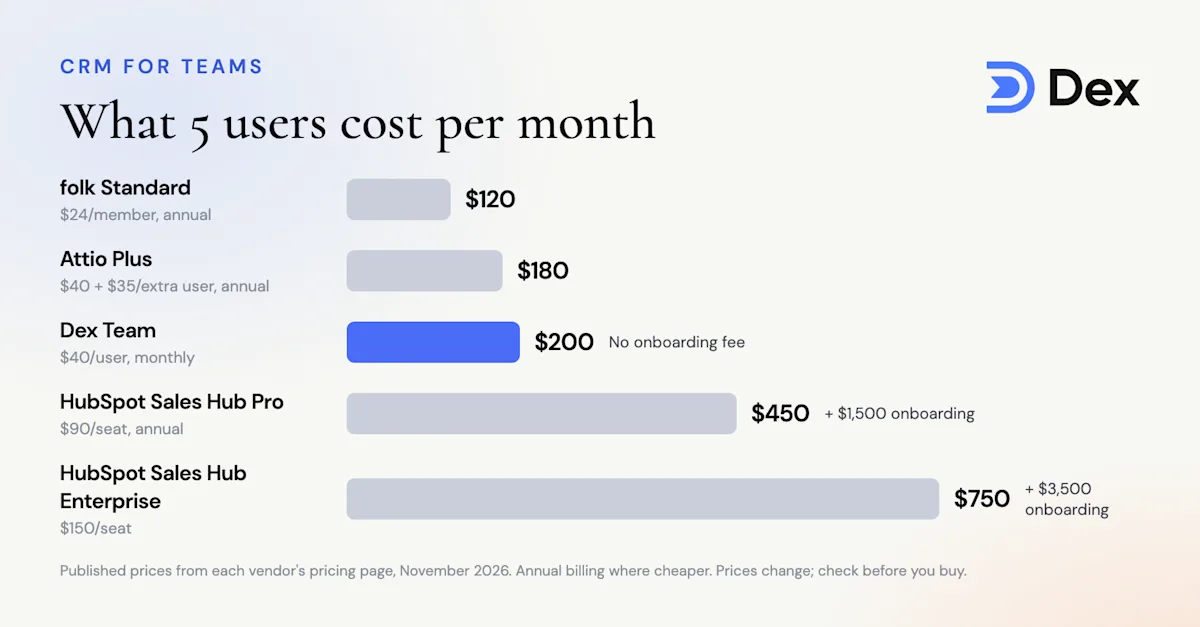
Here's what five users cost per month on four tools that small teams often compare, using each vendor's published prices in November 2026. Annual billing is used where it's cheaper.
CRM | Pricing model | 5 users per month | Extra costs |
|---|---|---|---|
folk Standard | $24 per member, annual | $120 | Premium is $48 per member |
Attio Plus | $40 workspace with 1 user, then $35 per extra user, annual | $180 | Free for up to 3 users; Pro is $100 + $79 per extra user |
Dex Team | $40 per user, monthly | $200 | No onboarding fee; 14-day trial, no card |
HubSpot Sales Hub Professional | $90 per seat, annual | $450 | $1,500 required onboarding |
HubSpot Sales Hub Enterprise | $150 per seat | $750 | $3,500 required onboarding |
Sources: Attio pricing, folk pricing, HubSpot's Sales Hub page above, and Dex pricing. Prices change often, so check the pages before you buy.
So how much does a CRM cost? For a small team, the honest answer is "less than you'll be quoted, if you buy only what you use." The gap between the cheapest and most expensive rows is more than $7,500 a year for five people, before onboarding. Most of that gap is features.
Seat prices aren't the whole bill, either. Add the hours it takes to set up pipelines and custom fields, the person who has to maintain them, and the paid add-ons that appear once you're committed, like extra automation or data enrichment. A simple CRM for teams that fills itself from email and calendar skips most of that work. When you compare quotes, put setup time and add-ons on your CRM checklist next to the seat price, because that's often where the second half of the cost hides.
How to choose a CRM for your team in 5 steps
1. Write down the one job the CRM must do
Every team says it wants "a CRM." Few write down what it's for. Pick one sentence:
"Track deals from lead to close and forecast revenue." That's a sales CRM.
"Know who on our team knows whom, and keep key relationships warm." That's a relationship CRM.
"Keep one shared list of clients with notes and follow-ups." That might be a simple shared CRM, or even a spreadsheet for now.
The sentence rules out half the market. If you write the second one, a forecasting tool is overbuying no matter how good the demo is. Our post on what relationship intelligence is explains that second category if it's new to you.
2. Split your CRM requirements into must, nice, and skip
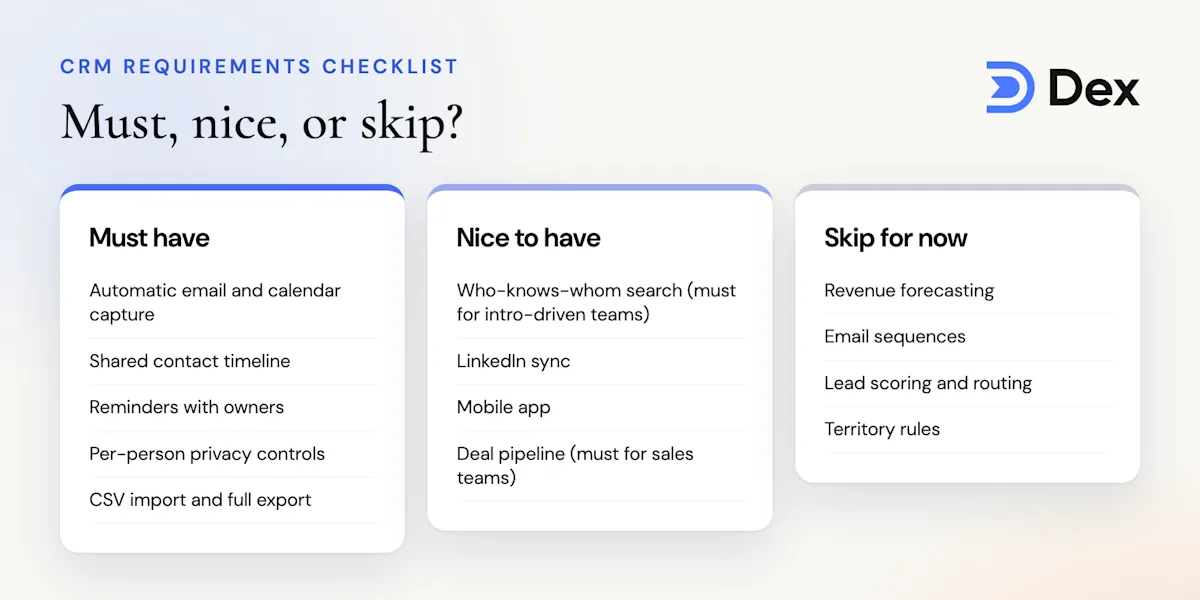
Most CRM requirements lists only have one column: things you want. Add two more. "Nice to have" is what you'd use if it were free. "Skip" is what you're deciding not to pay for. Those three columns become your CRM checklist.
Be strict with "must." A requirement belongs there only if the team would stop using the CRM without it. For most small teams that's automatic capture from email and calendar, a shared view of contacts, and reminders. Our list of 7 team CRM features that actually matter goes deeper on which ones earn the label.
3. Count real seats, not headcount
Seat pricing punishes optimism, and it's where most CRM for teams quotes balloon. Before you buy, list every person who would get a seat and mark how often they'd use it: daily, weekly, or rarely.
Buy seats for the daily and weekly people. For the rest, look for a read-only or viewer role, or let them ask a teammate. On a $90 seat, two seats you didn't need cost $2,160 a year.
4. Run a two-week trial with real accounts
Don't judge a CRM from a demo account full of sample data. Have two or three people connect their real email and calendar, and use it for actual work for two weeks. Then check three things: does the data show up without typing, do people open it without being reminded, and does it answer the question from step 1?
If a vendor won't let you trial without a sales call, that tells you something about how they price, too.
5. Check how you'd leave
The last step is the one most teams skip. Before you sign, find out how to export contacts, notes, and history, whether that includes everything or just contacts, and whether the contract is monthly or annual.
A CRM that's easy to leave is a CRM that has to keep earning your business. Monthly billing costs a bit more per seat, but it caps your downside while you find out whether the team will use it. If you're moving off an old system, our CRM migration guide covers the export side.
Your CRM requirements checklist
Copy this CRM checklist into a doc, adjust it for your team, and score each tool on your shortlist against it.
Requirement | Must, nice, or skip? | Why it lands there for most small teams |
|---|---|---|
Automatic email and calendar capture | Must | Without it, records go stale within weeks |
Shared contact timeline | Must | Stops two people sending the same follow-up |
Keep-in-touch reminders with owners | Must | Relationships go cold when nobody owns them |
Per-person privacy controls | Must | People won't connect their inbox without them |
Who-knows-whom search | Nice (must for intro-driven teams) | Turns the team's network into warm intros |
LinkedIn sync | Nice | Keeps job titles and companies current |
Mobile app | Nice | Notes right after a meeting are better notes |
CSV import and full export | Must | Getting in and out should be easy |
Deal pipeline and stages | Depends on step 1 | Must for sales teams, skip for relationship work |
Revenue forecasting | Skip | Only useful if you forecast by stage |
Email sequences | Skip | Built for outbound at volume |
Lead scoring and routing | Skip | Needs inbound volume most small teams don't have |
A short CRM checklist like this is useful after you buy, too. Look at it again at the three-month mark. If a "skip" feature has turned into a real need, that's the time to move up a tier.
Where Dex for Teams fits
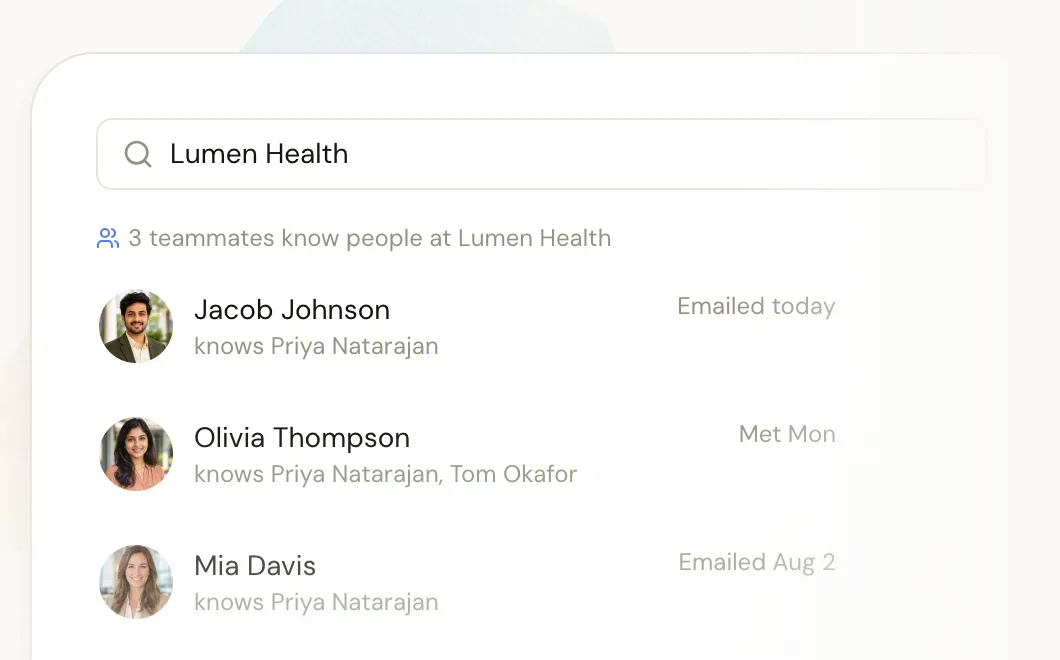
Dex for Teams is a CRM for teams whose work runs on relationships rather than a pipeline: venture firms, recruiting firms, foundations, agencies, and founders raising money. Each person keeps their own private Dex, and the team shares a workspace with who-knows-whom search, one timeline per contact, and shared reminders. Each member chooses whether the workspace sees just email subject lines and metadata or the full content.
It covers the "must" rows in the checklist above and leaves the "skip" rows out on purpose. There's no forecasting, no sequences, and no lead scoring, which is why it costs $40 per user per month instead of $90 to $150. The Team plan also includes CRM integrations and SAML SSO, so teams that still need deal stages can run Dex next to a sales CRM. The /teams/ page offers a 14-day free trial with no card needed.
Who this isn't for
If you run a sales team with quotas, SDRs, and a forecast your board reviews every month, you aren't overbuying when you pay for HubSpot or Salesforce. Those features are your job. Use the five steps on how to choose a CRM to trim seats and tiers, but don't expect a relationship CRM to replace your pipeline. And if you're one person managing your own network, skip team pricing entirely and look at a personal CRM.
FAQ
How do I choose a CRM for a small team?
Write down the one job the CRM must do, split your requirements into must, nice, and skip, count the seats that will be used, trial two or three tools with real accounts for two weeks, and check export and contract terms before you sign.
How much does a CRM cost per user?
Small-team CRMs run from free (Attio for up to 3 users) to about $24 to $40 per user per month for tools like folk and Dex, and $90 to $150 per seat for HubSpot Sales Hub Professional and Enterprise, which also charge onboarding fees.
What should be on a CRM requirements list?
Automatic email and calendar capture, a shared contact timeline, reminders with owners, per-person privacy controls, and easy import and export. Add pipeline and forecasting only if you forecast revenue by deal stage. The CRM checklist in this guide is a good starting point.
Is a free CRM good enough for a team?
Sometimes. Free plans work for two or three people with simple needs. Watch for user caps, missing email sync, and features that move to paid tiers once the team grows.
Should we pay monthly or annually?
Pay monthly until the team has used the CRM for a couple of months. Annual billing is cheaper per seat, but monthly billing makes it cheap to walk away if adoption stalls.
Can we use two CRMs?
Yes. Many teams keep a sales CRM for deals and a relationship CRM for people and intros. Set a clear rule for what lives where so you don't duplicate work.
The bottom line
The best CRM for teams is the one your team uses every week, at a price that matches that use. Start by writing down the one job the CRM must do. Split your CRM requirements into must, nice, and skip, and be strict about the skip column on your CRM checklist. Buy seats for daily and weekly users only. Trial two or three tools with real accounts for two weeks, and check how you'd leave before you sign. Do that, and a CRM for teams costs what it's worth rather than what the demo suggested.
If your team's work runs on relationships rather than a pipeline, start your free Dex trial and see what your shared network looks like in a day.
Related guides