

2026
September 2026: Talk to Dex with Voice Mode 🎙️ + Granola Sync 📝
September was all about spending less time typing into Dex. You can now talk to Dex and have it look things up or update your contacts while you're between meetings. And if you take meeting notes in Granola, those notes can sync to Dex automatically.
We put together a quick video for each feature below, so you can see them in action.
Talk to Dex with Voice Mode 🎙️
You can now talk to Dex. It's the fastest way to get something into Dex when you're walking out of a meeting or away from your keyboard.
Ask about your network, tell it to add someone new, or have it set a reminder, and Dex answers out loud and makes the change for you.
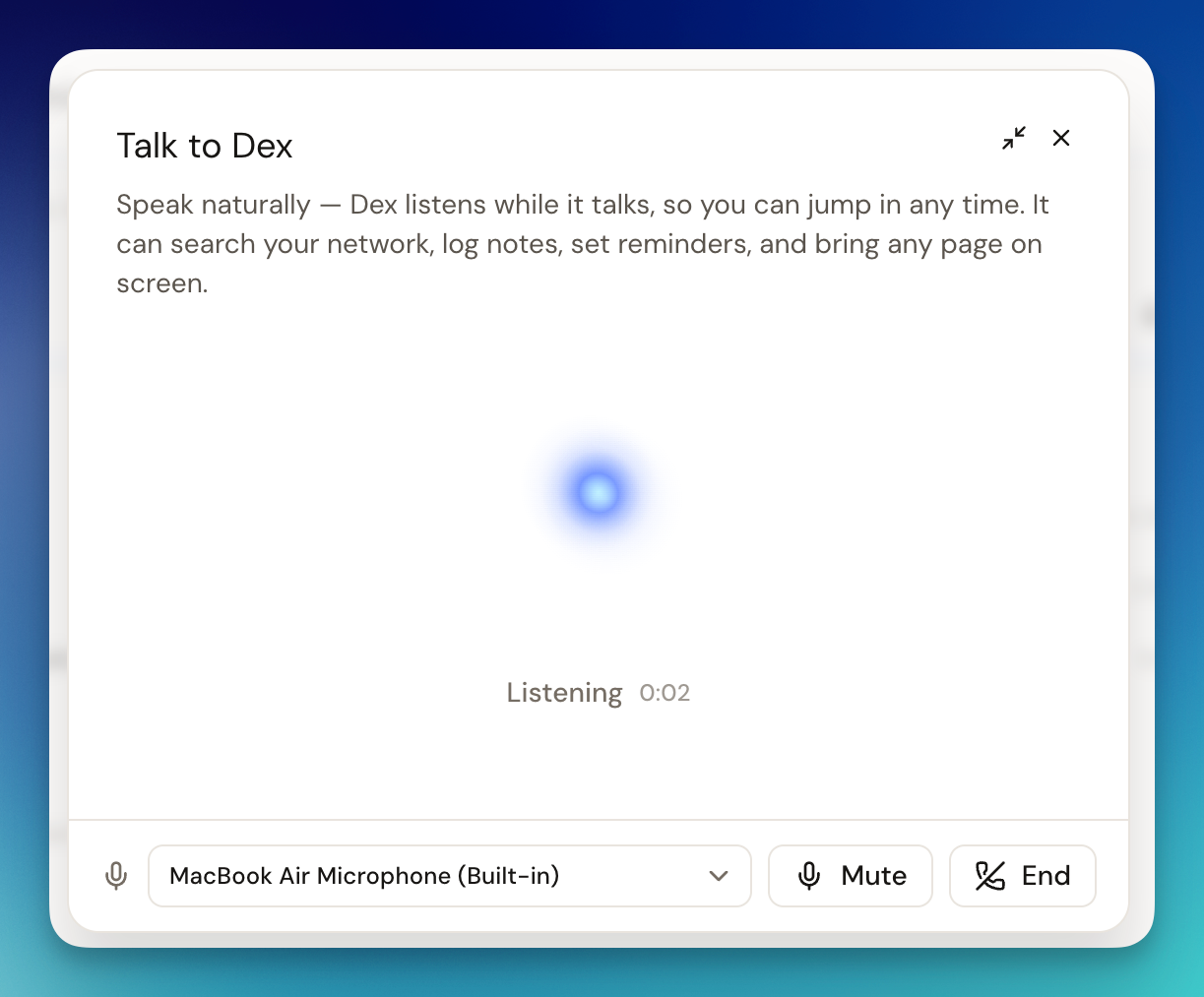
You can talk to Dex the way you'd talk to a person:
- Ask about your network: "Who do I know at Stripe?" or "When did I last talk to Maria?"
- Add or update people: "Add Sarah Chen, she's a product designer at Figma."
- Remember details: "Add a note to Sarah: she's starting a fintech company and loves hiking on weekends."
- Set reminders: "Remind me to call Mike about the marketing proposal next Tuesday."
- Stay organized: "Add Sarah to my Investors group" or "Who am I meeting tomorrow?"
You can interrupt Dex at any time. It keeps listening even when it talks, so you can correct it mid-answer or ask a follow-up. Voice mode works in the Dex mobile app too.
Full details are in the Voice Mode documentation.
Granola notes, synced into Dex 📝
If you're scheduled back to back and use Granola to take meeting notes, you no longer have to copy anything into Dex. Connect your Granola account and every meeting you record shows up in Dex as a note.
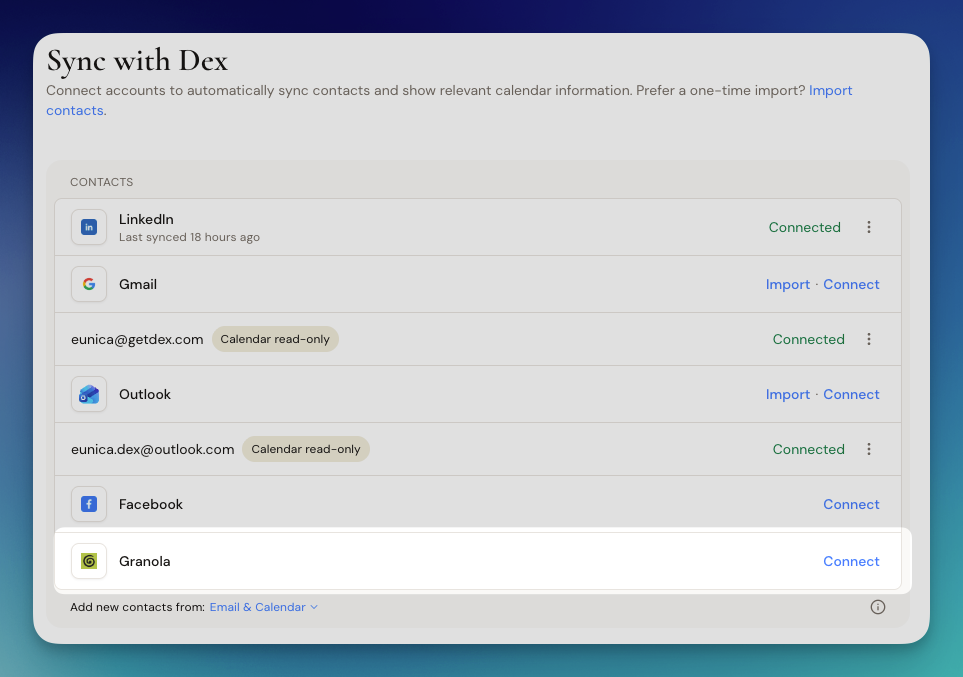
Here's what happens after you connect:
- Dex saves each summary on everyone who attended, so the context sits right on their contact timeline.
- If someone from the meeting isn't in Dex yet, we add them for you.
- Each note counts as a recent interaction, so last-seen dates update and keep-in-touch reminders move forward on their own.
- The first sync brings in your last 30 days of meetings. After that, Dex checks Granola every 4 hours.
To connect, go to Settings → Sync & Integrations, find Granola, and click Connect.
Granola sync is available on Dex Professional. For more information, check out our Granola Sync documentation.
Bug Fixes and Improvements 🧩
We also shipped a long list of fixes and improvements in September:
- LinkedIn sync is more reliable and catches up on messages you missed while it was disconnected
- Fewer duplicate contacts from LinkedIn, and better profile matching for names written without spaces
- Fixed job change updates not showing up for some people in your network
- Improved the desktop app with working voice input, clearer Mac sync permissions, and smoother updates
- Improved iMessage syncing on Mac, now including RCS messages and skipping emoji reactions
- Dex Copilot can now edit and cancel reminders, link related contacts, and put groups inside other groups
- Claude and ChatGPT can now see your upcoming Dex reminders, birthdays, and who's due for a check-in
- Filter contacts by location, social profiles, phone, or email, and see each contact's last note at a glance
- Added keyboard shortcuts and tooltips to keep-in-touch views
- "Last interaction" dates are more accurate and no longer change from newsletters or emails you were CC'd on
- Contact timelines now load your full email history and calendar events faster
- Duplicate cleanup now catches archived copies and works better for large contact lists
- Spreadsheet and email imports are smarter, correctly splitting multiple groups and skipping newsletters and receipts
- Fixed sync issues with Instagram, Google Calendar, Apple Contacts, and the WhatsApp assistant
- Fixed the Daily Digest showing no meetings or listing the same meeting twice
- Fixed mobile issues with entering phone numbers on Android, the iOS notification badge, Messenger links, and several crashes
- Fixed AI summaries and suggested actions sometimes failing to load
August 2026: New referral program ($40!) + Dark Mode is here 🌙
August was about shipping a new Dex: a full web and mobile refresh with Dark Mode finally live, referrals now paying $40 in cash, and new Mac and Windows desktop apps.
We put together a quick video walking you through everything we shipped in August.
Refer a friend, get $40 (in cash) 💸
Referring someone to Dex used to earn you $20 in Dex credit. Now, our new Referral & Affiliate Program pays you $40 in cash every time someone you refer becomes a Dex customer.

Since this replaces the old referral program, a few details worth being clear about:
- Credit you've already earned stays in your account and is still redeemable. We've stopped issuing new credit, not taken back what's there.
- Payouts run through our new partner platform, so there's a short payout setup the first time you cash out.
- Ambassadors are on this same deal, so it's one rate whether you're sharing with a friend or with an audience. Apply to become an ambassador at getdex.com/ambassador and we'll set you up with the resources and branding you need.
Your new referral link is waiting on the refer page. For more information, read our documentation.
Dark Mode on web and mobile 🌙
Dex now has Dark Mode on both web and mobile, making those late-night check-ins a little easier on the eyes.

To switch on web, click the icon in the top left corner of the screen, next to the Dex logo. You'll get three options: light, dark, and system. On mobile, open the menu in the bottom right and tap the Dark Mode toggle.
This is part of the new Dex web experience. Full details are in the Dark Mode documentation.
A new Dex desktop app 🖥️
Dex now has a desktop app for Mac and Windows. It brings everything the Dex sync utility did into one app, with background syncing for LinkedIn connections and messages, plus iMessage and phone call syncing on Mac.
No window needs to be open. Dex keeps syncing in the background and catches up automatically when your computer wakes.

It's one app instead of two: simpler, smoother, and more reliable.
Get it at getdex.com/desktop, or open the link from the menu in the top right of the Dex web app.
Bug Fixes and Improvements 🧩
We also shipped a long list of fixes and improvements in August:
- Made contacts editable in place: click any cell in the contacts table, or a card in gallery and board views, to edit emails, phones, groups, tags, and custom fields
- Added more bulk actions for selected contacts: add the same note to many people at once, remove contacts from a group, set priorities, and export your selection to CSV
- Type @ in a contact's description to tag other people, and they are automatically linked as related contacts
- Improved the network views: the relationship graph is back as its own Network view, and the Priority Map (in beta!) supports bulk priority-setting and archiving
- Improved keep-in-touch: snoozing now follows each contact's own cadence, completions show immediately, and the home page shows your full list again without limits (we previously limited to 5)
- Dex Copilot and AI assistants like Claude and ChatGPT can now create, reschedule, and cancel calendar events, mark keep-in-touch reminders as done, and update your digest and timezone preferences
- Improved importing: Google and Outlook imports keep running if you close the tab, and CSV imports keep custom-field columns and can't create duplicates when retried
- Improved mail merge with custom-field variables and CC/BCC recipients saved on templates
- Improved notes: paste images directly into a note, add attachments while editing, and turn highlighted text into links
- Improved sync reliability across WhatsApp, Instagram, Facebook, and Outlook, fixing stuck connections and first-time syncs
- Fixed an issue where merging duplicates with Copilot could remove contact details; duplicate cleanup now merges contacts safely
- Fixed an issue where no email was sent when a connected account needed reconnecting
- Fixed mobile issues with tag filtering, group counts, custom field deletion, and several crashes, and made the timezone picker searchable
- Fixed billing issues: resubscribing after an App Store cancellation, checkout getting stuck behind popup blockers, and incorrectly displayed discount and quarterly amounts
July 2026: Share Contacts from Any App 📲 + Rebuilt Card Scanner + More
We put together a quick video walking you through everything we shipped on the app this July.
Share profiles and contacts into Dex 📲
Adding people to Dex used to mean switching apps, copying a name, and typing it in. Now you can add someone from wherever you found them, without leaving that app.
From LinkedIn, X, Instagram, and many other apps, simply tap Share, choose Dex, and we'll either create a new contact or update an existing one automatically.
You can also now do the same from your phone's contacts app by sharing a saved contact directly into Dex:

To read more, check our documentation.
A rebuilt business card scanner 📇
We've completely improved business card scanning across iPhone and Android.
Scanning is now faster, more reliable, and much more stable, especially on Android. New contacts and scanned card images appear almost instantly instead of taking minutes to sync.

The biggest practical change is sync speed. New contacts and the saved card image now appear almost instantly instead of taking minutes. If you're working a conference badge line, you can scan five cards in a row and see all five contacts before you've put your phone away.
To read more about our business card scanner, read this documentation.
Better voice-to-text 🎙️
Voice notes are now noticeably more accurate, including in noisy rooms, and when you're dictating through AirPods, a car system, or another external mic.
We tested multiple speech recognition models and chose one that delivers a much more reliable experience, making it easier to capture thoughts on the go with less cleanup afterward.

Learn more about capturing notes with your voice in our documentation.
A faster, more reliable app ⚡
We audited the entire mobile experience to make Dex feel noticeably faster.

Improvements include:
- Faster app startup
- Quicker sign-ins
- Better first-time setup with live contact sync progress
- Smoother editing with instant updates while changes sync in the background
- Improved offline support that safely caches changes for up to 30 days
Overall, the Dex app should launch faster and simply feel much snappier to use.
Bug Fixes and Improvements 🧩
We also continued with improvements across the Dex app in July:
- Improved the mobile app with a "First met" field on contact detail, a faster Locations page, and the ability to connect Facebook, Instagram, and LinkedIn right from your phone
- Improved reminders so past contacts and notes resurface at more useful moments
- Improved share links so they open and look the same whether you send them from web or mobile
- Improved sync and import reliability across LinkedIn, phone contacts, and Google Contacts, fixing stuck syncs, repeated notifications, missing profile photos, and contacts imported in the wrong language
- Fixed issues on mobile where contact info would not appear, login links would not work, scanned contacts showed the wrong timeline or email label, and descriptions would disappear after saving
- Resolved a crash that could stop your plan details from loading
June 2026: Dex Shuffle + Daily Digest + more improvements
Meet Dex Shuffle
Some of the best relationships just slip off the radar. Dex Shuffle brings them back.
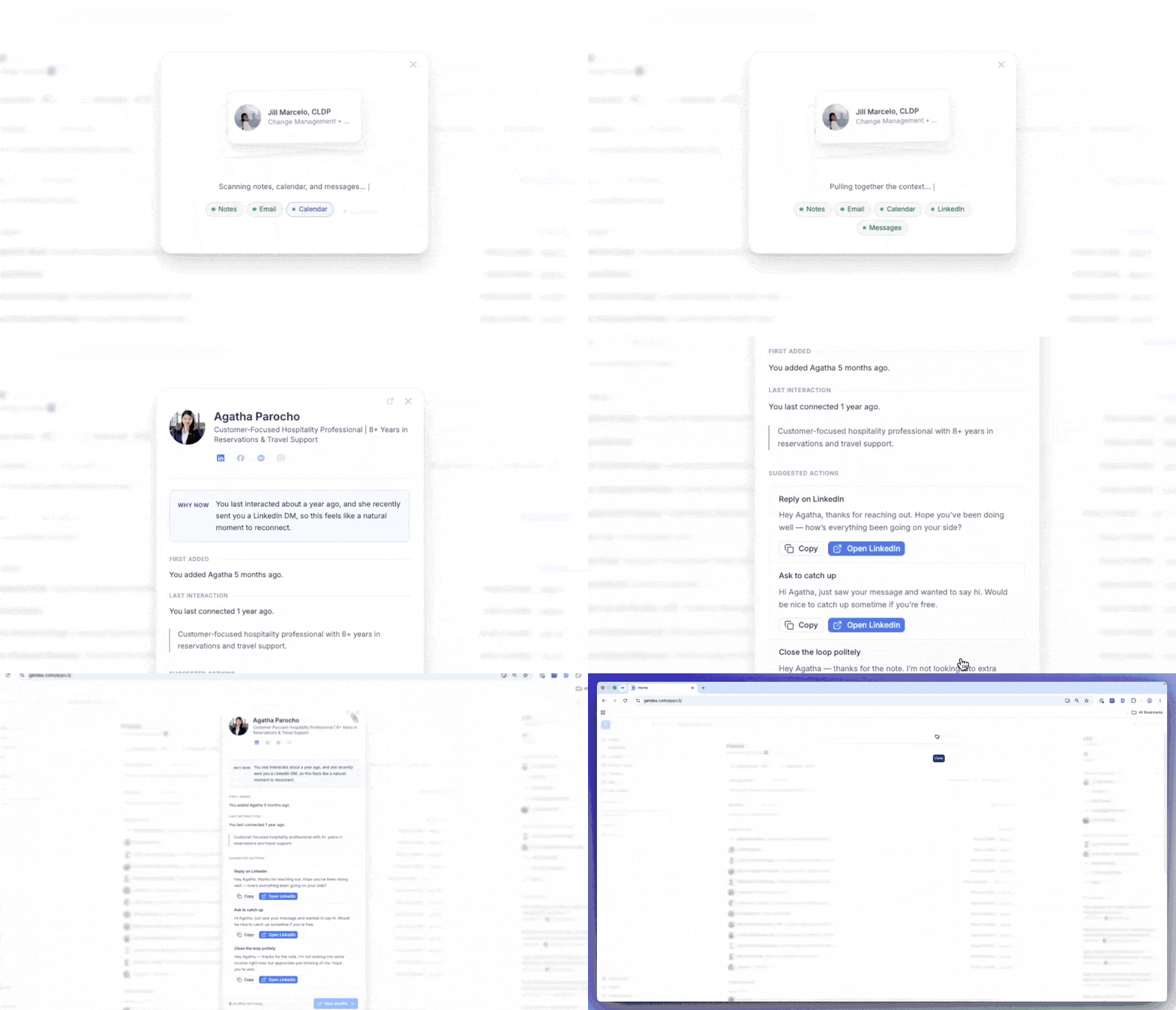
Just tap the dice icon in the top-right corner of your screen. Dex surfaces someone from your real relationship history, gathers the context from your past interactions, and drafts a thoughtful message that's ready to send.
Using the Dex Shuffle, you can:
- See the story so far: When you first met, your last real conversation, and why they came up now: grounded in your notes, email, calendar, and LinkedIn.
- Reach out in a tap: Dex drafts a few short, editable messages. Copy one, draft an email, or open the right channel. Nothing is ever sent automatically.
- Save it for later: Not ready today? Tuck a shuffle into your saved list and come back when the moment's right.
- Get two a day, on purpose: You get two shuffles daily, enough to make it a light habit and not a to-do list.
A rebuilt Daily Digest
Your Daily Digest got a top-to-bottom refresh.
We're talking a calmer look, a clearer structure, and one big addition: the reminders we used to text you now live right here in your email.

Here's what we improved:
- Updated layout, hierarchy, and type make your day with Dex easy to scan in seconds.
- The nudges that used to come by text are surfaced in the digest too: same clarity, same directness, all in one place.
- Reminders, follow-ups, and updates are ordered so what matters most rises to the top.
Open email threads from the Dex app
You can now open and read full email threads right inside the Dex app. Before, emails were web-only, now the whole conversation travels with you.

With this update, you can:
- Read the whole thread: Every reply, in context, from your phone.
- Stay in flow: Catch up on an exchange before you reach out.
Bug Fixes and Improvements
We also continued with improvements across Dex this month:
- Fixed issues in Copilot where conversations would fail to load or behave inconsistently. Improved overall stability and responses.
- Fixed an issue where new contacts would not be placed on the map consistently.
- Improved sync reliability across LinkedIn, iMessage, Instagram, WhatsApp, and CardDAV, reducing missing or duplicated data
- Fixed bugs affecting reminders, contacts, groups, and custom fields where certain actions would fail or show incorrect information.
- Resolved several crashes and UI issues across the web app, including map errors, loading failures, and broken interface components
- Improved mobile and web usability, including keyboard navigation in contacts, fixes to frequency/snooze controls, and general interaction reliability.
May 2026: Use Dex with Claude (+ more with MCP!) 🤖 + Product Updates
Connect Dex to your AI assistant
Dex now supports MCP (Model Context Protocol), allowing AI assistants like Claude and ChatGPT to connect directly to your contacts and relationship data. Once connected, you can manage your network using natural language.
With Dex MCP, you can:
- Look up anyone instantly (contact info, notes, and history)
- Log interactions hands-free
- Set follow-up reminders through chat
- Organize contacts at scale with tags and groups
The MCP server gives AI assistants access to your Dex data, while the Dex Skill adds relationship intelligence such as meeting prep, follow-up suggestions, duplicate cleanup, and custom field support.
Watch our full walkthrough here:
The Dex Skill sits on top of that connection and turns it into a true relationship assistant: helping it prep you for meetings, suggest follow-ups, clean up duplicates, and work with custom fields like deal stages or tags.
In simple terms: The MCP server provides the tools, and the Skill adds CRM intelligence on top.
For more information, read the full MCP documentation here and the Dex Skill guide here.
Voice Input Upgrade 🎙
We've upgraded voice input on the Dex web app. The new model is faster with lower latency, so you can see your speech transcribed in real time as you speak, with more accurate results.
Choose 'Add with voice' when adding a note to get started.
- Real-time transcription - see your words appear as you speak, with improved accuracy.
- Multi-language support - voice input now works across multiple languages.
- Keyboard shortcuts - quickly toggle to voice when leaving notes without reaching for the mouse.

To explore more about note creation, see our documentation.
Contact Timeline Filters
You can now filter a contact's timeline to quickly find specific interactions, including notes, emails, meetings, and other touchpoints, without scrolling through everything.

To learn more about managing and organizing your contacts, visit our documentation here.
Improved mail merge formatting ✉
Mail merge now supports rich text formatting for better-looking outreach emails. Emails render more consistently across clients including Outlook, with improved layout and personalization.

To find out what you can do with mail merge, click here.
Bug Fixes and Improvements 🧩
We also continued with improvements across Dex this month:
- Fixed issues in Copilot where conversations would fail to load or behave inconsistently, improving overall stability and responses
- Improved sync reliability across LinkedIn, iMessage, Instagram, WhatsApp, and CardDAV, reducing missing or duplicated data
- Fixed bugs affecting reminders, contacts, groups, and custom fields where certain actions would fail or show incorrect information
- Resolved several crashes and UI issues across the web app, including map errors, loading failures, and broken interface components
- Improved mobile and web usability, including keyboard navigation in contacts, fixes to frequency/snooze controls, and general interaction reliability
- Added usability improvements including clearer frequency and snooze actions, tooltips, and a new “Upcoming” view for easier planning
April 2026: Use Dex within ChatGPT 🤖 + Share into Dex from IG and socials
Use Dex within ChatGPT 📱
You can now connect your Dex account to ChatGPT and manage your relationships directly inside chat. No switching tools necessary.

With the Dex ChatGPT app, you can:
- Search contacts instantly with full details, notes, and history
- Log meetings and notes in natural language or via voice
- Set follow-up reminders directly from ChatGPT
- Organize contacts with tags and groups, or ask ChatGPT to clean up your network
- Bulk import contacts, assign groups, and add shared notes in one step
- Prep for meetings or review past context before reaching out
- Works in Codex and OpenAI Codex automations too!
Watch the full walkthrough here:
This integration is for staying on top of your relationships while you’re on the move. Let us know what you think!
Install the Dex app in ChatGPT here. For more details, read our documentation.
Go Straight from Any Social Profile to Dex ⚡
You can now jump directly from LinkedIn, Instagram, X, or your Contacts app straight into Dex.
Just open a profile, tap the three dots, select “Share via”, and choose Dex.
We’ll open the right profile inside Dex, where you can:
- Save a new contact
- Update existing contacts
- See past notes
- Add a quick note for next time
Watch it in action:
We built this to make Dex feel more like a layer on top of your network, not a separate place you have to remember to update.
For more information, visit our documentation.
Filter Map View by Groups
Map View on your mobile app just became more useful and interactive.
If you’re planning a trip or looking at where your “college friends” are concentrated, you can now filter Map View by any group in Dex. This lets you narrow the map to only the relevant people in that group.

Simply select a group and both the map and contact list instantly update to show only those people.
Open Map View → select a filter → choose a group → and your network comes into focus.
For more information, check out our documentation.
Bug Fixes and Improvements 🧩
- Improved WhatsApp sync, message delivery, and contact naming
- Faster, more reliable LinkedIn, Instagram, and phone syncs
- Fixed issues with calendar events, emails, and call history not loading properly
- Improved contact sorting, merging, duplicate detection, and imports
- Fixed problems with sharing profiles into Dex and matching existing contacts
- More accurate Map View locations and contact data updates
- Improved AI organization suggestions and contact summaries
- Fixed CSV import/export issues and expanded large exports
- Better Chrome extension troubleshooting and clearer error messages
- Improved mobile experience, including clickable websites and phone imports
- Better handling for accented characters in filters and views
- Faster calendar processing and improved mail merge personalization
March 2026: Dex Action Button 📱 + Faster Tagging ⚡️
Quick Notes with the iPhone Action Button 📱
The Action Button (available on iPhone 15 Pro and later) can be setup to open Dex's note composer instantly, before the thought slips away.

Setting it up takes about 30 seconds:
- Open the Shortcuts app and create a new shortcut using the "Open composer" action.
- Go to Settings → Action Button, scroll to Shortcuts, and select your new shortcut.
Once you're in the note, everything you need is already there. You can type a quick note, tag contacts, set a reminder, or add it to a group, all without leaving the composer.
Watch it in action:
Perfect for capturing thoughts, reminders, and follow-ups the moment they happen. To learn more about creating notes via the Action Button, visit this page.
Faster Tagging and Grouping ⚡️
You can now add contacts to multiple Groups, assign multiple Tags, and set Related Contacts all in one go, making it much faster to organize your relationships.

Here's how:
- Select any contact
- Click a field (Groups, Tags, or Related Contacts) and select one or more options from the dropdown
- Use your arrow keys to navigate, press Space to select, and Enter to confirm.
For more on organizing your contacts, read our documentation here.
Bug Fixes and Improvements 🧩
- Upgraded the Merge & Fix algorithm to be significantly faster, more predictable, and catche more duplicate candidates than before
- Fixed empty reminders appearing in your feed with no text for some users
- Fixed multiple filters not returning correct results when combined
- Fixed validation error when saving a phone number label without a number
- Fixed search results not loading correctly for some contacts
- Fixed title change cards not displaying properly when job history was incomplete
- Fixed calendar sync failing for some email addresses
- Fixed emoji picker not working in some cases
- Fixed Mail Merge displaying email addresses instead of contact names
- Fixed misaligned note input form on the contact detail page
- Fixed buggy phone number input behavior on web + now show country code on hover
- Fixed duplicate "Description" option appearing in the filter dropdown
- Fixed new values for category-type custom fields not saving
- Fixed "Enable app badge number" toggle reverting to off after enabling
- Fixed Facebook/Messenger icon not opening correctly from contact profiles
- Fixed slow redirect when adding new contacts via the Chrome extension
- Fixed Merge & Fix removing profile photos during contact merges
- Fixed LinkedIn, Instagram, and Facebook sync creating duplicate contacts
- Fixed LinkedIn sync creating duplicates when a contact's profile URL changed
- Fixed iMessage Sync not capturing SMS interactions for some users
- Fixed CardDAV contact profile images not loading on macOS
- Fixed Sync Utility causing high CPU usage on macOS
- Fixed mobile import screen getting stuck loading for large contact lists
- Fixed group picker showing a flat list instead of parent/sub-group hierarchy
- Fixed input checkmark not clearing after pressing Cleanup
- Fixed multiple birthday reminders being sent for the same contact
- Fixed birthday emails being sent multiple times
- Added ability to filter a contact's timeline by interaction type
- Added bulk archiving and merging via multi-select on mobile
- Added drag-and-drop re-ordering for custom fields on contact detail pages (web and mobile)
- Added custom fields as viewable columns in the main contacts table
- Added country code display on phone number hover for easier international dialing
- Added ability to regenerate API keys from settings
- Added default tags on emails based on the sender's domain
- Updated Quick Action to surface contacts by most recent interaction first
- Improved CSV importer to automatically detect social links and assign them to the correct fields, with better compatibility for Google Contacts CSV exports
- Improved Copilot note search accuracy and feedback
- Improved Instagram and Facebook sync speed and reliability
- Improved mobile app cold start times
- Improved CardDAV sync to archive contacts instead of deleting them
February 2026: Outlook Integration + Dex Professional Plan + Mail Merge + More
Outlook Integration 📧
Our most requested integration is finally here! You can now sync your Outlook with Dex. Connect your Outlook account in Settings → Sync & Integrations.

We've built this integration to be as complete and robust as our integrations which we support for Gmail and Google Suite accounts. With Outlook sync:
- See all your meetings, reminders, and contact updates in one place
- Easily view and track interactions across email and calendar
- Automatically update last interaction dates and keep-in-touch reminders
- Connect one or more Outlook accounts
- See this seamlessly on web and mobile
Outlook sync is available on mobile and on web, but is only available on the Dex Professional Plan.
Learn more about the Outlook integration in our guide.
Introducing Dex for Professionals ⭐
For over 7 years, you've trusted Dex to help manage and strengthen your relationships. We are deeply grateful to everyone who has supported Dex and made it part of their workflow.
As Dex has grown, so have the costs of operating a reliable, secure, and increasingly powerful platform. Supporting advanced features, integrations, data sync, and ongoing development requires sustained investment. To ensure Dex remains viable and continues to improve long term, we're introducing the Dex Professional Plan************************.

Dex Professional is designed for users who rely on Dex more heavily and need advanced capabilities (like Outlook sync!) to work more efficiently. This plan allows us to operate Dex as a sustainable business while continuing to build better tools and support the product at a high level of quality.
Here's what's now exclusively part of the Pro plan:
- Mail Merge – Send personalized bulk emails to your contacts in minutes.
- Outlook Sync Support – Keep every relationship on track by syncing one or more Outlook accounts.
- API & Zapier Access – Automate workflows and connect to 5,000+ apps.
- More LinkedIn Connections – Sync up to 9,000 most recent connections (vs max 2,500 on Premium).
To learn more about the Professional Plan, check our guide here.
Already on Premium? You can upgrade anytime from your billing settings.
Mail Merge (with AI Personalization) 📨
Dex Mail Merge lets you send personalized emails to up to 200 contacts without the manual work. Write once, let AI personalize based on your notes and history, review each email, and send through Gmail or Outlook, all from Dex. Watch our walkthrough to see it in action:
Everything you need to send smarter:
- AI personalization draws from your relationship history, notes, interactions, and profile data, to write personalized content for each recipient
- Add dynamic placeholders like first name, company, or other contact details to make every message feel personal
- Reusable templates so your best outreach is never a one-time thing
- Complete review control so you can see and edit every draft before it lands in someone's inbox
- Dex handles delivery through your connected Gmail or Outlook account in smart batching to avoid looking automated
Mail Merge works seamlessly with Gmail and Outlook, and is only available on the web with Dex Professional.
Check out the full guide and start sending personalized email smarter.
Custom Fields at a Glance 🔎
You can now see custom fields on your contacts right from the main contacts view. Create fields like hometown, company, spouse, or important dates, and stay organized to keep track of what information matters most.

Simply click Properties on any contact, or on a group of contacts, and select the field you want to surface.
Learn more about creating and managing custom fields in this page.
Bug Fixes and Improvements 🧩
We've also focused on continuous refinement in this release:
- Added email suggestions for contacts based on connected accounts
- Improved search when looking up contact emails
- Fixed homepage layout issues on larger screens
- Added ability to view a contact's social profiles from their detail page
- Fixed contacts displaying incorrect future dates for emails and calendar events
- Improved bulk enhance to support up to 750 contacts (previously 250)
- Added keyboard shortcuts for actions like enhancing and archiving contac
- Added option to set a default meeting type when logging meetings
- Improved "Recent LinkedIn connections" to reflect truly recent activity
- Improved LinkedIn sync with clearer error messages and a disconnect option
- Added notifications for LinkedIn sync limits
- Added snooze for keep-in-touch reminders on mobile app
- Added option to toggle app badge notification count on mobile app
- Improved business card scanner to capture multiple phone numbers and emails on mobile app
- Added option to display company names in the contacts list on mobile app
- Improved pricing page with plan selection on mobile app
- Added richer email context to pre-meeting briefs
- Fixed sidebar flickering when editing contact fields
- Fixed invisible control characters appearing in contact fields
- Fixed tab state persistence so refresh keeps you on the same tab
- Fixed Dex Guide & Resources link not working
- Fixed multi-select "Add contacts to Group" support in the Command Bar
- Disabled WhatsApp reconnect banner for disconnected users
January 2026: New Note Creation (+AI Cleanup) 🖥 + Improvements
New Note Creation in Dex 📝
Quickly add new contacts, notes, reminders, and interactions from a single, streamlined interface. No more hopping between multiple screens. Everything you need for note taking is now in one place:
- Improved note experience to help you organize information faster
- Add reminders and set follow-ups directly while creating a note
- Open notes in a dedicated full-tab view to stay distraction-free
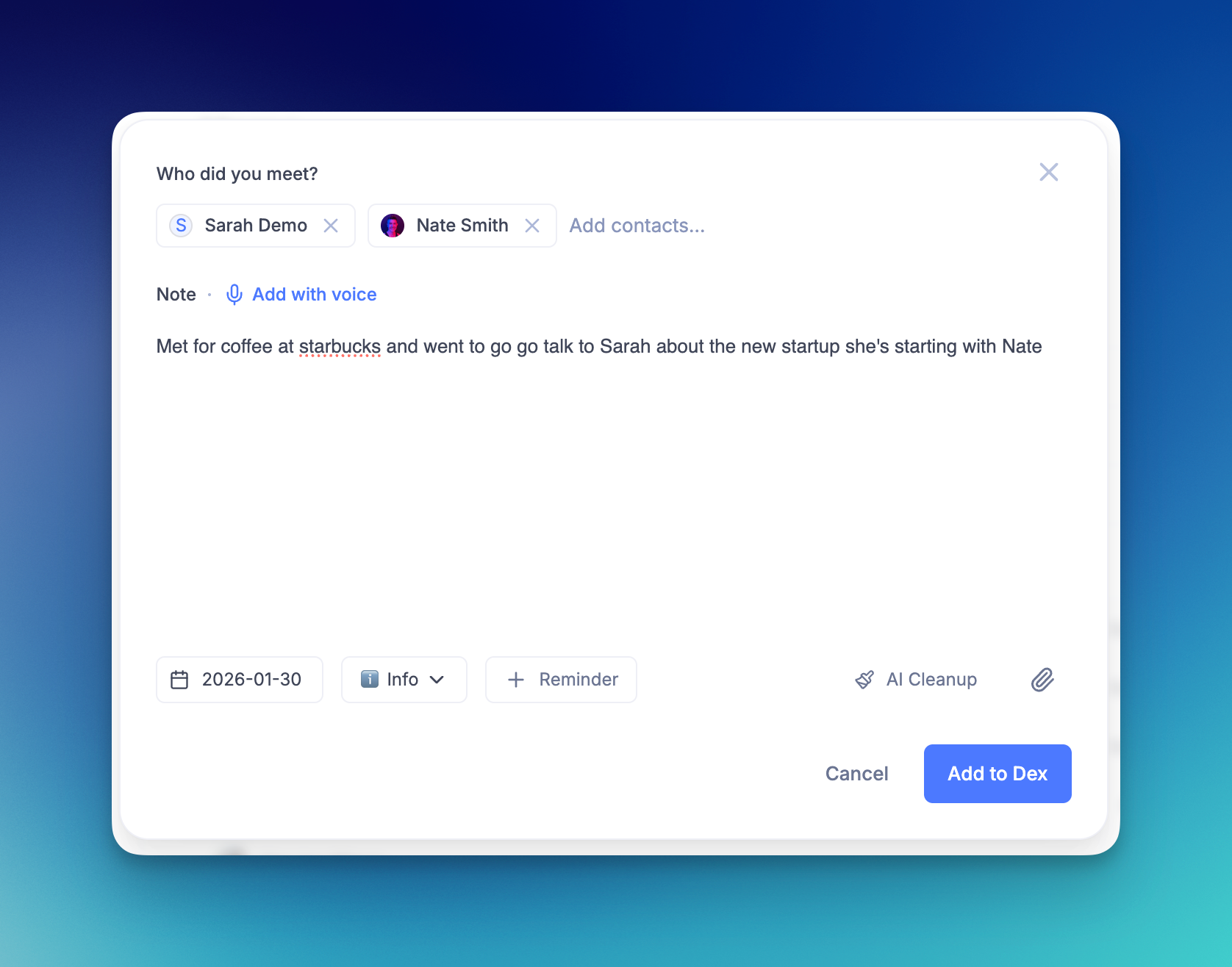
Voice Notes + AI Cleanup 🎙
If you're on the go, we make it easy to take notes with your voice on mobile and on the desktop app. After dictating your note (which lacks formatting and structure), use our one-click AI Cleanup to organize and structure notes for the future.
- Dictate notes by voice for fast, hands-free input. Simply click "Add with voice" and start talking.
- Use "AI Cleanup" to turn transcripts into clear, readable notes.
- This feature is available both on mobile and on web.
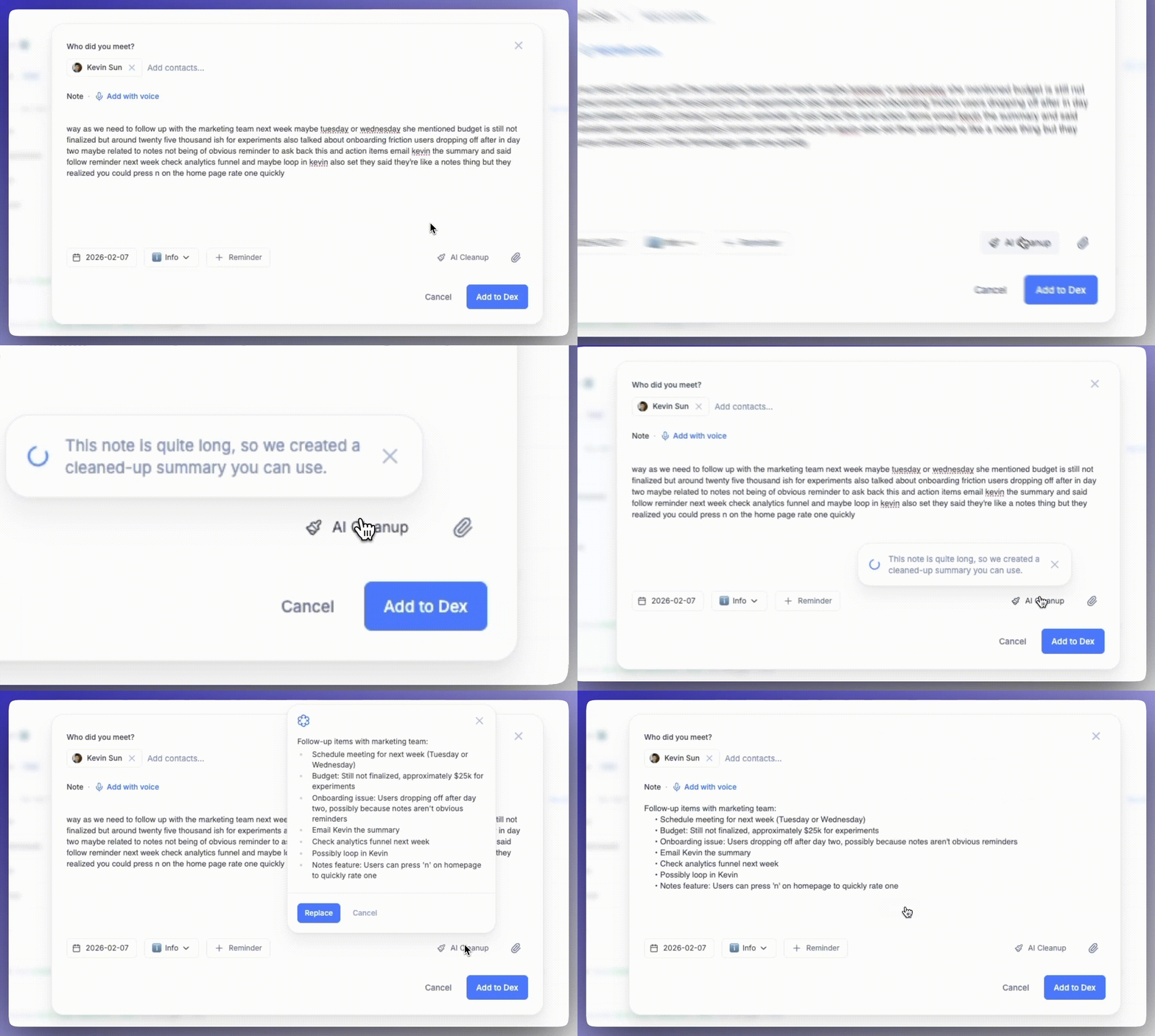
To read more about how note creation and AI cleanup works, visit this page.
Bug Fixes and Improvements 🧩
We're starting the new year with a smoother, more reliable Dex experience, and continue to improve the core experience:
- Improved WhatsApp sync reliability across devices
- Fixed an issue where opening WhatsApp links from Copilot on web returned a 404 error
- Fixed an issue where Dex AI reported no recent interactions despite visible email or iMessage activity
- Improved timeline search for faster and easier note finding
- Improved LinkedIn Enhance for private and public profiles
- Improved CSV import with better support for Google Contacts files
- Added note search capability in Copilot for matching keywords
- Added support for searching directly on the timeline
- Added phone number country codes to Dex API and improved field formatting
- Added new global note creation experience
- Fixed issues with editing and adding birthdays to contacts
- Fixed the card scanner camera not working on mobile
- Ensured uploaded files save correctly in the mobile app
- Fixed "Search in LinkedIn" not working on mobile
- Improved location accuracy in Map View
- Added an option to sort tags for easier organization
- Improved duplicate detection for contacts with titles
- Restructured Dex Guides for easier search and navigation
- Fixed various UI issues across desktop and web apps
- Fixed errors when enabling Google Sync
- Fixed an issue where searching with more than two words caused errors for certain users