
Dex vs Obsidian as a Personal CRM: Which Wins at Contact Management?
Dex and Obsidian can both function as a personal CRM, but they take opposite approaches to contact management. Here's how they compare on setup, reminders, AI, and data ownership — and which one fits your workflow.

If you've ever scrolled through old texts trying to remember how you met someone, you already know why good contact management matters more than a phone full of names and numbers. Your contacts are a map of your relationships — clients, collaborators, old classmates, people you promised to grab coffee with "sometime." Losing track of that map costs you real opportunities.
Two tools keep coming up when people look for a better way to manage contacts outside of a bloated sales CRM: Dex, a personal CRM built specifically for relationship and contact management, and Obsidian, a markdown note-taking app that a dedicated corner of its community has turned into a DIY personal CRM using plugins and templates.
They solve the same underlying problem — remembering who you know, how you know them, and when to reach out — but they get there in almost opposite ways. This guide breaks down how each one handles contact management, where each one shines, and which is the better fit depending on how you like to work.
What Is Dex?
Dex is a personal CRM built from the ground up for contact management. Instead of a sales pipeline full of deal stages and quotas, Dex organizes your world around people: friends, family, clients, investors, and everyone in between.
Core contact management features include:
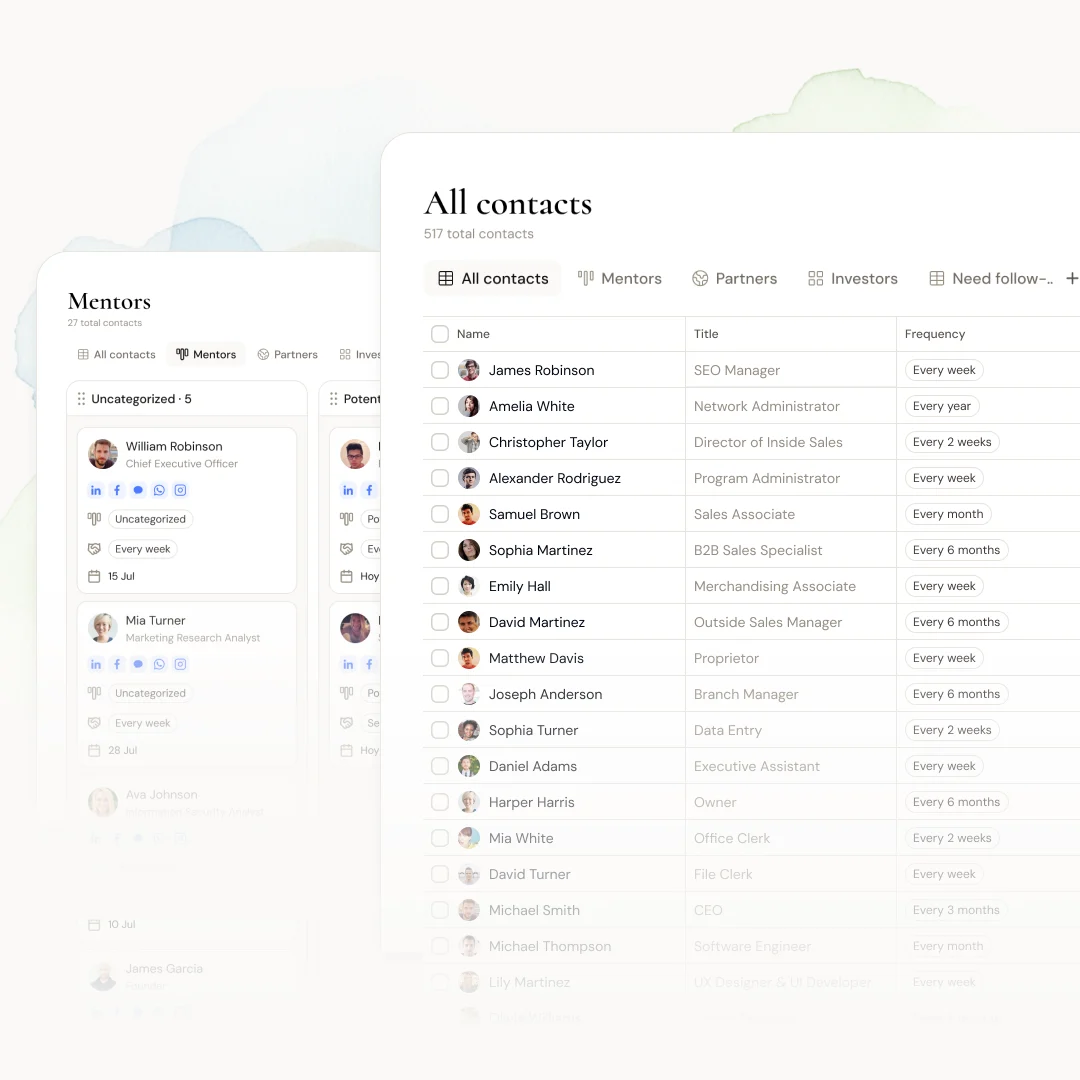
A unified contacts table that consolidates contacts from your phone, email, and LinkedIn into one clean, searchable view
Interaction timelines that automatically log calls, texts, and emails against each contact, so you can see your full history with someone at a glance
Reminders and follow-up nudges that resurface a contact before a birthday, after a set number of days of silence, or ahead of a deadline you set yourself
AI summaries that read your notes and interaction history and surface what matters most about a person before you reach out
A network map that visualizes how your contacts connect to each other, useful for figuring out who can make an introduction
A mobile app and business card scanner for capturing new contacts the moment you meet someone
Because Dex is purpose-built, contact management is the whole product experience. You open the app, see who needs attention, and act. There's no assembly required.
What Is Obsidian?
Obsidian is a local-first, markdown-based note-taking app. On its own, it has nothing to do with contact management — it's a knowledge base, journal, and idea vault. What makes it relevant here is a subset of its community that has built personal CRM workflows on top of it using community plugins like Obsidian Contacts, obsidian-personal-crm, and Arcadia Connect, or simply by hand-rolling a folder of contact notes.
A typical Obsidian contact management setup looks like:
One markdown file per person, often created from a template with fields for name, company, how you met, and notes
Backlinks connecting a contact's note to meeting notes, projects, and journal entries where they're mentioned
Dataview or Bases queries that pull structured data — like "everyone I haven't talked to in 60 days" — into a dashboard note
Plugins for reminders or pipelines, such as Arcadia Connect, which layer follow-up nudges and simple deal stages on top of your notes
Full local storage, meaning your contact data lives in plain text files on your own machine, syncable however you choose
Obsidian's strength here is flexibility. Contact management becomes just another layer of your existing notes, not a separate app you have to remember to open.
The Core Difference: Structured Tool vs. DIY System
The real split between these two isn't features — it's philosophy.
Dex treats contact management as a solved problem you should never have to build yourself. Everything from the reminder logic to the AI summaries to the network map works the moment you sign up, and it keeps working as you add more contacts.
Obsidian treats contact management as one more thing you can build with a flexible enough toolkit. It rewards people who like assembling their own systems, will tolerate some upkeep, and want contact notes woven into a much bigger personal knowledge base rather than siloed off in a separate app.
Neither approach is wrong. They're built for different kinds of people.
Dex vs Obsidian: Feature-by-Feature Comparison
Category | Dex | Obsidian |
Setup time | Minutes — sign up and sync contacts | Hours to days — install plugins, build templates |
Contact import | Automatic sync from phone, email, LinkedIn | Manual entry, or custom scripts/plugins |
Reminders & follow-ups | Built in, automatic | Requires a plugin (e.g., Arcadia Connect) or manual dataview query |
Interaction history | Auto-logged timeline per contact | Manual notes and backlinks |
AI contact summaries | Built in | Not native; possible via third-party AI plugins |
Network mapping | Built-in visual map | Not available without custom graph workarounds |
Mobile app | Native iOS/Android app | Mobile app exists but plugin support is limited |
Collaboration | Designed for individual use, easy to use anywhere | Local-first; sharing requires manual syncing setup |
Data portability | Exportable | Fully plain text, zero lock-in |
Cost | Free plan, paid tiers for advanced features | Free core app; some plugins add cost, sync add-ons are paid |
Learning curve | Low | Moderate to high |
Who Should Use Dex for Contact Management
Dex makes the most sense if you want contact management to be a five-minute-a-day habit, not a project. It's a strong fit if:
You want reminders and follow-ups to happen automatically, without building your own queries
You'd rather have contacts synced from your phone and inbox than typed in by hand
You want AI to do the work of summarizing who someone is and what you last talked about
You're managing a large or fast-growing network — investors, clients, event contacts — where manual upkeep isn't realistic
You want something you can hand to a non-technical version of yourself and still use consistently
Who Should Use Obsidian for Contact Management
Obsidian is the better fit if you already live inside it for notes, journaling, or project work, and you want your contacts to be part of that same system rather than a separate app. It's a strong fit if:
You already keep a knowledge base in Obsidian and want contacts linked to meetings, projects, and ideas
You want full control over your data structure and don't mind configuring plugins to get reminders or pipelines
You care more about owning your data as local plain text than about automatic syncing
You enjoy building and tweaking your own systems as much as using them
Your contact list is manageable enough that manual upkeep isn't a burden
The Verdict
For most people, Dex is the faster path to reliable contact management — it's built for exactly this job, so the reminders, AI summaries, and interaction history all work without any setup. Obsidian can absolutely function as a personal CRM, but it asks you to build the contact management layer yourself out of notes, plugins, and queries, which pays off mainly if you're already a committed Obsidian user who wants everything in one vault.
If contact management is the primary problem you're solving, start with a tool designed to solve it. If you're optimizing for a single, self-owned knowledge system and you're willing to do some setup, Obsidian can get you there too — just expect to spend more time maintaining the system yourself.
Frequently Asked Questions
Can Obsidian really replace a personal CRM? Yes, with the right plugins and templates, Obsidian can function as a lightweight personal CRM. It won't automatically sync contacts or send reminders out of the box, so you'll need to set that up using plugins like Arcadia Connect or Dataview queries.
Is Dex better than Obsidian for contact management? Dex is purpose-built for contact management, so it requires far less setup and maintenance. Obsidian offers more flexibility and full data ownership, but at the cost of a longer setup process and ongoing manual upkeep.
Can I use both Dex and Obsidian together? Some people do — using Dex for day-to-day contact management, reminders, and AI summaries, while keeping Obsidian for deeper notes, journaling, and project work that occasionally references the same people.
Does Dex work if I already have a system in Obsidian? Yes. Dex can run alongside any note-taking system. Many users import their existing contacts into Dex and keep using Obsidian for everything else, rather than trying to migrate their whole knowledge base.