
Networking CRM: Best Way to Manage Your Contacts?

Seven years ago, I built Dex because I had a problem I couldn't solve with existing tools. After meeting people in networking events, I used to dump everything into a spreadsheet, rely on my contacts apps, and simply hope I remembered everything about everyone. I had countless rows of names I had no idea about, no system for follow-ups, and a growing sense of guilt about the people I was already forgetting.
Spreadsheets don't remind you to follow up. Your phone's contact app stores a name and a number. LinkedIn buries your connections behind an algorithm. A networking CRM (or a personal crm) solves a different problem: it keeps your relationships organized, prompts you to stay in touch, and gives you smart context about someone.
But the category is confusing. Some tools marketed as networking CRMs are really sales platforms with a lighter UI. Others are glorified address books. Here is how to think about what you actually need, what separates a good networking CRM from a bad one, and which tools are worth your time in 2026.
What a networking CRM does (and what it does not)
A networking CRM is software designed for individuals who want to manage personal and professional relationships without the overhead of a sales pipeline. The core use: pull your contacts into one place, track your interactions, and remind you when it is time to reach out.
That sounds basic, but the "pull your contacts into one place" part is where most people get stuck. Your network is scattered across LinkedIn connections, Gmail threads, WhatsApp conversations, Instagram DMs, phone contacts, and business cards sitting in a desk drawer. A good networking CRM consolidates all of that into a single searchable database and keeps it updated without manual data entry.
The terminology gets confusing because "CRM" traditionally means tools like Salesforce or HubSpot, or platforms built for sales teams to track leads through a pipeline and close deals. A networking CRM (or a personal CRM) borrows the "contact management" part of that equation and drops everything else. There are no deals to close. There is no pipeline. The unit of value is the relationship, not the transaction.
What a networking CRM is not: it is not Salesforce. If someone is trying to sell you a "networking CRM" with deal stages, lead scoring, or pipeline management front and center, they built a sales CRM and relabeled it. Sales CRMs are designed around converting prospects into customers. A personal CRM for networking is designed around maintaining relationships with real people.
Five features that actually matter
After testing dozens of tools over the past few years, both while building Dex and as a user of other products, I have noticed that the features separating useful networking CRMs from forgettable ones are not the ones that get the most marketing attention.
Contact consolidation across platforms
This is the table-stakes feature. If a tool cannot import from LinkedIn, sync with your email, and pull in your phone contacts, it is not solving your actual problem. The best tools go further: they pull from Gmail, WhatsApp, iMessage, Instagram, and other platforms too.
The question to ask: after connecting everything, do you have one profile per person with their full history across platforms? Or do you have three separate entries for the same person because their email and LinkedIn did not match automatically?
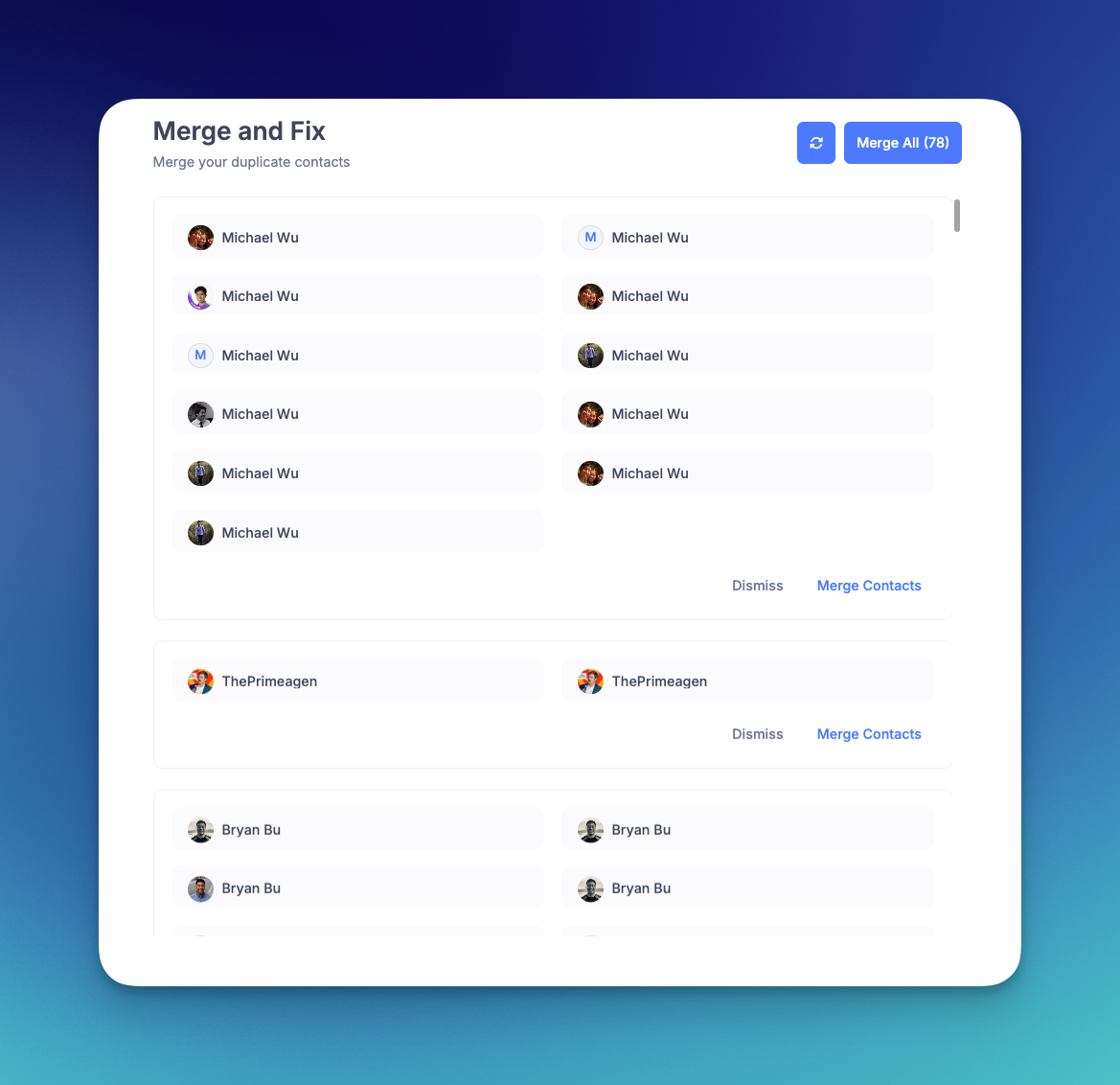
In Dex, when you import from multiple sources, the Merge and Fix tool detects duplicates based on name, email, phone, and nicknames, and cross-checks social profiles to make sure two different people with the same name do not get combined. You review the matches and confirm before anything merges. There is also an opt-in Auto Merge & Fix beta if you prefer hands-off cleanup, but it is off by default.
Reminders that you will actually use
The whole point of a networking CRM is staying in touch with people you would otherwise forget. That means reminders need to be frictionless. The best systems give you a visual board where you can see at a glance who is overdue for a check-in and who you spoke with recently. Set a cadence (every two weeks, monthly, quarterly) and the CRM does the nagging for you.
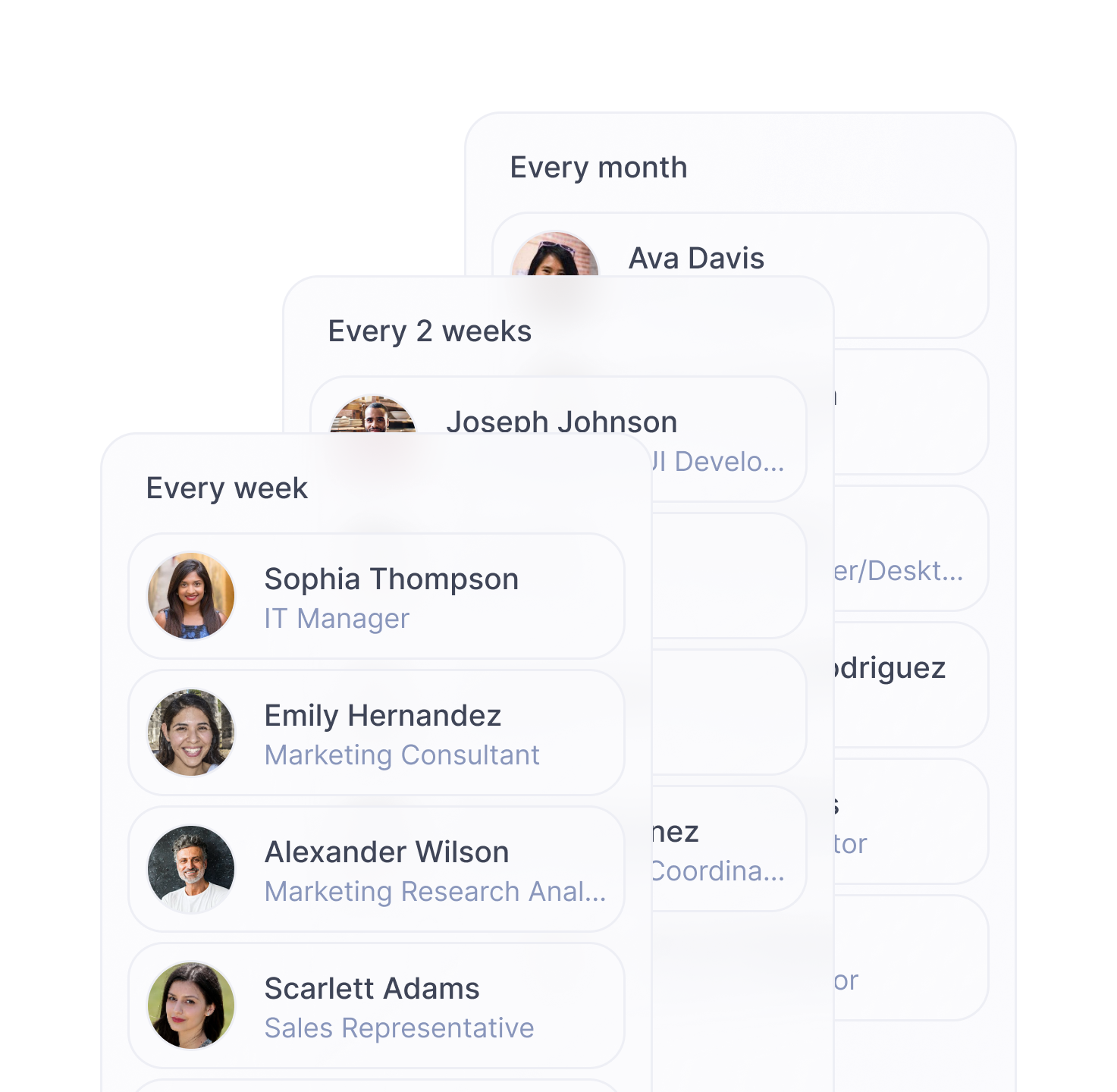
Dex's keep-in-touch board as a kanban-style layout specifically because to-do lists feel like work. A visual board feels like a dashboard. Small difference in design, big difference in whether you actually open it.
Context before every conversation
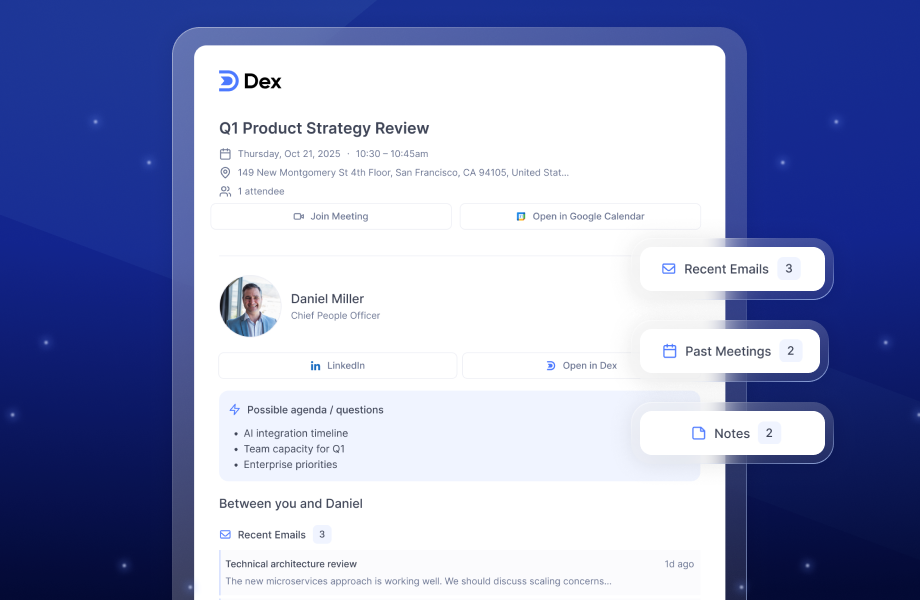
Nothing is worse than jumping on a call and blanking on what you talked about last time. A good networking CRM gives you a timeline of every interaction: emails exchanged, meetings attended, notes you took, LinkedIn messages sent. Dex takes this further with pre-meeting brief emails that arrive automatically before your calendar events, summarizing who you are meeting, what you discussed last, and any notes you saved.
LinkedIn sync that stays current
For most professionals, LinkedIn is where the network lives. A networking CRM without LinkedIn integration is like a fitness tracker that does not count steps. You need connection import, yes, but you also need ongoing sync: job changes, title updates, company moves. These are natural touchpoints for reaching out, and the best CRMs surface them automatically.
Search that finds anyone instantly
You meet someone at a conference. Six months later, someone mentions a company and you think, "I know someone there." If your CRM cannot find that person by company name, by a note you wrote, or by a tag you assigned, it has failed at its core job. Search should work across names, emails, companies, tags, notes, and custom fields.
How a networking CRM fits different workflows
The "best" tool depends on how you actually work. A founder managing investor relationships needs different things than an MBA student building a career network.
Founders and entrepreneurs. You are juggling investors, potential hires, advisors, partners, and customers. You need LinkedIn sync, fast note-taking after meetings, and reminders segmented by relationship type. Groups and tags matter here so you can filter your entire investor pipeline separately from your hiring pipeline. Dex's founder-specific features are built around this workflow.
MBA students. Business school throws hundreds of new people at you in a compressed timeline. Orientation, club events, recruiting events, alumni coffees. The challenge is not meeting people. It is remembering them all three months later. A networking CRM with a mobile app and quick contact capture (including a business card scanner) makes the difference between a stack of forgotten LinkedIn requests and a real network. We wrote a full guide on networking for MBA students that covers this in more detail.

Freelancers and solopreneurs. Your clients are your business. A personal CRM for freelancers helps you track past projects, remember personal details about clients, and follow up at the right cadence to stay top-of-mind for repeat work. Mail merge is useful here for sending personalized check-ins to multiple clients at once.
Job seekers. Networking drives hiring. The data on this is consistent: roughly 37% of hires come through referrals, even though referrals represent only about 6% of applications. A networking CRM helps you organize your job search by tracking who you have spoken with, what companies they work at, and when to follow up after informational interviews.
Why spreadsheets and phone contacts stop working
Most people start managing their network with a spreadsheet or their phone's built-in contacts app. Both work for about 50-100 people. Beyond that, they break down.
Spreadsheets do not sync with anything. Every contact update is manual. There are no reminders. You cannot see your email history with someone by clicking their name. And the spreadsheet lives on one device, so it is not available when you are at a networking event on your phone.
Phone contacts store a name and a number. Maybe an email. They do not store how you met, what you talked about, their spouse's name, or the project they mentioned they were working on. They do not remind you to follow up. They do not show you who changed jobs last week.
Truth is, it is the difference between a list of names and a system that actively helps you maintain relationships. And that system becomes more valuable the larger your network grows, not less.
What to look for when picking a networking CRM
Skip the feature comparison matrices for a moment. The honest evaluation criteria for a networking CRM come down to four questions:
- Will you actually use it? If the interface feels heavy or setup takes more than 15 minutes, you will abandon it within a month. Simplicity beats feature count.
- Does it connect to where your contacts already live? Check the integration list before anything else. If it does not sync with LinkedIn, your email provider, and your messaging apps, you will spend more time entering data than managing relationships.
- Can you find people when you need them? Search is the most underrated feature. You should be able to find anyone by name, company, tag, note, or custom field in under five seconds.
- Does it help you follow up, or just store data? A contact database without reminders is a filing cabinet. A networking CRM should actively nudge you to reach out to the right people at the right time. That is the feature that creates actual value.
Building a follow-up system that sticks
Having a networking CRM is step one. Using it consistently is where most people stall. Here is a system that works without requiring discipline you do not have:
- Batch your follow-ups. Set aside 15 minutes every Monday morning to review your keep-in-touch board and send quick messages to anyone overdue. A two-line "saw this and thought of you" or "how did that project turn out?" takes 30 seconds per person.
- Log notes immediately. After every meaningful conversation, spend 30 seconds writing two things they told you. Not a transcript. Just enough that when you open their contact card in three months, you remember the human behind the name.
- Use life events as triggers. Job changes, promotions, birthdays, company milestones. These are natural excuses to reach out. A networking CRM with LinkedIn sync surfaces these automatically. A congratulations message sent on the day someone announces a new role gets a response rate that cold outreach can only dream of.
- Connect people. Once a week, introduce two people in your network who should know each other. This creates value for three people (them and you as the connector) and is the single fastest way to become someone people think of when opportunities come up. Our guide on becoming a super connector goes deeper on this.
A networking CRM is not a magic wand
It will not make you a better networker any more than a gym membership makes you fit. But it removes the friction that kills most relationships: forgetting to follow up, losing context, and letting good connections go cold because life got busy.
Try Dex free for seven days and see if having a system changes how you show up for the people in your network.
Frequently asked questions
What is a networking CRM?
A networking CRM is software that helps individuals manage personal and professional contacts in one place. It consolidates contacts from sources like LinkedIn, email, and messaging apps, tracks your interaction history, and sends reminders to follow up with people in your network. Unlike sales CRMs (Salesforce, HubSpot), a networking CRM is designed for maintaining relationships, not managing deal pipelines.
Do I need a CRM just for networking?
If your network is under 50 active contacts, you can probably get by with your phone and memory. Beyond that, things start slipping. You forget to follow up, you lose context from past conversations, and you miss natural touchpoints like job changes. A networking CRM becomes the difference between a list of names and a system that helps you maintain real relationships.
What is the best free networking CRM?
Most dedicated networking CRMs do not offer permanent free tiers. HubSpot has a free CRM, but it is built for sales teams. Monica is a free open-source personal CRM, but it requires self-hosting and manual data entry. For a personal CRM that integrates with LinkedIn and your email, expect to pay $10-20/month. The investment pays for itself if even one relationship leads to a referral, a hire, or an opportunity.
How is a networking CRM different from a sales CRM?
A sales CRM (Salesforce, HubSpot, Pipedrive) is built around converting leads into customers. It uses terminology like deals, pipeline stages, and lead scoring. A networking CRM is built around maintaining relationships with people you know. It uses reminders, notes, interaction timelines, and contact groups. The difference is intent: are you trying to close someone, or stay connected to them?
Can I use a networking CRM on my phone?
Yes. Most modern networking CRMs have mobile apps. Dex runs natively on iOS and Android with full functionality including the keep-in-touch board, contact search, note-taking, and the business card scanner. Mobile access matters because networking happens at events, in coffee shops, and between meetings, not just at your desk.
What integrations should a networking CRM have?
At minimum: LinkedIn, Gmail or Outlook, and your phone contacts. Better tools also sync with WhatsApp, iMessage, Google Calendar, and social platforms like Instagram and Facebook. The more sources a CRM pulls from, the more complete your contact profiles are without manual work. Dex integrates with 12+ platforms including all of the above.