
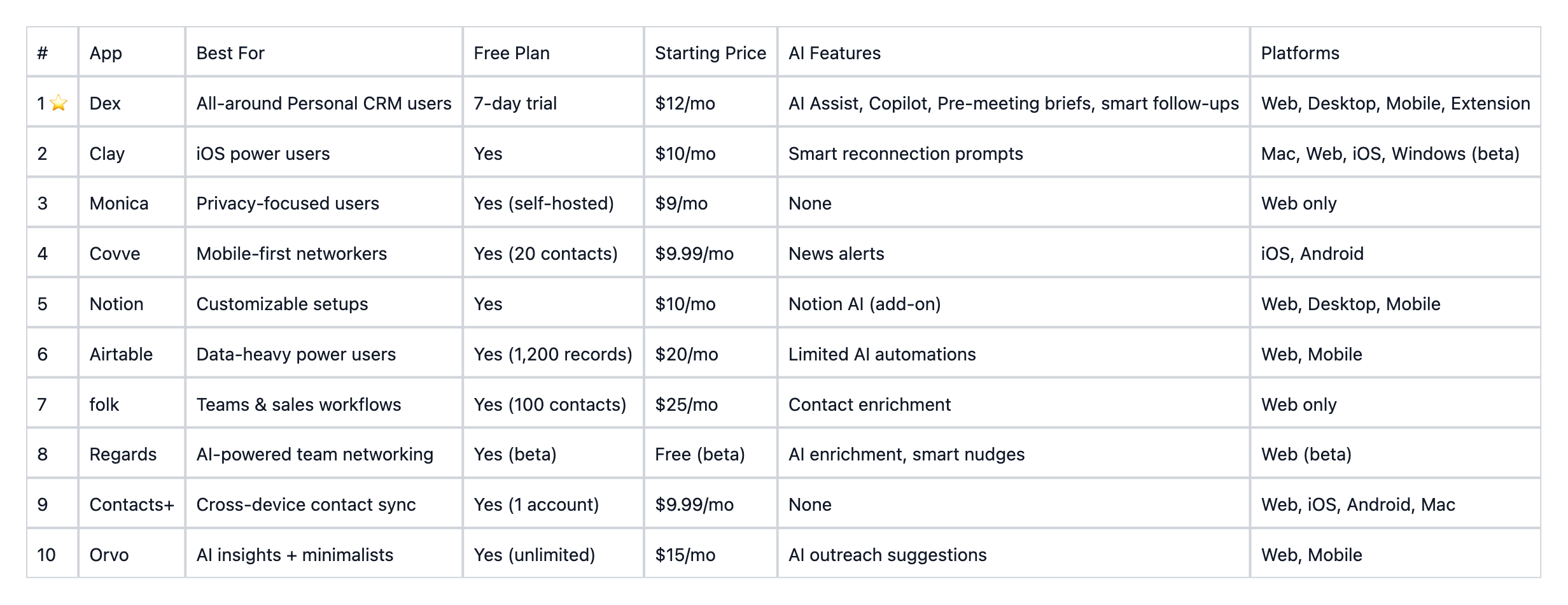
10 Best Personal CRM Apps for Networking in 2026
A personal CRM for networking is the easiest way to stay on top of your contacts and relationships, and in 2026, the best ones are powered by AI. Whether you call it a personal relationship manager app or a contact management tool, the goal is the same: keep track of who you know, remember when you last talked, and make sure no connection goes cold.
Twenty years ago, there were no smartphones. Twitter had just launched, Facebook had only begun experimenting with its News Feed, and “the cloud” was still a novelty. Fast-forward two decades: you might be reading this on your morning commute, from an iPhone more powerful than a 2000s-era rocket system. You’ve just connected with a friend halfway across the world, your family can see your location in real time, and the entire world fits in the palm of your hand. Technology has evolved at a superhuman pace, and so has the way we connect.

Our contacts now live everywhere. Buried in email threads, LinkedIn messages, social apps, and phone lists. As tech expands, your network grows, and keeping track of everyone becomes harder than ever. That’s where the right personal CRM comes in: a tool designed to help you stay connected and build relationships that actually last.
The latest wave of personal CRMs now comes with an AI assistant for personal relationships. These AI-driven tools help you remember important details, suggest follow-ups, and even guide how you nurture connections.
In this year’s roundup, we’re revisiting our Top 10 picks for Personal CRMs, now with AI integrations in consideration, and focusing on tools that help you network smarter and stay connected meaningfully.
Why Using A Personal CRM Can Help You
Most sales-focused CRMs are too complex for individual needs, leading solopreneurs, freelancers, and students to seek simpler, more tailored tools for managing personal networks.

While many rely on basic contact apps like Google Contacts or iCloud Contacts, these only store details and often feel outdated. A personal CRM, on the other hand, centralizes your connections, bringing together information from LinkedIn, email, contacts. and your calendars to help you stay organized, nurture meaningful relationships, and manage your network effortlessly.
Now, with AI in the mix, these personal CRMs become true AI assistants for personal relationships. They do more than just store names and dates. They remember key details, suggest timely follow-ups, and even draft thoughtful messages. It’s networking made smarter, without losing the human touch.
In our quest to find the best personal CRMs, we’ve gathered a bunch of them to identify the most intuitive, AI-powered tools for 2026, both free and paid, and narrowed down which ones are truly designed for AI for networking.
Whether you're a solopreneur, freelancer, job seeker, or just someone who wants to nurture their network, here are the top 10 personal CRM apps worth using this year:
How We Evaluated the Best Personal CRM for Networking in 2026
Our evaluation of the best personal CRM in 2026 includes these main dimensions:
1. Features and Accessibility
The best CRM is the one you’ll actually use. Most are cloud-based with mobile apps, making it easy to manage relationships wherever you are. The best tools now also sync intelligently using AI. More on this later in the article.
2. Ease of Use
Traditional CRMs are often built for sales teams and feel overly complex. For personal use, the best CRMs are intuitive, easy to navigate, and customizable. AI now enhances usability through multiple features.
3. Cost
Individuals typically need a more budget-friendly solution. Pricing still varies by features, but AI is changing how value is delivered. If relationships are central to your work or life, a premium AI-powered plan may be worth the investment.
With these in mind, our evaluation is as follows:
1. Dex
Dex is widely regarded as one of the best personal CRM apps available in 2026, combining deep integrations, AI-powered relationship tools, and an intuitive interface that makes it easy to actually stay in touch.
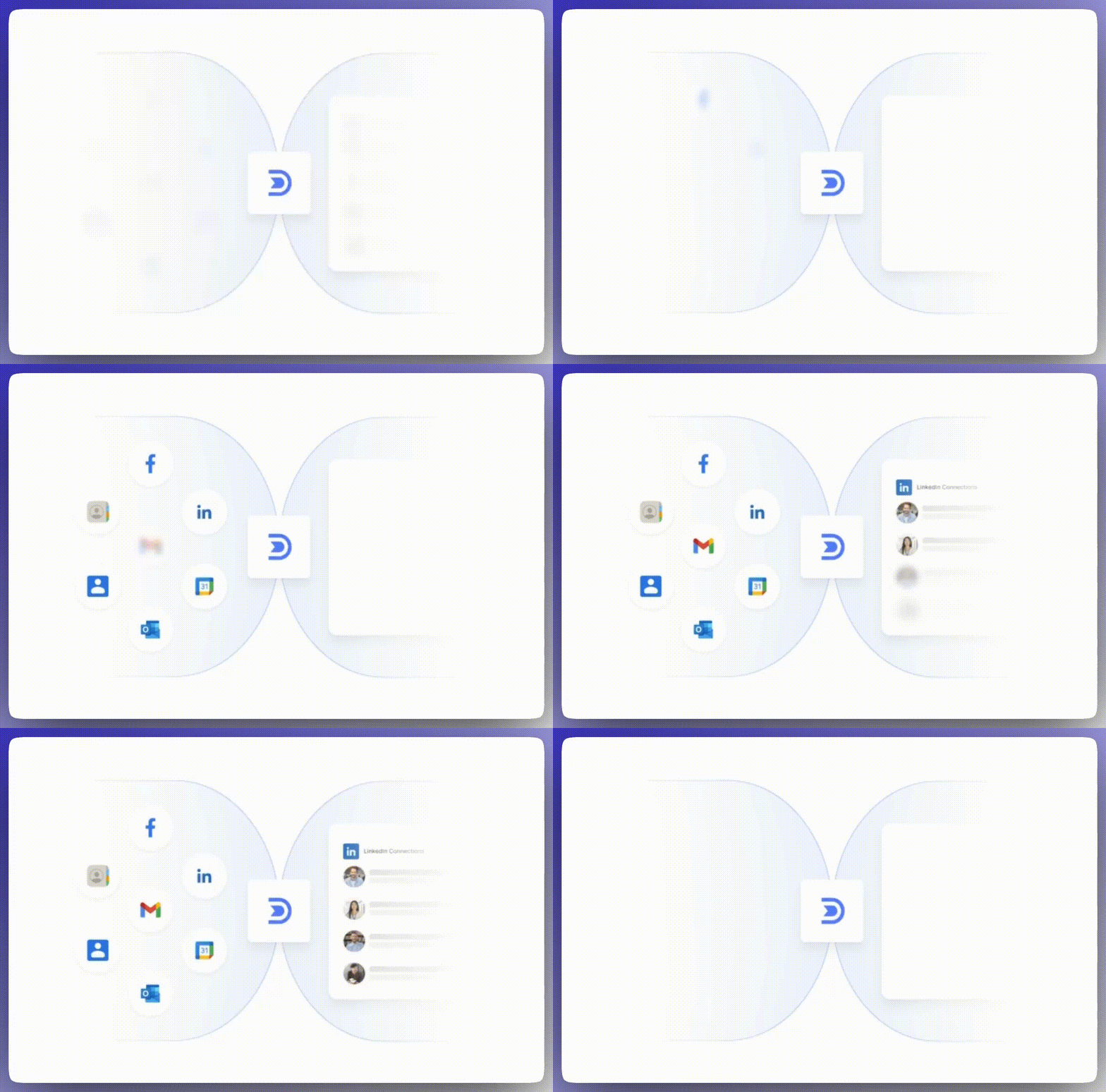
The main focus of Dex is helping people nurture professional and personal relationships. After importing from various social networks, including LinkedIn, Instagram, and many more, then let Dex automatically deduplicate and organize them. From there, you can sort contacts by importance, set keep-in-touch reminders, and get timely nudges so no relationship falls through the cracks.
With features like AI Assist, Dex Copilot, pre-meeting briefs, and interactive network mapping, Dex goes beyond basic contact management to serve as a true AI assistant for personal relationships
Key Features
- Strong Suit of Integrations: Dex brings everything together with powerful integrations: import contacts from LinkedIn, Facebook, Instagram, and X to keep all your relationships in one place, view your full Gmail and Outlook email history in a single timeline, and sync Google and Apple Calendar to automatically track meetings and events so you never miss an important connection.
- Smooth Note Creation with Voice + AI Personalization: Create notes, set reminders, add notes with voice and let AI cleanup format longer transcripts, all in one place.
- Mail Merge: Send personalized emails to multiple contacts at once using templates and dynamic fields from your Dex contact data.
- Pre-Meeting Brief Emails: Before important calls or meetings, Dex sends you a pre-meeting brief email, a concise summary with attendees, past interactions, shared notes, and meeting history. It dramatically reduces prep time and helps you show up informed and intentional.
- Messaging Dex: Text Dex like a friend via SMS or WhatsApp to log notes, set reminders, search contacts, get daily digests, and resurface past connections.
- AI Assist: Manage your contacts effortlessly with Dex’s AI. Organize contacts, set follow-up reminders, update details, track key interactions, and generate conversation starters tailored to your notes and a contact’s professional background.
- Dex Copilot: Organize contacts, update information, set reminders, track interactions, and surface context with AI, all in a natural, intuitive way.
- LinkedIn Messages: Draft and reply to LinkedIn messages directly in your browser. Dex provides context-aware, thread-specific suggestions with a single click.
- Business Card Scanner: Scan business cards on your phone to automatically create contact profiles with all relevant details.
- Smart Deduplication: Automatically merge duplicate contacts and organize people based on importance.
- Kanban-Style Keep-in-Touch Board: Easily set reminders to check in with important contacts at the right time.
- Interactive Network Mapping: Visualize your network with powerful filtering tools to find the right connections instantly.
- Browser Extension: Dex integrates directly into your workflow with support for LinkedIn, Gmail, Twitter, Instagram allowing you to manage contacts without leaving the page.
Pros & Cons
- Best-in-Class Integrations: Dex syncs seamlessly with social media, email, iMessage, WhatsApp, and calendars.
- Perfect for LinkedIn Power Users: Get notified when a connection changes jobs or updates their profile.
- User-Friendly & Intuitive: Simple interface with automation tools to streamline relationship management.
- Available on All Platforms: Web, desktop, mobile apps, and a powerful browser extension.
- Not Built for Sales Teams: Dex is focused on personal use rather than sales or team collaboration.
Pricing:
- Free Version: Dex offers a free trial for 7 days
- Subscription: $12 per month (Premium), paid annually and $20 per month (Professional), paid annually
2. Clay
Clay is a personal relationship manager (PRM) first launched in 2018. It gained attention with its sleek, dark-themed landing page and invite-only signup. In 2024, Clay was acquired by Automattic, the company behind WordPress, Tumblr, and Beeper. Today, Clay is a full-featured personal CRM that helps you manage and maintain meaningful relationships across multiple platforms with minimal manual effort.
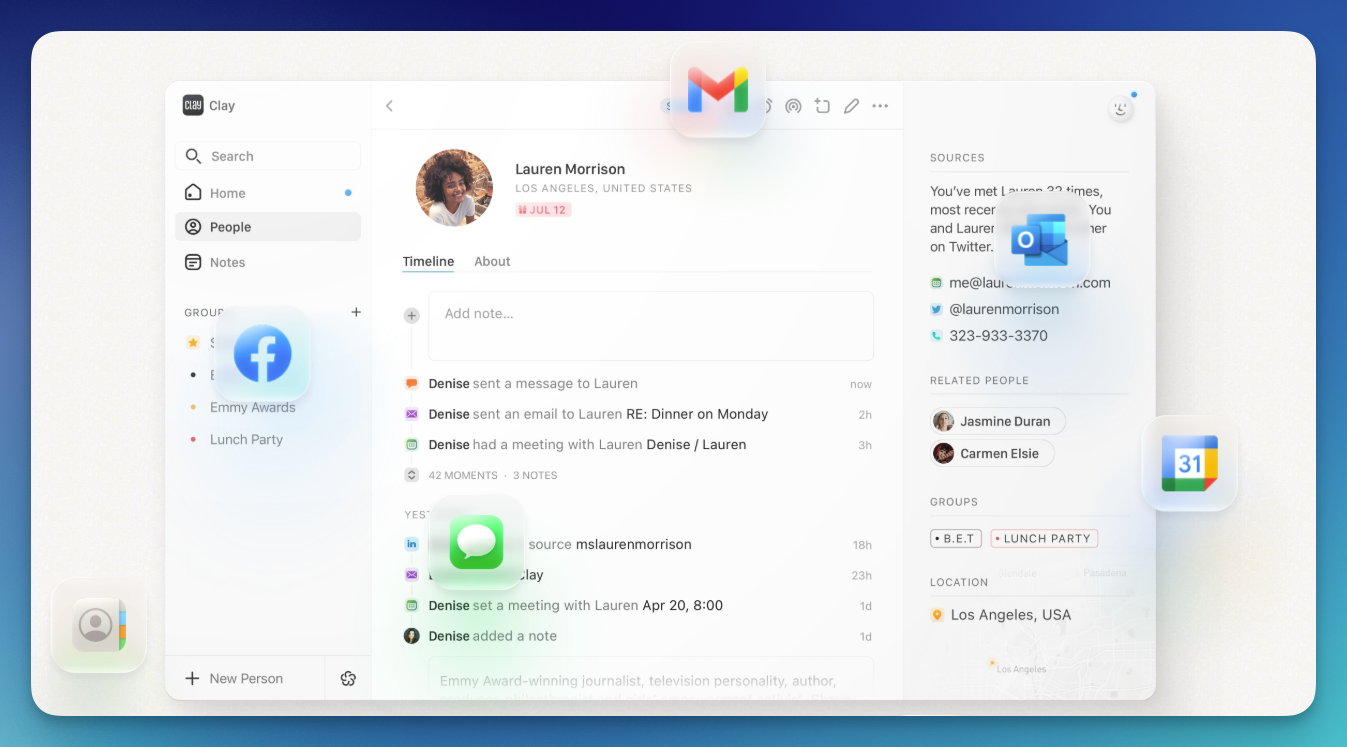
Clay is ideal for individuals who want smart reminders, thoughtful reconnection prompts, seamless messaging and calendar integration, and a visually elegant, intuitive user experience. If you're weighing Clay against other options, our Dex vs. Clay comparison covers where each tool shines.
Key Features
- Account & Integration Sync: Import and update contacts from LinkedIn, Twitter/X, Facebook, Instagram, iMessage, WhatsApp, Gmail, Google Calendar, Outlook, iCloud, CSV, Notion, iOS Contacts, Zapier, Make.com, and MCP Server.
- Cards: Centralized contact profiles showing interactions, connected platforms, and relationship timeline; supports adding, merging, and correcting contacts.
- Notes: Record interaction recaps with Markdown, #labels, and @ references; iOS supports Dictate and OCR.
- Reminders & Reconnect: Set follow-up reminders and use intelligent reconnection prompts based on interaction history.
- Calendar & Social Media Integration: Enrich contacts with calendar events and public social data updates.
- Nexus AI Navigator: Nexus is an AI navigator for your entire network — ask it to draft outreach emails, suggest gift ideas, summarize a contact's background before a meeting, or find the right person in your network for a specific need Clay. It can also create and update contacts, add notes, manage groups, find duplicates, and perform web searches about your contact
- Cross-Platform Access: Mac, Windows (beta), Web, and iOS with theme and notification customization.
Pros & Cons
- Deep Twitter Integration: Tracks bio changes and discovers relevant connections
Messaging Sync: iMessage and WhatsApp integrations create a complete conversation history - Thoughtful Reminders: Daily and weekly prompts to maintain relationships
Elegant Design: Modern interface with theme options, easy to navigate - Cross-Platform Support: Mac, Windows (beta), Web, and iOS
- No Android App: Currently unavailable for Android devices
- Limited Direct Browser Imports: Some social media contacts require CSV or platform-based imports
Pricing
- Free Plan: Generous features with essential integrations.
- Pro Plan: $10/month (billed annually) or $20/month (billed monthly), offering advanced search and onboarding support.
- Team Plan: $49/seat, per month (billed monthly), with ability to add 4 team members to your account.
3. Monica
Monica is the definition of a custom-built personalized CRM and the only open-source CRM on the list. As an open-source system, it offers flexibility, full control over your data, and a comprehensive suite of features focused on personal connections rather than business functions.
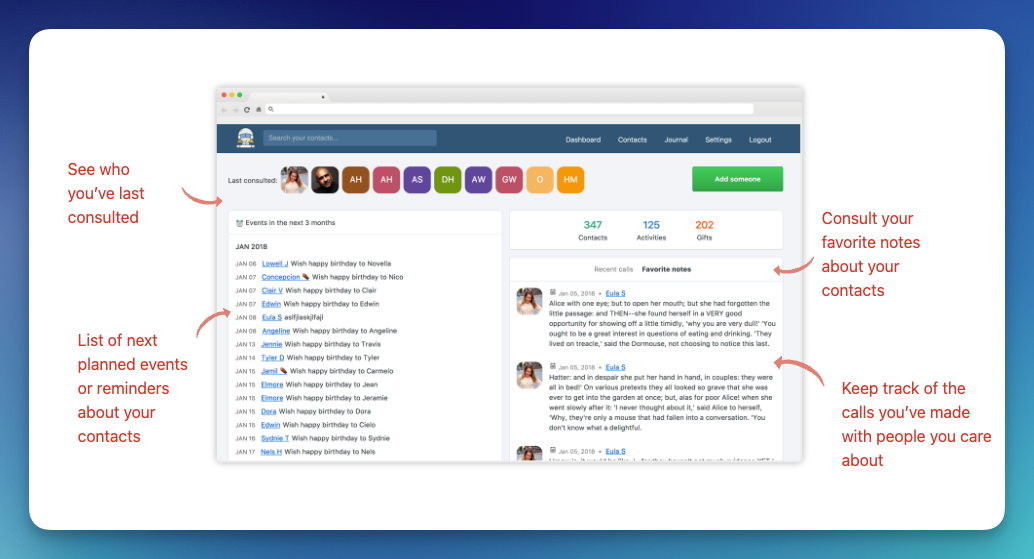
Monica serves as a valuable tool for individuals seeking a personalized approach to relationship management, offering flexibility through its open-source nature and a comprehensive set of features tailored to personal connections.
Key Features
- Comprehensive Contact Management: Store detailed information including names, significant others, children, pets, phone numbers, emails, WhatsApp nicknames, and other contact methods. Access a quick overview of each contact at a glance.
- Private Notes: Add personal notes about contacts to capture context, thoughts, or interaction history.
- Activity Tracking & Call Logging: Record interactions and calls to stay on top of relationships, with reminders for follow-ups on people you don’t hear from often.
- Reminders & Important Dates: Set reminders for birthdays, anniversaries, and other events. Some reminders, like birthdays, are automatically added.
- Gift & Debt Management: Track gifts you’ve given or plan to give and monitor debts owed or owed to you.
Centralized Organization: Manage all interactions and data about your contacts in one place with a modern, easy-to-use web interface. - Web-Based & Accessible: Available via browser, either hosted on your own server or Monica’s cloud servers.
Developer-Friendly API: Import/export contacts and automate various aspects of Monica using a powerful REST API.
Pros & Cons
- Privacy-Focused: Self-hosting gives you full control over your data.
- Open-Source & Customizable: Tech-savvy users can tailor features to their needs.
Comprehensive Contact Management: Track birthdays, interactions, gifts, and debts. - Modern & Simple Interface: Fast, intuitive, and easy to use.
- Developer-Friendly API: Automate workflows and import/export contacts easily.
- No Mobile Apps: iOS and Android versions are not available.
- Manual Data Entry: Many interactions and details must be entered by hand.
- Limited Integrations: Doesn’t sync natively with social media or email services.
Pricing
- Self-Hosted Version: Free to use, requiring technical knowledge to set up and maintain on your server.
- Cloud-Hosted Version: For those preferring a managed solution, Monica offers a cloud-hosted option at $9 per month or $90 per year.
4. Covve
Covve is a strong choice for professionals seeking a personal CRM to streamline networking with smart reminders, business card scanning, and automated news tracking. However, its mobile-only availability and lack of social media integrations may limit its usefulness for some users.
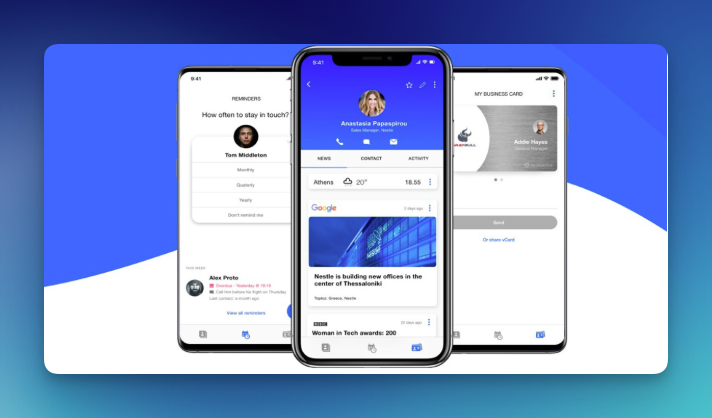
Covve is best suited for users who rely heavily on mobile communication and want tools to track, follow up, and stay informed about their contacts.
Key Features
- Notes Tab: Automatically logs calls, texts, and emails initiated through the app, grouped under each contact.
- Add Notes: Prompted after each interaction to capture key points, with easy access to review before your next conversation.
- Follow-Up Scheduling: Schedule follow-up calls and set reminders to maintain engagement with contacts.
- Comprehensive Contact Management: Maintain detailed profiles with notes and reminders to stay organized.
- Business Card Scanning: Digitize business cards accurately, simplifying your networking process.
News Alerts on Contacts: Receive curated news updates about your contacts for timely conversation starters.
Pros & Cons
- Best for Professional Networking: Notes, follow-ups, business card scanning, and news alerts help maintain meaningful professional relationships.
- Sleek & User-Friendly Interface: Clean, intuitive mobile design.
- Automated News Updates: Stay informed about key developments for your contacts.
- Smart Follow-Up Reminders: Helps you proactively manage engagements.
- Mobile-Only: No web or desktop app; only available on iOS and Android.
- Limited Free Version: Supports only 20 contacts.
- No Social Media Sync: Lacks automatic updates from LinkedIn, Twitter, or other platforms.
- Past Data Security Concern: Experienced a data breach in 2020 affecting some users.
Pricing
- Free Plan: Basic features with a limit of 20 contacts.
- Pro Plan: $9.99/month (billed annually) or $12.99/month (billed monthly) with unlimited contacts and advanced features.
5. Notion
Notion is another great choice for a relationship management tool. It brings a myriad of different options for managing contacts and also allows you to customize your personal CRM system exactly as you see fit.
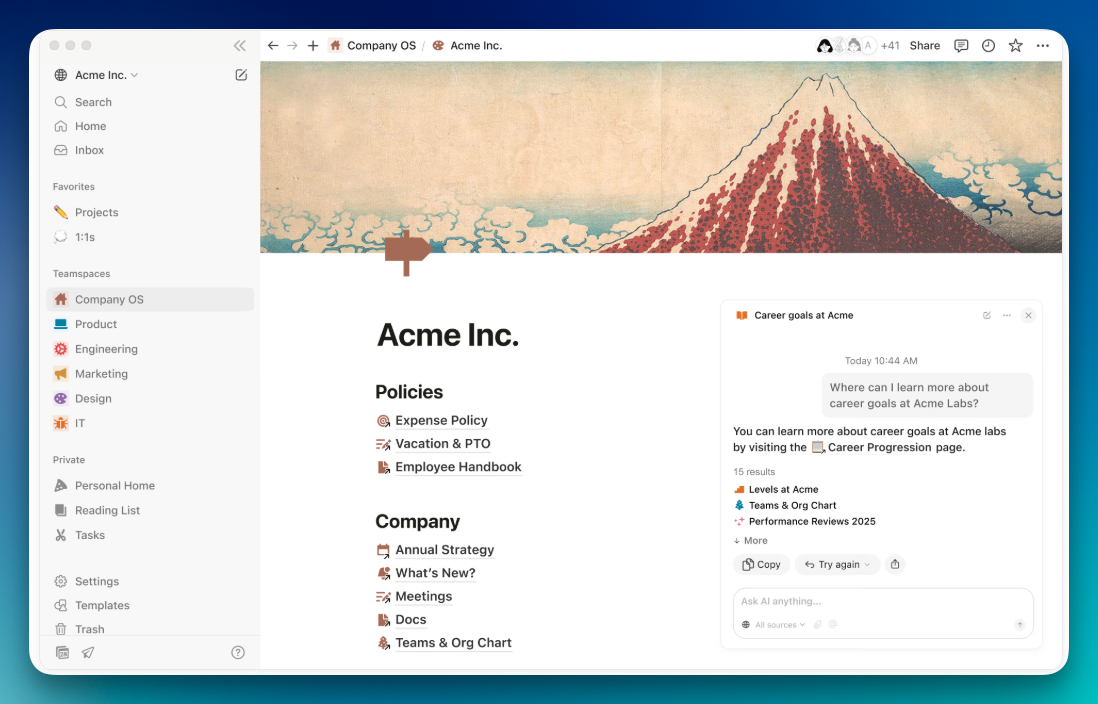
Notion can help you track all sorts of events related to your friends, family, and co-workers. You won’t ever be out of context when meeting an old friend. That is why it’s a handy tool for people who want to organize their life. However, you would need to use Google Calendar side by side to set recurring date reminders for birthdays.
This app also gives the user free rein to build different templates. At the start, Notion comes with a few standard templates that fit most people, but you can always change it up to make it suit your needs.
That said, if you're specifically looking for a tool built for relationship management rather than general organization, see how Notion compares to a dedicated personal CRM like Dex.
Key Features
- Flexible Database System: Build custom contact databases with properties like phone numbers, emails, tags, relationship status, last contacted date, and any other custom field you need, all in table, board, gallery, or calendar views.
- Templates & Quick Setup: Start with pre-built personal CRM templates or build your own from scratch. Notion's template gallery includes relationship trackers, networking boards, and contact directories that can be customized freely.
- Rich Notes & Context: Attach detailed notes, meeting summaries, documents, and media to any contact page. Each person can have their own dedicated page with full formatting, embedded content, and sub-pages.
- AI Agents (Notion 3.0): Launched in late 2025, Notion AI Agents can run multi-step tasks across your workspace and connected tools like Slack, Google Drive, and GitHub.
- Multi-Platform Access: Available on web, Mac, Windows, iOS, and Android with real-time sync across all devices.
Pros & Cons
- High Level of Customizability: Allows users to tailor the tool to their needs.
- Intuitive User Interface: Easy to add notes and organize information.
- Workflow Integration: Can be integrated into some existing workflows.
- Generous Free Version: Sufficient for most personal use cases.
- No Social Media Import: Cannot import contacts from LinkedIn, Facebook, or other social networks.
- Manual Upkeep Required: Requires regular maintenance and has very limited reminder functionality.
Pricing:
- Free Plan: Offers a feature-rich free plan sufficient for most users.
- Subscription: Paid plans start at $10 per member/month, billed annually.
6. Airtable
Airtable is a controversial pick on this list. It's an incredibly powerful tool with many customization options, but it also relies heavily on manual input. And while you get tremendous flexibility and power with Airtable, you'll need to provide a lot of manual input for it to become a functional personal CRM.
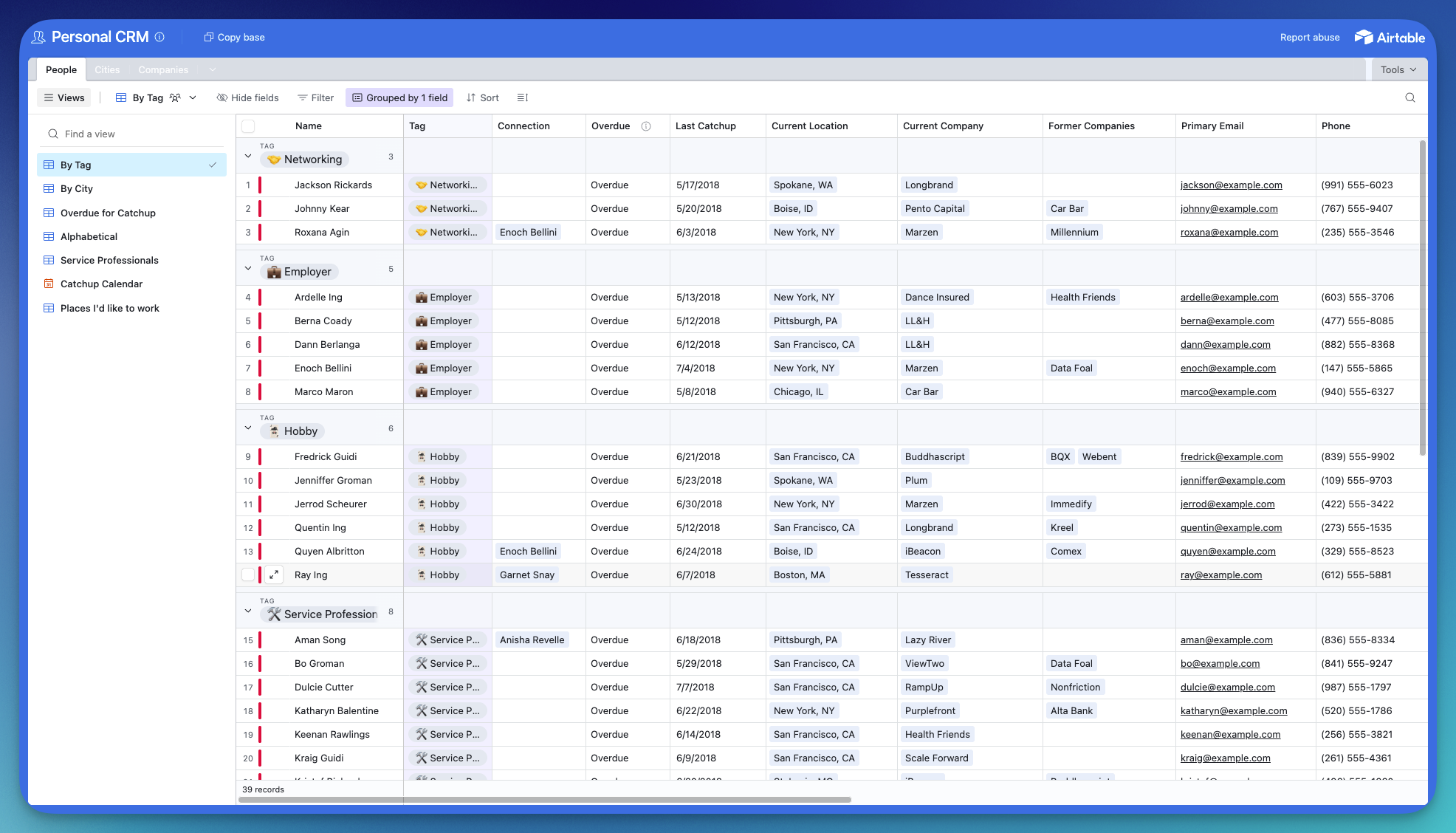
We know some people might balk at its non-automated nature. But its redeeming quality is that it is one of the least opinionated CRM apps, so it's suitable for the more unusual or specific use cases. It also has a lot of flexibility in terms of overall usage. You can set it up as a fully professional tool or a fully personal one. There are plenty of options in between too.
Aside from being a CRM, it can serve as a powerful data visualization tool. It can help you organize all your contact data in charts, 3d models, and other formats. It gives the user full control over the template. You can also switch between different gallery, grid, or kanban views.
Lastly, Airtable also brings excellent app integration features too. The only downside is that it requires a lot of manual tinkering to reach the optimal form. The basic templates are somewhat mediocre. You can even go as far as to say that it is a glorified Excel app.
Key Features
- Multiple View Types: Switch between grid, kanban, calendar, gallery, Gantt, and timeline views to visualize your contacts and relationships in whatever format fits your workflow best.
- Custom Fields & Formulas: Create any field type you need — dropdowns, checkboxes, dates, attachments, linked records, formulas, and more. Build calculated fields to track things like days since last contact or relationship scores.
- Linked Records & Relational Data: Connect tables together so contacts link to companies, meetings link to people, and everything stays relational. This lets you build a CRM structure as simple or complex as you need.
- Extensions & Data Visualization: Add charts, pivot tables, page designers, and other extensions directly into your base to turn raw contact data into visual dashboards and reports.
- Automations: Set up trigger-based automations to send emails, update records, or create tasks when certain conditions are met — like notifying you when a contact hasn't been updated in 30 days.
- Team Collaboration: Multiple users can work on the same base simultaneously with granular permissions, comments, and revision history. Ideal for teams sharing a contact database.
- Integrations: Connects with thousands of apps through native integrations and Zapier, including Gmail, Slack, Google Calendar, and more.
Pros & Cons
- High Customizability and Team Functionality: Allows users to tailor workflows and collaborate effectively.
- Generous Free Plan: 1,000 records included, sufficient for most individual users.
- Considerable Manual Input Required: Needs regular updates and maintenance.
- No Automated Social Media Sync: Does not automatically pull data from social platforms.
- Time-Intensive Setup: Setup can be complex, and the tool is not primarily designed as a personal CRM.
Pricing:
- Free Plan: Airtable offers a generous free plan allowing up to 1,000 records per creator.
- Subscription: Paid plans with additional features start at $20 per seat/month, billed annually.
7. folk
Inspired by the design of Notion, folk is a CRM company based in Paris, France. See how it stacks up in our Dex vs. folk comparison.
Folk is highly customizable and can easily be integrated with other tools. You can directly import your contacts from Gmail, LinkedIn, Google contacts, and more.
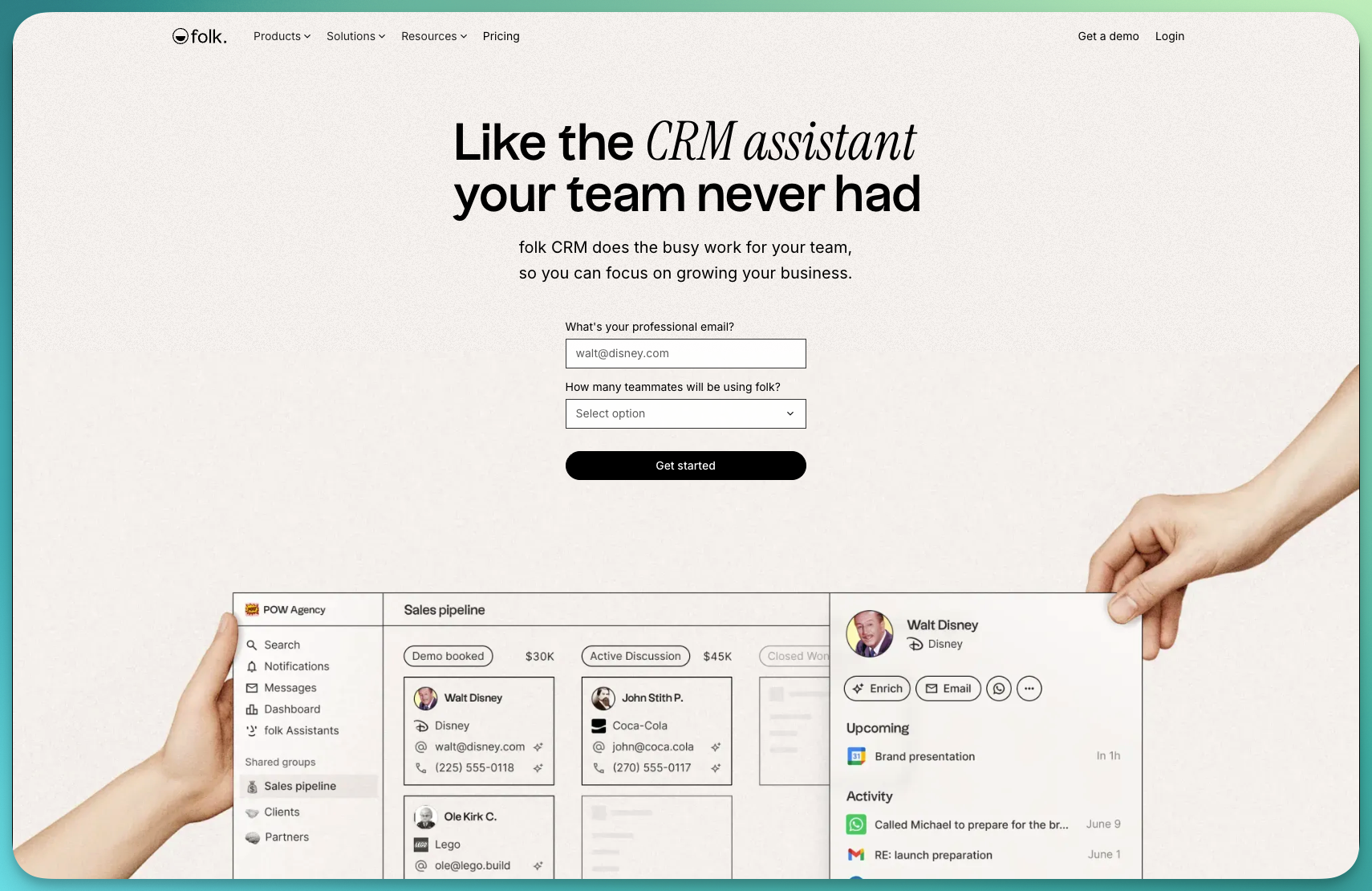
The workspace inside folk can be adapted for different use cases, which makes it great for someone who prefers to set up their own processes. For example, it can be used to build different sales workflows, send batch emails, or as a personal CRM manager. Moreover, the team at folk has put together a large set of templates that can be modified.
Key Features
- Customizable Workspaces: Adapt folk to your workflow with flexible layouts, custom fields, and tags—perfect for managing investors, clients, or personal connections.
- Powerful Contact Enrichment: Automatically fills in missing details like job titles, company names, and social profiles for richer, more complete contact profiles.
- Chrome Extension (folkX): Instantly import contacts from Gmail, LinkedIn, and other platforms, keeping your CRM updated without manual entry.
- Collaborative Relationship Management: Work together with your team in one shared database—assign contact ownership, add notes, and track interactions seamlessly.
- Multi-View Database System: Visualize your relationships as lists, tables, Kanban boards, or pipelines for a clear, customizable overview of your network.
- Batch Emailing & Follow-Ups: Send personalized batch emails directly from folk to maintain thoughtful, consistent communication at scale.
- Template Library: Choose from ready-to-use templates—like “Investor CRM” or “Personal Contacts” and customize them to match your needs.
- AI Assistants (24/7): folk now offers AI Assistants that work around the clock, like automating tasks, enriching contacts, and handling routine CRM operations even when you're offline
- WhatsApp & Reporting: folk now integrates with WhatsApp for automatic contact creation and message syncing. New customizable dashboards let you track performance and business health metrics in one view
Pros & Cons
- Clean User Interface: Similar to Notion, providing a simple and organized experience.
- Supports Team Functionality: Allows multiple users to work on the same database collaboratively.
- Handy Chrome Extension (folkX): Enables importing of contacts from social media.
- Supports Sales Processes: Includes features like sending batch emails.
- No Mobile App: Only available on the web.
- More Useful for Teams and Sales Processes: May not be ideal for individual users.
- Limited Free Tier: Only 10 contact enrichments and 100 contacts available.
- No Unlimited Contact Enrichments in Paid Plans: Paid plans still have limits on enrichments.
Pricing
- Standard Plan: $24 /member/month, billed annually
- Premium Plan: $48 /member/month, billed annually for businesses who need a CRM that supports advanced collaboration and multi-channel
8. Regards
Regards AI is a smart personal CRM designed to help individuals and teams build stronger, more meaningful connections. It turns networking from a chore into an effortless, organized process, helping you follow up, remember key details, and grow relationships that last.
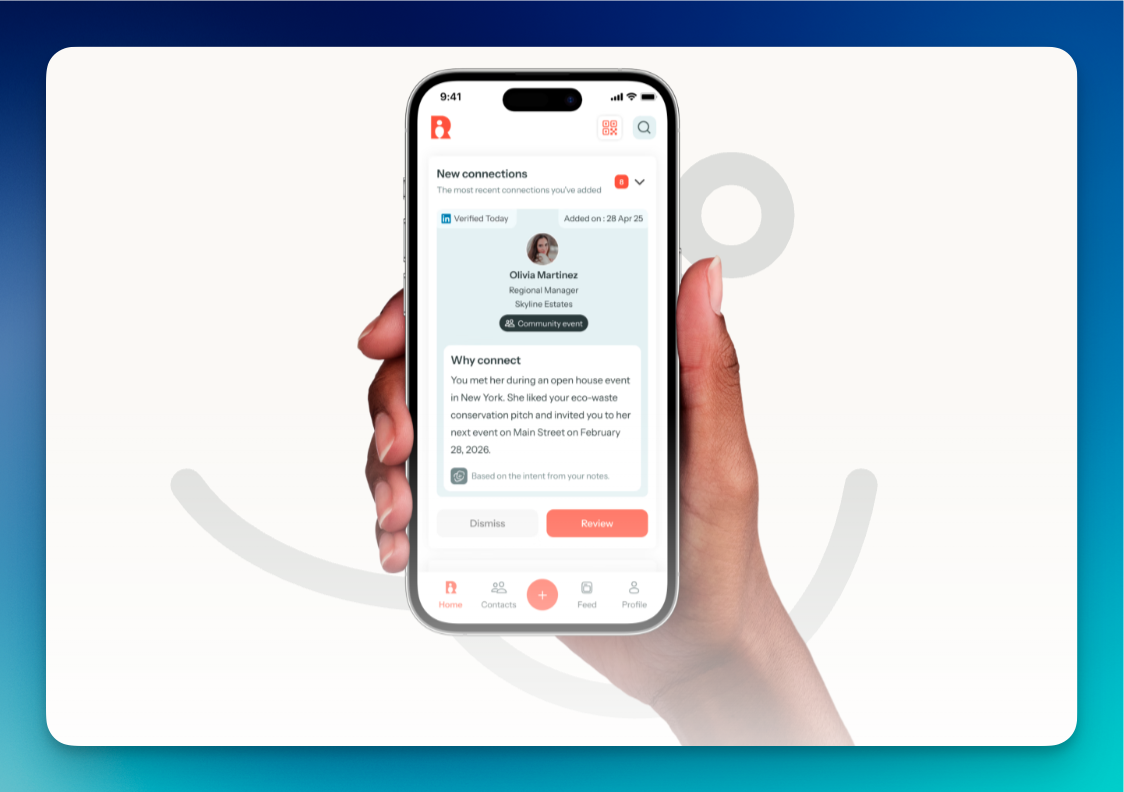
Built for professionals who value connection, Regards combines AI-driven insights with seamless organization. Whether you’re managing personal contacts or coordinating across a team, Regards ensures you never lose track of a conversation or miss the right moment to reach out.
Key Features
- Easy Contact Management: Instantly scan business cards or import contacts from multiple sources.
- AI-Powered Enrichment: Automatically gathers data to create rich, up-to-date profiles.
- Relationship Summaries: Generates intelligent insights and recaps from past interactions, making every follow-up more personal.
- Smart Nudges & Conversation Starters: Helps you reconnect at the right moments without being spammy.
- Centralized Team Data: Keeps relationship information organized, shared, and secure—so everyone knows who owns what, and when.
Pros & Cons
- AI-Powered Networking: Automates relationship management from enrichment to follow-ups.
- Team Collaboration: Designed to give teams a unified view of contacts and interactions.
- Personalization at Scale: Makes outreach smarter and more thoughtful.
- Clean, Modern Design: Intuitive and simple to use.
Pricing
- Pro Plan: $19.99/month, billed monthly
9. Contacts+
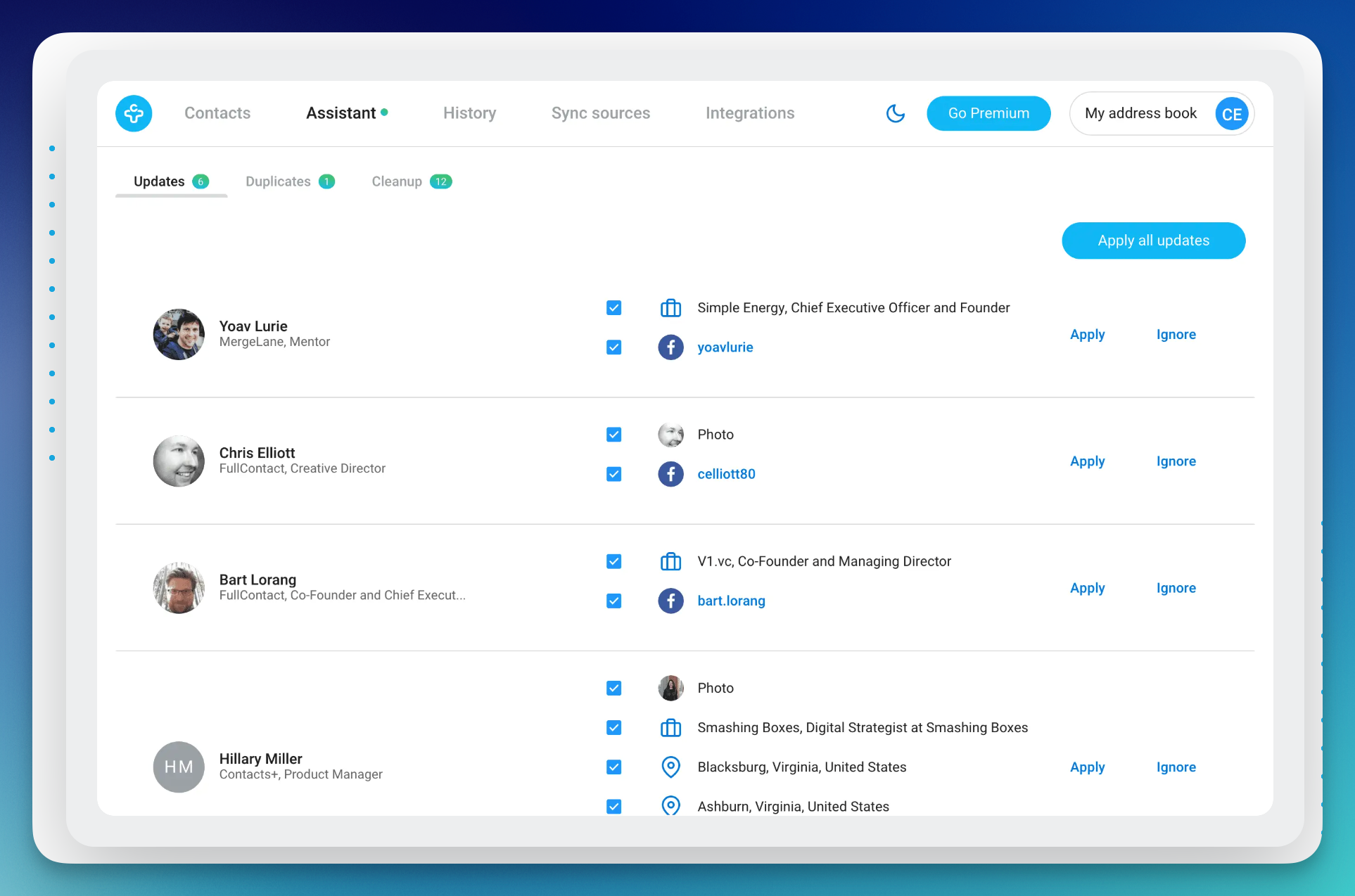
Contacts+ is a cross-platform contact management app designed to help professionals and teams keep their address book clean, synchronized, and organized across all devices and accounts. It turns scattered contacts into a single, unified view of your network — making it easier to manage personal and professional relationships without the chaos.
Key Features
- Unified Contact Sync: Sync and merge contacts across Google, Apple, Microsoft, and more for a centralized address book.
- Duplicate Detection & Cleanup: Automatically detects and merges duplicate entries to keep contact data clean and accurate.
- Notes, Tags & Reminders: Add personalized notes, tags, and birthday alerts to track important details for each connection.
- Cross-Platform Access: Available on web, iOS, Android, and Mac, ensuring your network is always accessible.
- Business Card Scanner: Instantly capture and digitize business cards to add new contacts seamlessly.
- Advanced Search & Filters: Quickly find the right contact using smart search and filtering options.
- Secure Backup & Sync: Keeps your contacts securely backed up and synchronized across all devices.
Pros & Cons
- Easy Cross-Device Sync: Perfect for users managing multiple accounts and devices.
- Simple, Clean Interface: Intuitive and straightforward to use.
- Comprehensive Data Management: Automatically merges duplicates and enriches profiles.
- Not a Full CRM: Lacks features like AI insights or advanced relationship tracking.
- Team Features Locked Behind Paid Plans: Shared databases and collaboration require subscription access.
Pricing
- Free Plan: Basic syncing for one account with limited updates.
- Premium: $9.99/month, unlocking 5 account syncs, enrichment, and faster updates
10. Orvo
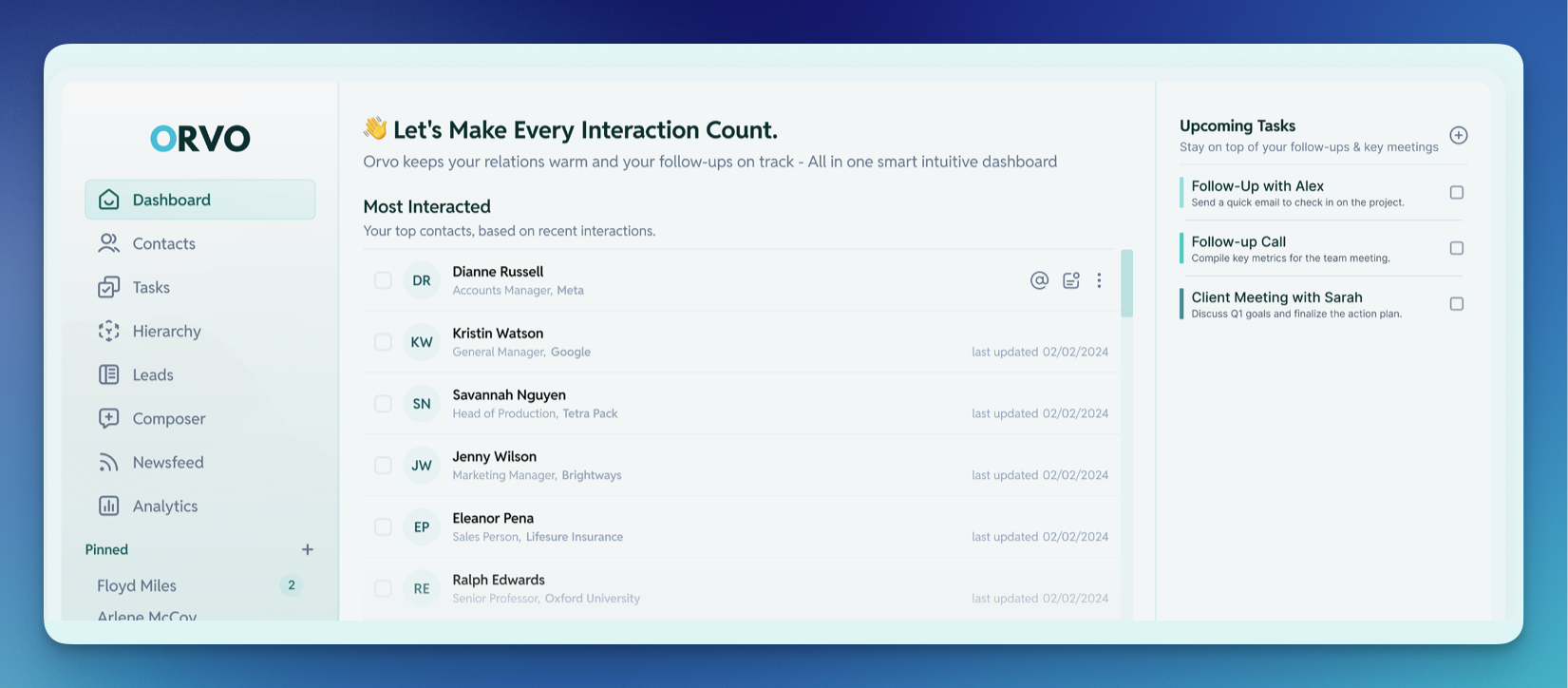
Orvo is a personal CRM platform designed to help individuals and teams organize, track, and nurture relationships more intelligently. It combines contact management with AI-powered insights to make follow-ups more natural, timely, and effective. Whether you’re managing your personal network or coordinating with a team, Orvo helps you build genuine connections that last.
Key Features
- AI-Powered Relationship Insights: Uses AI to generate personalized outreach suggestions, summaries, and next steps for every contact.
- Smart Follow-Up Reminders: Prompts you to reconnect at the right moments without feeling forced or repetitive.
- Comprehensive Contact Management: Organizes contacts, logs interactions, and stores detailed relationship context in one place.
- Visual Activity Timeline: Displays all past communications and milestones for quick context before reconnecting.
- Task & Reminder Management: Centralizes follow-ups, tasks, and meeting prep to keep your workflow organized.
- Personalized Newsfeed: Highlights updates and relevant news about your contacts to make outreach timely and authentic.
- Simple, Modern Interface: Designed with usability in mind, keeping your relationship management efficient and intuitive.
Pros & Cons
- Strong AI Integration: Excellent for users who want automated insights and suggestions.
- Clean and Focused Design: Streamlined for ease of use and minimal distractions.
- Unlimited Contacts on Free Plan: Generous offering compared to most CRMs.
- Still Maturing: Advanced AI and team features are being gradually rolled out.
- Limited Integrations: Fewer third-party connections compared to larger CRMs.
Pricing
- Free Plan: Includes unlimited contacts and basic CRM functionality.
- Pro Plan: $15/month, adding AI tools like email writing, transcription, and analytics.
- Business Plan: $30/month, unlocking collaboration, enhanced automation, and full AI features.
Best Free Personal CRMs in 2026
Not ready to commit to a paid plan? Several personal CRMs on this list offer genuinely useful free tiers that go beyond a basic trial. Here's how they stack up:
- Orvo offers the most generous free plan with unlimited contacts. If you want a no-cost starting point with room to grow, it's hard to beat.
- Monica is completely free if you self-host it. Since it's open-source, you get full control over your data and features at no cost, though you'll need some technical know-how to set it up.
- Contacts+ has a free tier that covers basic syncing for one account, giving you a clean, unified address book across devices.
- Notion and Airtable both offer free plans that can be configured into personal CRMs, though they require manual setup and ongoing maintenance since they're not purpose-built for relationship management.
- Dex offers a 7-day free trial so you can test the full feature set, including AI Assist, Copilot, and LinkedIn integration, before deciding on a plan.
If your network is small and your needs are simple, a free option can work well. But as your contacts grow and you want features like AI-powered follow-ups, automated syncing, and smart reminders, a dedicated personal CRM like Dex pays for itself in time saved.
Honorable mentions: Shut-down personal CRMs
Many past companies have also tried building tools in the space. Here, we mention a few of the more recent products that have either been discontinued or have significantly changed course:
- Garden, an app for iOS developed by a solo founder. It hasn’t been updated since mid-2020.
- FollowUp has pivoted from being a personal CRM manager since its acquisition in 2018. FollowUp now only offers a reminder tool that integrates with your email inbox. It helps you not forget important emails by automatically setting reminders to send follow-up emails. However, its focus on a specific workflow means it's no longer an alternative to a fully-featured personal CRM.
- Nouri is now focused more on event management features. Nouri now lets you list events, sell tickets, and allows attendees to network during events using their platform.
- UpHabit is now focused on "Relationship Selling" and "Salesforce Hygiene" as of 2022. The focus on becoming a sales tool means it is no longer a viable personal CRM solution for most people.
Make Networking Effortless with the Best Personal CRM
Personal CRM tools have been shown to be incredibly useful in creating and maintaining your personal and professional relationships. By using a system to manage your relationships, networking is a process that becomes systematic and repeatable, providing a clear source of personal fulfillment and professional opportunities.
For 2026, here are the personal CRMs that stand out for different use cases. Remember, the best CRM is the one you’ll actually use:
- Best for Teams: folk or Airtable
For team-based networking and shared workflows, folk and Airtable provide collaborative features, flexible layouts, and customizable contact management. They let multiple users manage relationships efficiently, track interactions, and organize workflows. - Best for Minimalist & Cross-Platform Use: Monica or Orvo
If you value simplicity but still want comprehensive tracking, Monica (privacy-focused, open-source) and Orvo (clean interface, intuitive design) offer organized ways to manage relationships across devices, without unnecessary complexity. - Best for iOS Power Users: Clay
iOS users who want a sleek, deeply integrated experience, especially for social media interactions, will find Clay unmatched. Its intelligent prompts, reconnection reminders, and elegant design make keeping in touch effortless. - Best for AI-Enhanced Team Networking: Regards
For teams looking to leverage AI for smarter collaboration built inside a personal CRM, Regards provides automated insights, conversation starters, and follow-up suggestions, helping groups maintain relationships efficiently without losing the human touch. - Best for Personal Networking + AI Assistance: Dex
For those who want the perfect mix of personal relationship management and AI assistance, Dex is the standout. Its AI Assist and Dex Copilot help you track interactions, set reminders, draft messages, and surface important context automatically. Combined with LinkedIn integration, network mapping, and smart follow-ups, Dex empowers you to stay connected meaningfully while letting AI handle the repetitive tasks.
What all of these personal relationship management apps share is a focus on the individual, not the sales team. They're built to help you remember, follow up, and stay connected with the people who matter to your career and your life.
While there are plenty of great options out there, Dex stands out for its seamless integrations, AI-powered features, and focus on making networking feel effortless rather than like just another item on your to-do list.
Ready to try the top-ranked personal CRM for networking? Start with Dex for free today and see how it can transform the way you stay connected.
Frequently Asked Questions About Personal CRMs
What Is a Personal CRM?
A personal CRM is a powerful tool for keeping track of your personal and professional connections. It helps you manage your networks with notes, reminders, and smart organization features. Many modern personal CRMs now include an AI assistant for personal relationships, which can help you prioritize contacts, suggest follow-ups, and even highlight key details from your interactions. These systems often blend elements of an address book, calendar, map, and database, making it easier to use AI for networking to maintain and grow meaningful connections.
What Is a Personal CRM Used For?
A personal CRM can greatly enhance how you manage your relationships. By keeping all contact details like professional background, shared interests, and interaction history, all in one place, you get a complete view of each connection. A personal CRM can analyze these details to suggest the best times to reach out, recommend personalized messages, or identify connections that might help you achieve your goals. You can also save time by integrating your CRM with email, calendar, and social media, ensuring all your interactions are well-organized. Plus, setting reminders for birthdays, anniversaries, and follow-ups ensures you never miss important dates, showing that you genuinely care, now powered by AI for networking that keeps you proactive.
What's the Difference Between a Personal CRM and a Business CRM?
A business CRM like Salesforce or HubSpot is built for sales teams, tracking pipelines, deals, and revenue. A personal CRM is built for individuals managing their own network. The focus shifts from closing deals to nurturing genuine relationships. Personal CRMs are simpler, more affordable, and designed around how real people stay in touch through texts, LinkedIn messages, coffee chats, and occasional check-ins, rather than sales workflows and quotas.
Is a Personal CRM Easy to Learn and Use?
The learning curve varies depending on the CRM, but most are designed with user-friendliness and intuitive interfaces in mind. Modern personal CRMs that include an AI assistant for personal relationships often make adoption even easier by providing smart suggestions, automated reminders, and helpful prompts. With the right guidance and resources, getting comfortable with a CRM is usually straightforward, allowing you to leverage AI for networking without a steep learning curve.
Do I Really Need a Personal CRM, or Is a Spreadsheet Enough?
A spreadsheet can work as a basic contact tracker, but it quickly becomes a chore to maintain. There's no automatic syncing, no reminders, no interaction history, and no AI to help you stay proactive. A personal CRM automates the upkeep — pulling in data from your email, calendar, and social platforms — so your contact list stays current without manual effort. If your network is growing and relationships matter to your career or personal life, a dedicated personal CRM will save you time and help you stay genuinely connected in a way a spreadsheet simply can't.
What Are The best tools for Managing Professional Networking Contacts?
The best tools for managing professional networking contacts combine automatic contact capture, smart reminders, and integrations with platforms where networking actually happens — like LinkedIn, Gmail, and calendar apps. Dex, Clay, and folk are the top picks for 2026. Dex stands out for LinkedIn-heavy networkers with features like automatic job change sync, a browser extension for adding contacts from profiles, and AI-powered pre-meeting briefs. For a full breakdown, see our comparison above.
Is Dex a Personal CRM?
Yes. Dex is one of the most fully-featured personal CRMs available in 2026. It's built specifically for individuals who want to manage personal and professional relationships in one place, with deep integrations across LinkedIn, Gmail, WhatsApp, iMessage, and your calendar. What sets Dex apart is its AI layer: Dex Copilot and AI Assist help you stay on top of your network by surfacing context, drafting messages, and reminding you who to reach out to next. It's a relationship tool, built for real people.