
folk CRM Review 2026: Best for Teams or Personal Use?

folk is a legitimately well-built team CRM. It's also badly mismatched for a lot of the people searching for it, because its marketing borrows "personal CRM" language while the product itself is priced per seat, optimized for shared pipelines, and has no mobile app. This review is about figuring out which side of that line you're on before you put your card down.
But we'll be upfront: we run Dex, a personal CRM that shows up in the same searches folk does. Read this folk CRM review knowing we have a horse in the race.
folk CRM at a glance
| Rating | Score | Notes |
|---|---|---|
| Ease of setup | 4.5 / 5 | A working CRM in about 20 minutes |
| Interface polish | 4.5 / 5 | Clean, Notion-style, fast |
| Native integrations | 3 / 5 | Four native; the rest run through Zapier |
| Mobile experience | 1 / 5 | No iOS or Android app |
| Value at Standard tier | 3 / 5 | Missing deals, sequences, dashboards |
| Value at Premium tier | 3.5 / 5 | Full feature set, but $48/member/month |
| Team collaboration | 4.5 / 5 | Shared pipelines, roles, permissions |
| Fit for solo networkers | 2.5 / 5 | Priced and built for teams |
| Overall | 3.8 / 5 | Good for the right team. Wrong for individuals. |
Buy folk if: you're a small sales team (5–20 people), agency, partnership team, or VC firm that needs shared contacts and pipelines and does nearly all its work on a desktop.
Skip folk if: you're a solo founder, or anyone managing a personal network that has to travel with you on your phone.
What is folk CRM?
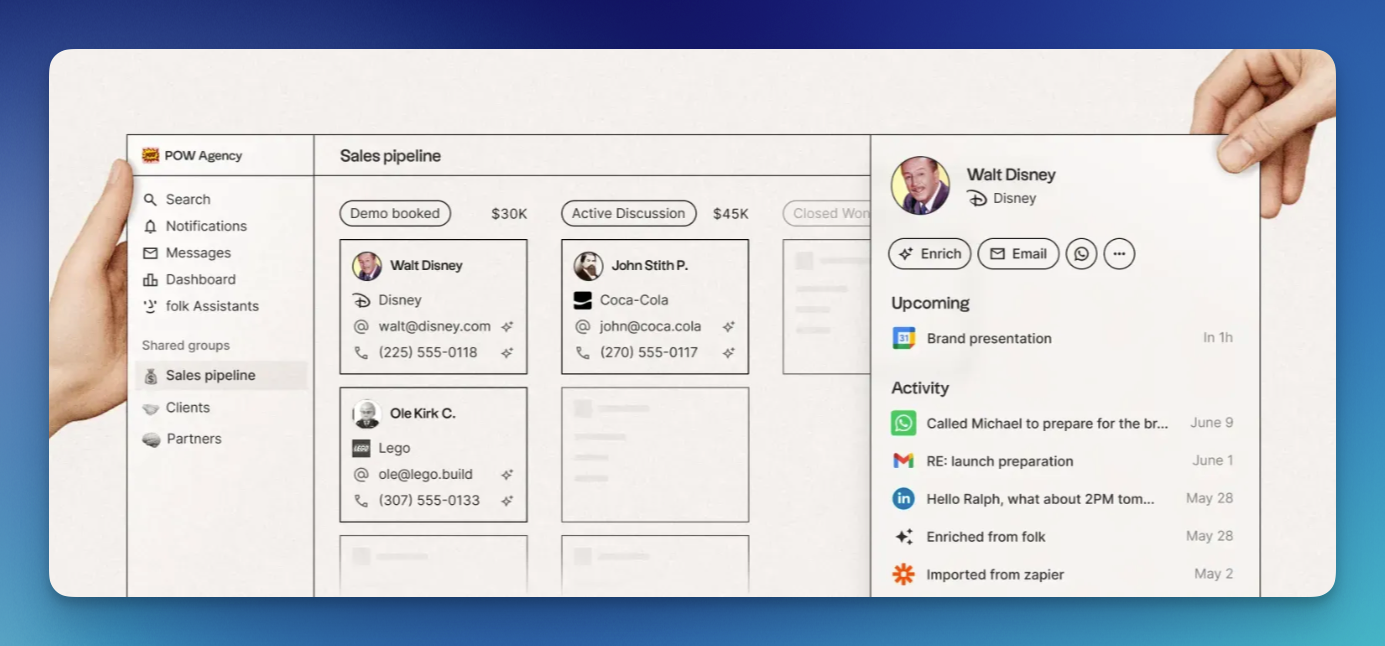
folk is a browser-first CRM built around contact management, pipelines, and AI-assisted workflows. Think Notion meets HubSpot, minus HubSpot's sprawl and minus a mobile app. The product positions itself as "the CRM that works for your team" and markets heavily to sales, partnerships, agencies, and VC firms.
The star of the product is the folkX Chrome extension. It sits on top of LinkedIn, Gmail, Crunchbase, and dozens of other sites and lets you save contacts to folk with one click. Enrichment runs in the background, so contact cards fill themselves out with job titles, company data, and social profiles. For anyone who sources leads from LinkedIn, it's genuinely one of the best browser extensions in the CRM category.
folk pricing: the full breakdown
folk has three plans, all priced per member per month. Annual billing shaves roughly 20% off. There's a 14-day free trial with no credit card required. There is no free tier. When the trial ends, your account is locked but your data is preserved if you upgrade later.
| Plan | Annual (per member/month) | Monthly (per member/month) | Annual cost per seat |
|---|---|---|---|
| Standard | $24 | $30 | $288 |
| Premium | $48 | $60 | $576 |
| Custom | from $80 | from $100 | from $960 |
Pricing current as of April 2026, sourced from folk.app/pricing.
What the Standard plan includes ($24/member/month)
Pipeline management, email campaigns, contact enrichment, the folkX Chrome extension, email and calendar sync, WhatsApp sync, AI Assistants (Follow-up, Recap, Research, Workflow), and integrations access.
Credit limits are where Standard gets restrictive: 500 enrichment credits/month, 2,000 Magic Field credits/month, 2,000 messages/member/month, and 1 account sync per member. That last one matters. If two teammates both want to connect their work Gmail, you're already paying for extra seats just to authorize accounts.
What the Premium plan unlocks ($48/member/month)
Custom objects, deal objects, email sequences, advanced roles and permissions, dashboards, API access, full interaction history, and doubled credit limits across the board.
Premium is where folk becomes a real sales CRM. Standard is a teaser tier. More on that in a second.
The Custom plan ($80+/member/month)
Custom enrichment limits, dedicated integration support, dedicated account contact, custom billing. If you're on this tier, you're already in sales calls with folk directly. Pricing is negotiable.
What folk actually costs at scale
Per-seat pricing always hides the real numbers. Here's what folk costs a team at common sizes, billed annually:
| Team size | Standard per year | Premium per year |
|---|---|---|
| 3 people | $864 | $1,728 |
| 5 people | $1,440 | $2,880 |
| 10 people | $2,880 | $5,760 |
| 20 people | $5,760 | $11,520 |
A 10-person sales team on Premium is looking at $5,760 a year. Competitive against HubSpot Sales Hub Professional, but noticeably more than flat-fee personal CRMs, and noticeably more than Pipedrive or HubSpot Starter at the low end. Scale that to 20 people and you're past $11,000 for a CRM that still doesn't have a mobile app.
The tier-lockout problem
Here's the thing most folk CRM reviews gloss over.
What gets gated to Premium:
- Deal objects. Standard has no deals. You can tag contacts as prospect or customer, but there's no stage-based pipeline with weighted revenue, no forecasting, no deal-level notes. For any real sales team, this alone forces the upgrade.
- Email sequences. Standard supports one-off bulk sends. Multi-step automated cadences are Premium. If your outbound playbook is a 4-touch sequence, Standard can't run it.
- Custom objects. No projects, no investments, no candidates as first-class entities. Contacts and companies are all you get on Standard.
- Dashboards. Standard gets basic list views. Visual funnels, conversion rates, rep performance? Premium.
- API access. Standard has no API. Any integration outside of Zapier's coverage requires the Premium upgrade.
- Advanced roles and permissions. One role on Standard. If you want to prevent reps from editing certain records or scope pipelines by ownership, that's Premium.
The practical effect: folk Standard at $24 is priced like an entry tier but behaves like a trial. Anyone running a real sales operation will be on Premium within 60 days. The honest comparison isn't folk Standard vs anything. It's folk Premium vs HubSpot Sales Starter vs Pipedrive Professional. Budget $48/member/month as your baseline and you'll have an accurate picture of what folk actually costs.
folk CRM pros: what the product gets right
The interface is genuinely good
folk's design is its biggest asset. Sub-3-second page loads in my testing, clean layout, short learning curve. A non-technical user can land in folk and have a working contact database inside 15 minutes. Compared to Salesforce, HubSpot, or even Pipedrive, the drop in onboarding friction is real.
AI Assistants do actual work
The AI features aren't marketing fluff. The Follow-up Assistant drafts reasonable follow-up emails pulled from your interaction history. The Recap Assistant summarizes recent activity on a contact. The Research Assistant fills in company backgrounds. None of these are magic, but each saves 5–10 minutes of manual work per contact, which is usually the difference between using a CRM and abandoning it.
Team collaboration works as advertised
If you actually need a team CRM, folk delivers here. Shared pipelines are genuinely shared. Role-based permissions behave the way you'd expect. Activity logs show who did what. Multiple reps can touch the same deal without stepping on each other. This is where per-seat pricing makes sense.
Contact enrichment is reasonably accurate
Automatic enrichment fills job titles, company names, emails, and phone numbers with accuracy in the 85–90% range based on my 50-contact test sample. You still need to verify before sending anything important, but it cuts manual data entry significantly. No enrichment is perfect.
folk CRM cons: where the product falls short
No mobile app (this is the dealbreaker)
folk has no native iOS or Android app. The web interface technically works on a phone browser, but it's clearly built for a desktop. I tried to add a contact from a conference badge on my phone and it took four times longer than on desktop. Complex views don't render well. Notes feel like a chore.
For a team-based CRM used at a desk, it's inconvenient but workable. For anyone who networks at events, meets people on the move, or wants to log notes right after a coffee, it's a structural problem. The CRM you don't open after meetings is the CRM that stops being accurate within a month.
Dex has native iOS and Android apps and a business card scanner specifically because this failure mode is so common in personal CRMs.
Email sync has rough edges
Multiple users across G2, Capterra, and OnePageCRM's review flag the same thing: emails sent through folk sometimes don't appear as "Sent" in the user's Outlook account. I saw it happen twice in six weeks. Not constant, but present. Annoying if you're the kind of person who checks both.
Bulk editing and duplicate handling are weak
folk's dedupe is solid on initial import but gets messy afterward. Re-importing the same contact through different sources (LinkedIn and Gmail, for example) can create two cards instead of merging. Bulk editing is limited compared to Airtable or HubSpot. For a small database it's fine. For anything past 5,000 contacts it becomes a tax.
Reporting is thin even on Premium
Premium dashboards cover pipeline-stage counts, conversion rates, and rep activity. What you don't get: cohort analysis, win/loss reporting, forecast accuracy tracking, or anything close to HubSpot Sales Hub Professional's reporting depth. If reporting is a hard requirement, folk will feel undercooked.
Who folk CRM is best for

- Small sales teams (5–20 people). folk's core fit. Shared pipelines, roles, deals, sequences, team dashboards. Credible replacement for a spreadsheet or an outgrown HubSpot Free.
- Boutique agencies. Custom objects on Premium let you model clients, projects, and deliverables in one workspace. The collaborative pipelines handle agency workflows well.
- VC and investor relations teams. Deal flow tracking, founder relationships, portfolio management. folk has case studies with VCs and the fit is real.
- Partnership teams. Multi-stage partnership conversations don't fit a traditional sales funnel, and folk's flexible pipelines handle that well.
- Recruiters and talent teams. Custom objects let you model candidates, roles, and companies separately. Sequences and enrichment save meaningful time on outreach.
- Desktop-first teams. If your whole workflow happens in a Chrome window, the missing mobile app doesn't hurt you.
Who should skip folk CRM
- Solo founders and operators. You'll pay team-CRM prices for features you don't need. Read our breakdown of personal CRMs for founders for options that fit solo use.
- Mobile-first networkers. Conferences, coffees, on-the-move contact capture. The missing mobile app is a hard blocker.
- Anyone managing a personal network. folk's workflows are built around pipelines and deals, not relationship maintenance. For personal networking, look at the best personal CRM apps for 2026.
- Job seekers. Tracking applications and informational interviews in folk is technically possible but expensive and over-engineered. A personal CRM built for job search fits better.
- Teams that need deep reporting. HubSpot Sales Hub and Pipedrive Professional out-report folk by a wide margin.
- Budget-sensitive teams. Ten seats at Premium is $5,760/year. Worth comparing against HubSpot Starter ($15/seat/month) and Pipedrive Essential ($14/seat/month) before committing.
- Anyone whose network lives in WhatsApp, iMessage, or Instagram DMs. folk supports WhatsApp on higher tiers, but iMessage and Instagram are absent. If that's where your real relationships happen, folk isn't the right tool.
folk CRM vs HubSpot vs Pipedrive vs Dex
Quick comparison for the alternatives people weigh against folk:
| Tool | Starting price | Mobile app | Best for |
|---|---|---|---|
| folk | $24/member/mo | No | Desktop team sales, 5–20 people |
| HubSpot Starter | $15/seat/mo | Yes | Teams that want to grow into the HubSpot stack |
| Pipedrive Essential | $14/seat/mo | Yes | Teams that live in a sales pipeline |
| Salesforce Starter | $25/user/mo | Yes | Teams that will eventually need Salesforce anyway |
| Dex | $12/mo flat | Yes (iOS + Android) | Individuals managing personal networks |
The honest read: folk's real competitor for teams is HubSpot Starter and Pipedrive, not Dex. folk's real competitor for individuals is Dex, Clay (now Mesh), or Monica, not folk, because folk isn't built for that use case in the first place.
Dex as a folk CRM alternative
If you got this far and folk doesn't fit, here's where Dex makes more sense. Dex is a personal CRM built for individuals, not teams. Flat $12/month with a 7-day trial. No per-seat pricing, no shared pipelines, no deal stages. Instead, the product is built around:
- Contact consolidation across LinkedIn (up to 9,000 connections), Gmail, Outlook, WhatsApp, iMessage, Instagram, Facebook, and X — all native, not Zapier
- Keep-in-touch reminders on a kanban board that actually gets opened
- Pre-meeting briefs that arrive automatically before calendar events with notes from past interactions
- Native iOS and Android apps with a business card scanner for in-person networking
- AI features (Copilot, AI Assist, Messaging Dex) built around personal context, not sales automation
Pick Dex if:
- You're managing your own network rather than a team's sales pipeline
- You need the CRM on your phone for conferences, coffees, and transit
- You want native iMessage and Instagram sync, not Zapier workarounds
- $12/month flat makes more sense than $24–$48 per seat
- You're a founder, investor, job seeker, MBA student, freelancer, or solo operator
Pick folk if:
- You have a team of 5+ that needs shared pipelines
- Your workflow is desktop-first and stays that way
- You need custom objects for deals, projects, or candidates
- Email sequences and sales dashboards matter to your day-to-day
- The per-seat math works at your team size
Both are good products. They solve different problems. If you want a deeper side-by-side, read our Dex vs folk comparison.
Try Dex free for 7 days to see how a personal CRM handles your actual network.
folk CRM review: frequently asked questions
How much does folk CRM cost?
folk costs $24/member/month on Standard, $48/member/month on Premium, and from $80/member/month on Custom, all billed annually. Monthly billing raises those rates to $30, $60, and $100. There's a 14-day free trial with no credit card required, and no permanent free tier.
Is folk CRM worth the money?
For a small sales team (5–20 people) that works on desktop and needs shared pipelines, folk Premium at $48/member/month is reasonable value against HubSpot Sales Hub or Pipedrive Professional. For individuals or mobile-first users, folk is overpriced for what you actually get. The question is whether you'll use the team features you're paying for.
Does folk CRM have a mobile app?
No. As of April 2026, folk has no native iOS or Android app. The web interface works on mobile browsers but is clearly desktop-optimized. folk has said a mobile app is in development. If you need a CRM on your phone, folk is the wrong choice today.
What integrations does folk CRM have?
folk integrates natively with Gmail, Outlook, LinkedIn (via the folkX Chrome extension), and WhatsApp. Everything else runs through Zapier or Make.com. If you need deep, real-time sync with tools outside that short native list, expect to pay for Zapier on top of folk.
Is folk CRM better than HubSpot?
For a team that wants a lighter, faster interface and doesn't need HubSpot's full marketing/sales/service stack, folk is the better pick. For a team that needs deep reporting, marketing automation, or plans to grow into a full HubSpot implementation, HubSpot is the better pick. Note that HubSpot Starter at $15/seat/month is cheaper than folk Standard.
Can folk CRM be used as a personal CRM?
Technically yes, but folk's pricing and features are optimized for teams. A solo user paying $24/month for one folk seat is paying for team features (shared pipelines, role permissions, seat-based credits) while missing features that matter for personal use (a mobile app, iMessage and Instagram sync, a reminder-first interface). A dedicated personal CRM fits better. See our list of the best personal CRMs for 2026 for individual-first options.
Does folk CRM have a free plan?
No. folk offers a 14-day free trial with full premium features and no credit card required, but there is no permanent free tier. When the trial ends, your account is locked while your data is preserved in case you upgrade later. You can request a one-week trial extension.
What is folk CRM best known for?
The folkX Chrome extension. One-click contact saving from LinkedIn, Gmail, Crunchbase, and dozens of other sites, with automatic enrichment running in the background. It's the single feature most folk reviews cite as the thing that keeps users on the product.
What are the main folk CRM alternatives?
For teams: HubSpot Starter, Pipedrive, Attio, and Capsule CRM. For individuals: Dex, Clay (now Mesh), and Monica. The right alternative depends on whether you're buying for a team or for yourself, and whether you need a mobile app.
If you're an individual managing your own network
Or if your work happens on your phone as much as your laptop, folk will frustrate you in ways that have nothing to do with product quality. It'll frustrate you because you bought the wrong tool for the job. Figure out which problem you're actually solving before you put your card down.
If you're solo, try Dex free for 7 days.