
How to Use a Personal CRM for Better Networking

Most people collect contacts and never talk to them again. 48% of professionals admit they don't keep in touch with their network. The contacts pile up in LinkedIn, email, and your phone, and within six months the connection is cold.
A personal CRM fixes this by giving you one place to track who you know, when you last talked, and when to reach out next. Here's how to set one up and actually use it, in 7 steps.
| Task | Manual approach (spreadsheet/memory) | Personal CRM (auto-sync tool like Dex) |
|---|---|---|
| Adding new contacts | Copy-paste from LinkedIn, type from business cards. ~2 min each | Auto-imported from LinkedIn, Gmail, calendar. 0 min each |
| Tracking last interaction | Search email, check calendar, try to remember. ~3 min per person | Auto-logged from email and calendar. 0 min |
| Follow-up reminders | Calendar events, sticky notes, to-do apps. Easy to ignore | Built-in keep-in-touch reminders with nudges |
| Finding a contact's info | Search across LinkedIn, email, phone contacts. ~1-2 min | Single search across all synced sources. ~5 sec |
| Seeing who you've neglected | Impossible without scrolling through everything | Sorted by "last contacted" with one click |
| Weekly time cost (200 contacts) | 2-4 hours (data entry, searching, remembering) | 20-30 minutes (reviewing reminders, writing messages) |
Step 1: Pick a tool that matches how you actually work
The right personal CRM depends on where your contacts live. If most of your network is on LinkedIn and Gmail, pick a tool that syncs with both automatically. If your contacts come from in-person events, you need fast manual entry or voice capture.
Dex auto-syncs LinkedIn (up to 9,000 connections), Gmail, Outlook, and Google Calendar. You connect your accounts and the contacts populate themselves. No data entry. For people who already have a large digital network, this removes the biggest barrier to getting started: the initial import.
Other options worth knowing about: Folk is good for teams. Monica is open-source and self-hosted for privacy-first users. Covve has strong mobile apps with a built-in business card scanner.
Don't overthink the tool choice. The tool that auto-imports your existing contacts is the one you'll actually use.
Step 2: Import your existing network (don't start from scratch)
The fastest way to kill your personal CRM habit is to open an empty database and think "I'll add people as I meet them." You won't. Start by importing everyone you already know.
With a tool like Dex, this is automatic - just take care of connecting your accounts first. Connect LinkedIn, and your connections appear within a few hours with names, job titles, companies, and photos. Connect Gmail, and your email contacts come in with interaction history. Connect your calendar, and people you've met with recently show up too.

If your tool doesn't auto-import, export your contacts from LinkedIn (Settings > Data privacy > Get a copy of your data), your email provider, and your phone. Import the CSV files into your personal CRM. This takes 20-30 minutes but saves you from months of piecemeal data entry.
After import, you'll probably have duplicates. Most personal CRMs have merge tools. Dex detects duplicates automatically when the same person appears across LinkedIn, Gmail, and your phone contacts.
Step 3: Tag contacts by how you know them and how often to reach out
Raw contact lists are useless. You need categories so you can filter and prioritize.
Two tagging systems work well. First, relationship type: Clients, Investors, Mentors, Industry Peers, Friends, Former Colleagues. Second, follow-up frequency: Monthly, Quarterly, Twice a Year, As Needed.
Your top 50 contacts, or the people who've referred business, given career advice, or collaborated on something real, get Monthly. The next 100 get Quarterly. Everyone else gets Twice a Year or As Needed.
The math matters. Monthly follow-up with 50 people is roughly 12 messages per week, or 2-3 per work day. That's manageable. Monthly follow-up with 500 people would be 125 messages per week. Let’s be real here: nobody does that.
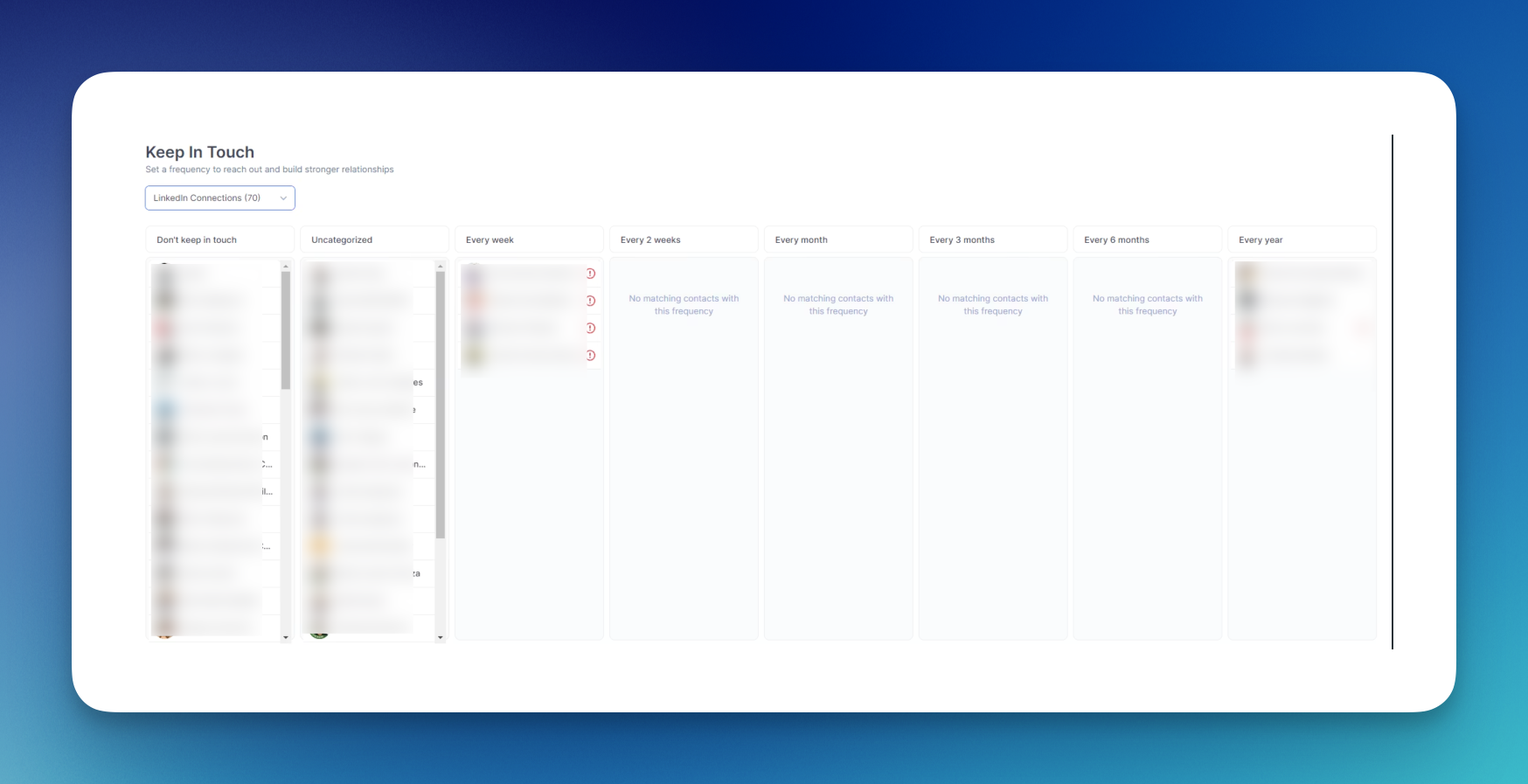
Dex has a keep-in-touch system where you set a reminder cadence per contact. Set it and the personal CRM tells you who to reach out to each day (it even gives you daily digests via text). Other personal CRMs handle this through manual tags and filtered views, which works but requires more discipline.
Step 4: Log interactions (or let your personal CRM log them for you)
The point of logging is simple: when you're about to email someone you haven't spoken to in four months, you want to know what you talked about last time.
Auto-sync personal CRMs like Dex log this passively. Every email you send or receive, every calendar meeting, every LinkedIn message gets timestamped on that contact's profile. You open a contact and see a full timeline without having typed a single note.
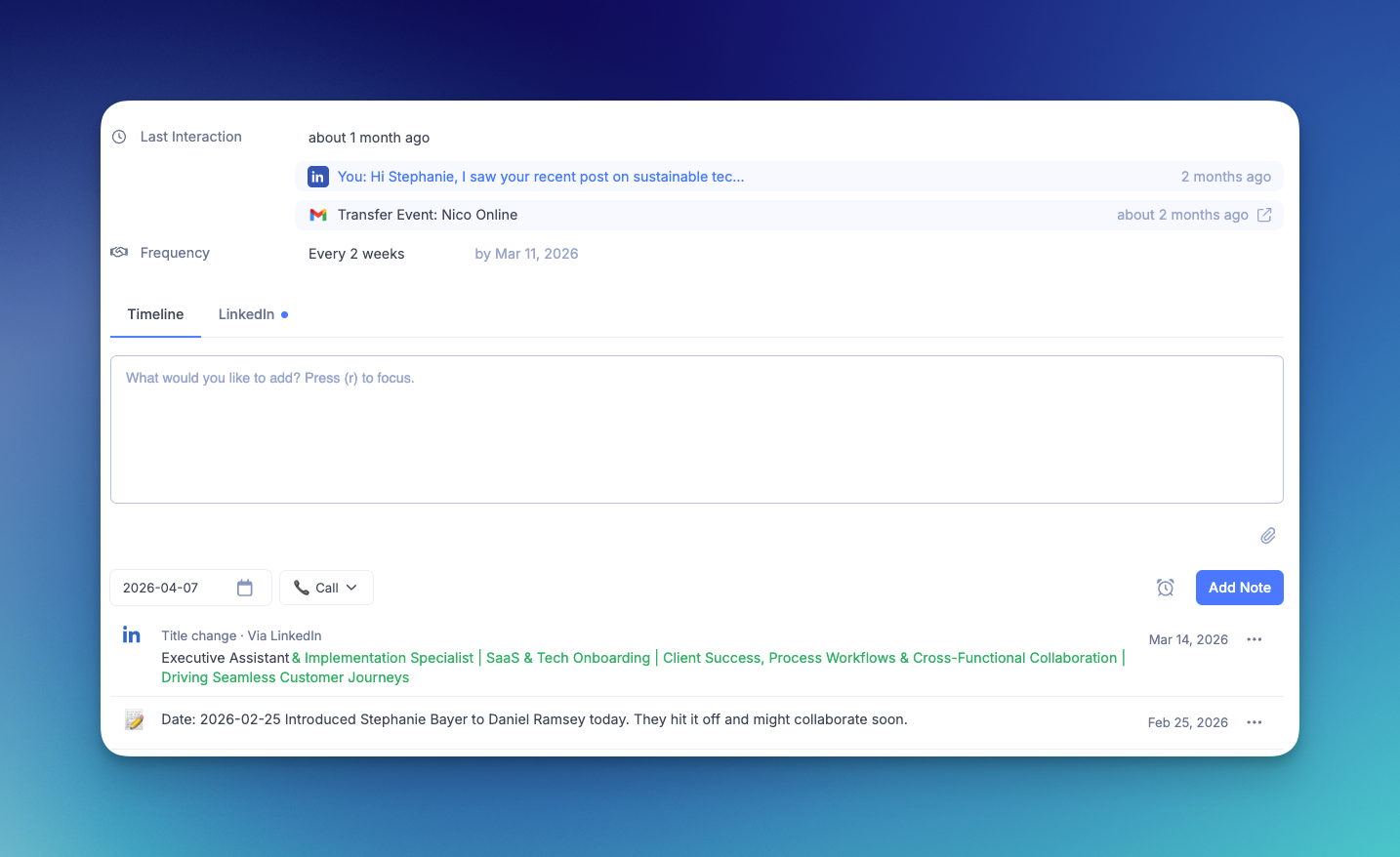
If your personal CRM doesn't auto-log, you need a habit. After every meaningful conversation, open the tool and write 1-2 sentences. Not a transcript. Just the key detail: "Discussed their Series A timeline, they're targeting Q3. Mentioned looking for a head of marketing." That's enough context to restart the conversation months later.
The notes are the most valuable part. The notes. Because nobody remembers what they talked about with someone 8 months ago, but the person who does remember (thanks to their personal CRM) seems thoughtful and attentive. This impression compounds, and your relationship never goes cold.
Step 5: Build a weekly review habit (15-20 minutes)
A personal CRM that you never open is a database. The habit that makes it work is a weekly review.
Here's what it looks like, every Monday morning:
- Open Dex. Check the "reach out" list, or the contacts whose follow-up cadence has come due. Usually 8-12 people.
- For each person, read the last interaction note or email thread. Takes 30 seconds per person.
- Send a message. Not a template. Something specific: "Saw your company just closed that round, congrats. How's the hiring going?" or "Still thinking about that cold brew recommendation you gave me. Worth the trip."
TIP: Dex can send directly from your email client and suggests personalized messages based on your contact history and relationship context.
4. Log anything new. Add a note if the conversation had something worth remembering.
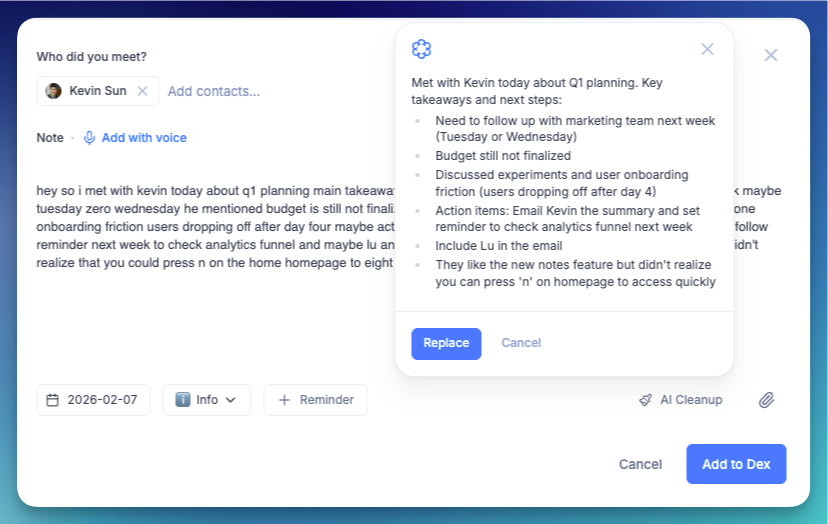
5. Scan for stale contacts: anyone you haven't talked to in 6+ months who should be closer to Quarterly.
Total time: 15-20 minutes. This habit alone puts you ahead of the 49% of professionals who say they don't network enough because they can't find the time.
Step 6: Use your tool before every meeting
This is where a personal CRM earns back its cost in a single interaction. Before any meeting, call, or coffee chat, pull up the contact and read your notes.
Dex generates pre-meeting briefs through AI that intelligently compile your shared history, last conversation, mutual connections, and any notes you've taken. You walk in knowing context without scrambling through email or LinkedIn.
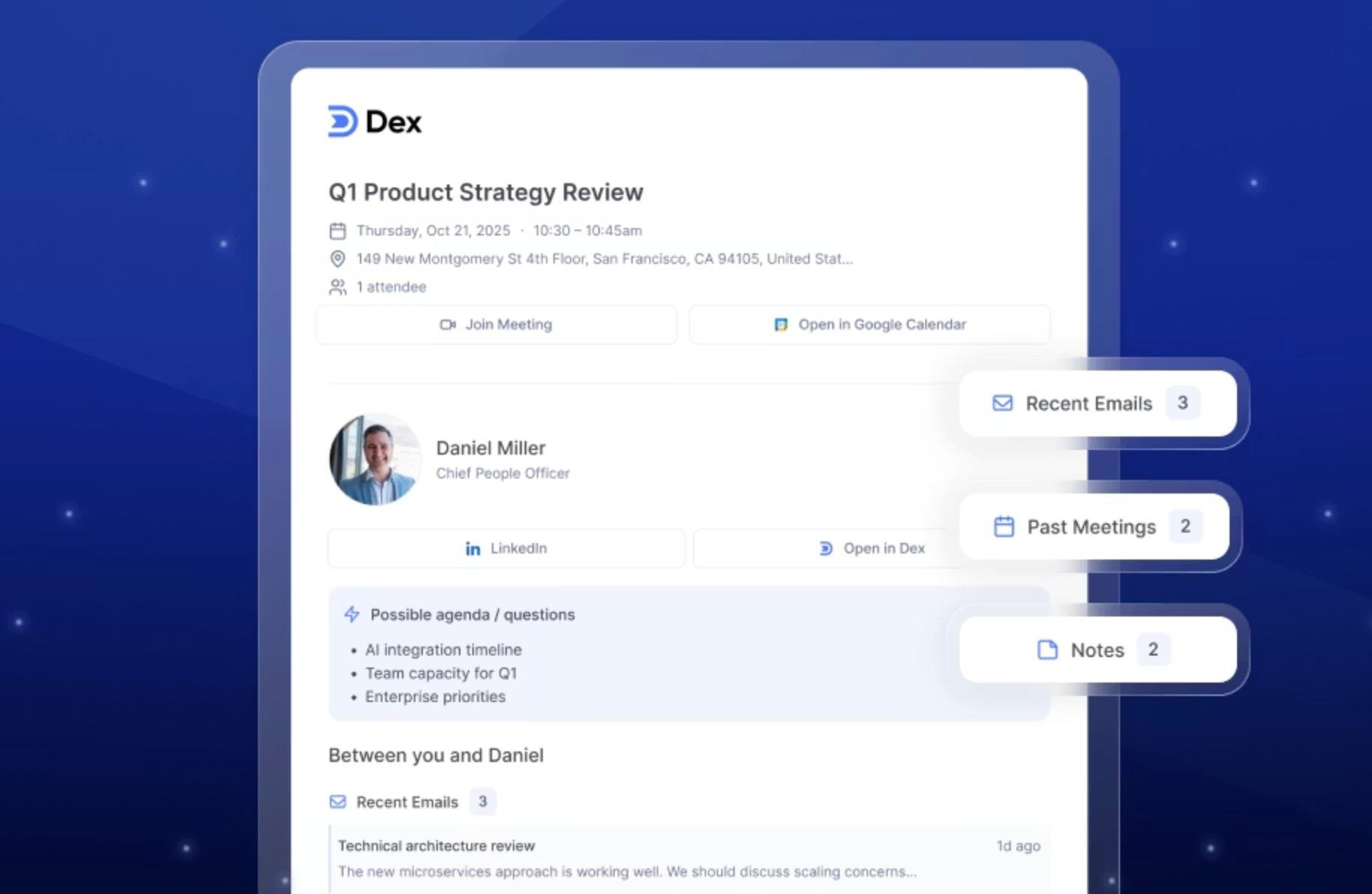
If your tool doesn't have AI briefs, about 60 seconds of reading your own notes does the same thing, though not as reliable. The person on the other end of that meeting won't know whether a computer or your own memory surfaced the details. They'll just notice that you remembered.
Step 7: Clean your data quarterly
Every three months, spend 30 minutes on personal CRM hygiene. This prevents data rot from making your system unreliable.
Merge duplicate contacts that slipped through. Update job titles for people who've changed roles (Dex does this automatically via LinkedIn sync). Remove contacts you'll never interact with again. Adjust follow-up frequencies based on how the relationship has evolved.
Why this matters: if your personal CRM is full of outdated titles and ghost contacts, you stop trusting it. Once you stop trusting it, you stop opening it. Quarterly cleaning keeps the data useful.
Contact decay without a system
Without a systematic follow-up approach, a network of 350 active contacts can decay to regular contact with only around 140 within 6 months, that’s a 60% decay rate. The rest go cold. Neither side reached out. When those people are eventually messaged, most respond warmly.
With Dex and a weekly review, regular contact (at least one meaningful interaction per quarter) can be maintained with around 280 of those same 350 contacts after 6 months, a 20% decay rate instead of 60%. The difference is the follow-up reminders and the 15-minute Monday habit.
Research on networking follow-ups consistently shows that speed matters. According to data compiled by Zippia, 40% of in-person meetings result in new customers in B2B contexts. And professionals who follow up within 24–48 hours of meeting someone see significantly higher engagement rates than those who wait a week or more, according to Pursue Networking research. The pattern holds in personal networking too: contacts followed up quickly stay active at roughly double the rate of contacts left to go cold.
The time investment is roughly 20 minutes per week on the Monday review, plus whatever time you spend actually messaging people, which you'd want to do anyway. The personal CRM doesn't add work. It redirects effort already being spent on scattered searches and forgotten follow-ups.
When a personal CRM is not for you
If you have fewer than 50 professional contacts and you see most of them regularly, you don't need a personal CRM. Your memory and a simple notes/contacts app will do.
If you hate the idea of systematizing relationships, a personal CRM will feel transactional and you'll resent it. Some people prefer to let relationships develop organically. That's a legitimate approach if your career doesn't depend on a broad professional network.
And if your networking is purely event-based with no digital trail: no email, no LinkedIn, no calendar invites, auto-sync tools like Dex won't capture those interactions (unless you are diligent enough to log notes after every interaction, in that case, Dex does a pretty good job in surfacing context).
Start using a personal CRM this week
A personal CRM works when you do three things consistently: import your contacts so you’re not starting from scratch, set follow-up reminders so nobody falls through the cracks, and review your list every Monday so the system stays alive.
The 7 steps above aren’t complicated. Pick a personal CRM that syncs with your existing tools. Import your network. Tag your top contacts. Let the CRM log your interactions. Do a 15-minute weekly review. Read your notes before meetings. Clean your data every quarter.
That’s it. The people who maintain the strongest professional networks aren’t working harder than everyone else. They have a system that turns good intentions into consistent follow-through.
Try Dex free, and import your all your contacts across multiple platforms under 30 minutes and see who you’ve been neglecting.
Frequently asked questions
What is a personal CRM and who needs one?
A personal CRM is software designed for individuals—not sales teams—to track their professional and personal contacts in one place. It stores names, job titles, notes, interaction history, and follow-up reminders. You need one if you have 100+ contacts you want to stay in touch with and you’re currently losing track of people. If your active network is small enough to manage by memory, you probably don’t need one.
How is a personal CRM different from Salesforce or HubSpot?
Sales CRMs like Salesforce and HubSpot are built for teams managing customer pipelines with deal stages, revenue tracking, and multi-user workflows. A personal CRM is built for one person managing their own relationships. No pipeline, no deal tracking, no sales metrics. Tools like Dex, Folk, and Monica focus on contact context, follow-up reminders, and interaction history.
Can I use a spreadsheet instead of a personal CRM?
You can, and many people start there. A Google Sheet with columns for Name, Company, Last Contact Date, Notes, and Next Follow-Up works fine for under 100 contacts. Beyond that, it breaks down: no auto-sync, no reminders, no duplicate detection, and updating “last contact date” manually for 200+ people eats hours every week.
How often should I follow up with professional contacts?
It depends on the relationship. Top-tier contacts (close mentors, active clients, collaborators): monthly. Mid-tier (industry peers, warm referral sources): quarterly. Everyone else: twice a year. Research on follow-up timing shows that reaching out within 24–48 hours of meeting someone produces significantly higher response rates than waiting a week or more.
What’s the best personal CRM for networking in 2026?
It depends on your workflow. Dex ($12/mo) is best for professionals who want auto-sync with LinkedIn, Gmail, Outlook, and calendar with zero manual entry. Folk ($24/mo) is best for small teams who need shared contacts. Monica is best for privacy-first users comfortable with self-hosting. Covve is best for mobile-first users who network at in-person events.
For a more detailed dive into the best personal CRMs in 2026, check out our full guide here.
How do I maintain professional relationships long-term?
Three things matter more than anything: consistency, context, and genuine interest. Use your personal CRM to stay consistent, read them before every interaction so you remember what matters to that person. And actually care about the people you’re reaching out to, because no CRM can fake that. The people with the strongest networks are the ones who treat follow-ups as a chance to reconnect, not a chore. The CRM just makes sure the intention turns into action.